CSS3 gradient allows you to show a smooth transition between twoor more specified colors.
In the past, you had to use images to achieve these effects. However, by using CSS3 gradients, you can reduce download time and broad band usage. In addition, the elements of the gradient look better when zoomed in, because the gradient is generated by the browser.
CSS3 defines two types of gradients:
Linear gradient (Linear Gradients)-down / up / left / right / diagonal
Radial gradient (Radial Gradients)-defined by their center
Linear gradient related attributes:
background-image
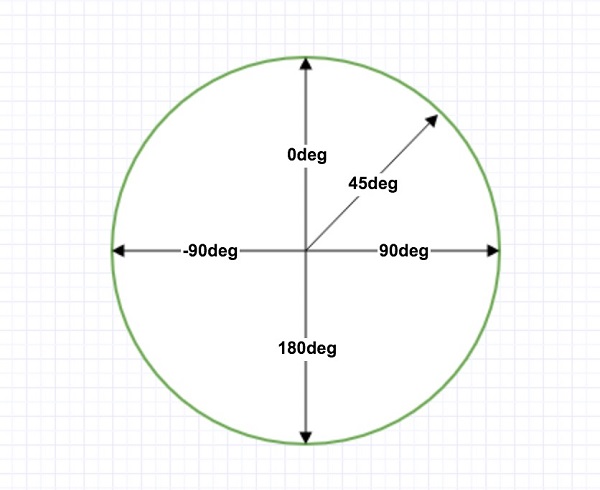
Linear gradient online tool: gradient online tool The numbers in the table specify the first browser version that fully supports this property. Attribute Background-image 1.0 4.0 1.0 1.0 3.5 Note: this attribute is not supported by IE8 and earlier IE browsers. To create a linear gradient, you must define at least two color nodes. The color node is the color you want to show a smooth transition. At the same time, you can set a starting point and a direction (or an angle). An example of a linear gradient: Linear gradient-from top to bottom (default) The following example demonstrates a linear gradient from the top. The starting point is red and slowly transition to blue: Example A linear gradient from top to bottom: Linear gradient-from left to right The following example demonstrates a linear gradient starting from the left.The starting point is red and slowly transition to yellow: Example A linear gradient from left to right: Linear gradient-diagonal You can make a diagonal gradient by specifying horizontal and vertical starting positions. The following example demonstrates a linear gradient starting from the upperleft corner (to the lower right corner). The starting point is red and slowly transition to yellow: Example Linear gradient from the upper left corner to the lower right corner: If you want more control over the direction of the gradient, you can define an angle instead of predefining the direction (to bottom, to top, to right, to left, to bottom right, etc.). The angle is the angle between the horizontal line and the gradient line, calculated counterclockwise. In other words, 0deg will create a gradient from bottom to top, and 90deg will create a gradient from left to right. However, note that many browsers (Chrome, Safari, firefox, etc.) use the oldstandard, that is, 0deg will create a gradient from left to right, and 90deg will create a gradient from bottom to top. The conversion formula 90-x= y, where x is the standard angle and y is the non-standard angle. The following example shows how to use angles on linear gradients: Example A linear gradient with a specified angle: The following example shows how to set up multiple color nodes: Example A linear gradient from top to bottom with multiple color nodes: The following example shows how to create a linear gradient with rainbow colors and text: Example CSS3 gradients also support transparency, which can be used to create a fade-out effect. To add transparency, we use the The following example demonstrates a linear gradient starting from the left.The starting point is completely transparent, slowly transitioning to a completely opaque red: Example A linear gradient from left to right with transparency: Example A repetitive linear gradient: The radial gradient is defined by its center. In order to create a radial gradient, you must also define at least two color nodes. The color node is the color you want to show a smooth transition. At the same time, you can also specify the center, shape (circleor oval) and size of the gradient. By default, the center of the gradient is An example of a radial gradient: Radial gradient-uniform distribution of color nodes (default) Example Radial gradient with uniform distribution of color nodes: Radial gradient-uneven distribution of color nodes Example Radial gradient with uneven distribution of color nodes: Example A radial gradient with a circular shape: Closest-side Farthest-side Closest-corner Farthest-corner Example Radial gradient with different size keywords: Example A repeated radial gradient: 8.7.1. Browser support 
8.7.2. CSS3 linear gradient 
Grammar 
background-image: linear-gradient(direction, color-stop1, color-stop2, ...);
#grad {
    background-image: linear-gradient(#e66465, #9198e5);
}
#grad {
  height: 200px;
  background-image: linear-gradient(to right, red , yellow);
}
#grad {
  height: 200px;
  background-image: linear-gradient(to bottom right, red, yellow);
}
8.7.3. Use Angl 
Grammar 
background-image: linear-gradient(angle, color-stop1, color-stop2);
#grad {
  background-image: linear-gradient(-90deg, red, yellow);
}
8.7.4. Use multiple color nodes 
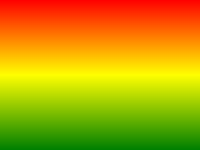
#grad {
  background-image: linear-gradient(red, yellow, green);
}
#grad {
  /* Standard grammar */
  background-image: linear-gradient(to right, red,orange,yellow,green,blue,indigo,violet);
}
8.7.5. Use transparency 
rgba()
function to define the color node. The last parameter in the `` rgba () `` function can be a value from 0 to 1, which defines the transparency of the color: 0 means completely transparent and 1 means completely opaque.#grad {
background-image: linear-gradient(to right, rgba(255,0,0,0), rgba(255,0,0,1));
}
8.7.6. Repetitive linear gradient 
repeating-linear-gradient()
function is used for repeated linear gradients:#grad {
/* Standard grammar */
background-image: repeating-linear-gradient(red, yellow 10%, green 20%);
}
8.7.7. CSS3 radial gradient 
center
(indicates at the center point), the shape of the gradient is``ellipse`` (represents an oval), the size of the gradient is
farthest-orner
means to the farthest corner.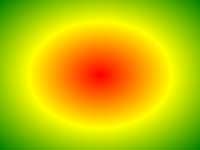
Grammar 
background-image: radial-gradient(shape size at position, start-color, ..., last-color);
#grad {
  background-image: radial-gradient(red, yellow, green);
}
#grad {
  background-image: radial-gradient(red 5%, yellow 15%, green 60%);
}
8.7.8. Set shape 
shape
parameter defines the shape. It can be a value.
circle
or
ellipse
. Among them
circle
represents a circle
ellipse
represents an oval. The default is
ellipse
.#grad {
background-image: radial-gradient(circle, red, yellow, green);
}
8.7.9. The use of keywords of different sizes 
size
parameter defines the size of the gradient. It can be the followingfour values:#grad1 {
background-image: radial-gradient(closest-side at 60% 55%, red, yellow, black);
}
#grad2 {
background-image: radial-gradient(farthest-side at 60% 55%, red, yellow, black);
}
8.7.10. Repeated radial gradient 
repeating-radial-gradient()
function is used to repeat the radial gradient:#grad {
background-image: repeating-radial-gradient(red, yellow 10%, green 15%);
}