8.11.1. 3D conversion 
CSS3 allows you to use 3D transformations to format elements.
In this chapter, you will learn some of these 3D conversion methods:
rotateX()rotateY()
Click on the following elements to see the difference between 2D and 3D transformations:
2D rotate
3D rotate
8.11.2. Browser support 
The number in the table represents the first browser version number that supports the property.
The number immediately preceding
-webkit-
,
-ms-
, or
-moz-
is the first browser version number that supports the prefix attribute.
Attribute | |||||
|---|---|---|---|---|---|
Transform | 36.0 12.0-webkit- | 10.0 | 16.010.0-moz- | 4.0-webkit- | 23.0 15.0-webkit- |
Transform-origin (three-value syntax) | 36.0 12.0-webkit- | 10.0 | 16.010.0-moz- | 4.0-webkit- | 23.0 15.0-webkit- |
Transform-style | 36.0 12.0-webkit- | 11.0 | 16.010.0-moz- | 4.0-webkit- | 23.0 15.0-webkit- |
Perspective | 36.0 12.0-webkit- | 10.0 | 16.010.0-moz- | 4.0-webkit- | 23.0 15.0-webkit- |
Perspective-origin | 36.0 12.0-webkit- | 10.0 | 16.010.0-moz- | 4.0-webkit- | 23.0 15.0-webkit- |
Backface-visibility | 36.0 12.0-webkit- | 10.0 | 16.010.0-moz- | 4.0-webkit- | 23.0 15.0-webkit- |
8.11.3.
rotateX()
method 
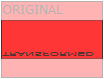
rotateX()
method around which the element rotates on the X axis of a given degree.
Example
div
{
    transform: rotateX(120deg);
    -webkit-transform: rotateX(120deg); /* Safari and Chrome */
}
8.11.4.
rotateY()
method 
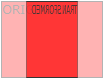
rotateY()
method around which the element rotates on the Y axis of a given degree.
Example
div
{
    transform: rotateY(130deg);
    -webkit-transform: rotateY(130deg); /* Safari and Chrome */
}
8.11.5. Conversion attribute 
The following table lists all the transformation properties:
Attribute | Description | CSS |
|---|---|---|
Transform | Apply a 2D or 3D transformation to an element. | 3 |
Transform-origin | Allows you to change the position of the converted element. | 3 |
Transform-style | Specifies how nested elements are displayed in 3D space. | 3 |
Perspective | Specifies the perspective of 3D elements. | 3 |
Perspective-origin | Specifies the bottom position of the 3D element. | 3 |
Backface-visibility | Defines whether the element is visible when not facing the screen. | 3 |
3D conversion method 
Function | Description |
|---|---|
Matrix3d (n ~ () ~ n ~ n | Define a 3D transformation, using a 16-value 4x4 matrix. |
N ~ (th). | |
Translate3d (xmeme yjinz) | Define 3D conversion. |
TranslateX (x) | Define 3D conversions, using only the values used for the X axis. |
TranslateY (y) | Define 3D conversions, using only the values used for the Y axis. |
TranslateZ (z) | Define 3D conversions, using only the values used for the Z axis. |
Scale3d (xmeme yjinz) | Define 3D scaling transformations. |
ScaleX (x) | Defines a 3D scaling transformation, given an X-axis value. |
ScaleY (y) | Defines a 3D scaling transformation, given a value of the Y axis. |
ScaleZ (z) | Defines a 3D scaling transformation, given a value of the Z axis. |
Rotate3d (xpencil ypencil angle) | Define 3D rotation. |
RotateX (angle) | Defines a 3D rotation along the X axis. |
RotateY (angle) | Defines the 3D rotation along the Y axis. |
RotateZ (angle) | Defines a 3D rotation along the Z axis. |
Perspective (n) | Defines a perspective view of a 3D transformation element. |