Socket, also known as “sockets”, applications usually send requests to or reply to network requests through “sockets”, so that hosts or processes ona computer can communicate.
In this chapter, we accept for you Use Use Use Use Use Use The following chart shows the communication process between the client and the server: In Perl, we use Parameter resolution: So Use Address cluster (TCP/IP, is Port number (for example, 21) Network address (e.g. 10.12.12.168) Use A simple example is as follows: By setting up When Once the connection is accepted, a return of 0 indicates success and an error returns-1. The above example can listen to the client’s request in real time. The following creates a connection to the server Next, let’s look at all of them through a complete example. Server side Open a terminal and execute the following code: Client Open another terminal and execute the following code:
Perl
how to use it in language
Socket
service. 5.41.1. Create a server #
socket
function to create the
socket
service.
bind
function binds the port.
listen
function listens on the port.
accept
function to receive client requests. 5.41.2. Create a client #
socket
function to create the
socket
service.
connect
function to connect to the
socket
server.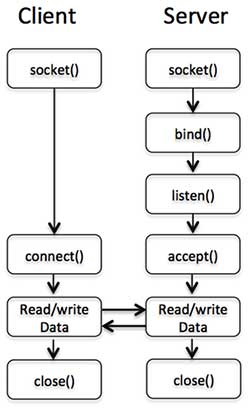
Server socket function #
5.41.3. Socket function #
socket()
function to create a socket in the following syntax format:socket( SOCKET, DOMAIN, TYPE, PROTOCOL );
DOMAIN
created socket specifies the protocol set. For example:
AF_INET
represents the IPv4 network protocol
AF_INET6
represents IPv6
AF_UNIX
represents a local socket (using a file)
TYPE
socket types can be classified as SOCK based on whether they are connection oriented or non connection oriented_ STREAM or SOCK_ DGRAM
PROTOCOL
should be
(getprotobyname('tcp'))[2]
. Specifies the transport protocol actually used.
socket
function is called as follows:use Socket # definition PF_INET and SOCK_STREAM
socket(SOCKET,PF_INET,SOCK_STREAM,(getprotobyname('tcp'))[2]);
5.41.4. Bind () function #
bind()
assign an address to the socket:bind( SOCKET, ADDRESS );
SOCKET
one descriptor of the
socket
.
ADDRESS
, The
socket
TCP/IP contains three elements:
AF_INET
, on your system, it could be 2)
socket()
after the socket is created, only the protocol it uses is assigned, and no address is assigned. Before accepting connections from other hosts, you must call the
bind()
assign an address to the socket.use Socket # Defined PF_INET and SOCK_STREAM
$port = 12345; # Listening port
$server_ip_address = "10.12.12.168";
bind( SOCKET, pack_sockaddr_in($port, inet_aton($server_ip_address)))
or die "Unable to bind port! \n";
or
die
executes after the binding address fails.
setsockopt()
optional
SO_REUSEADDR
setting port can be reused immediately.
pack_sockaddr_in()
function to convert the address to binary format. 5.41.5. Listen () function #
socket
after binding to an address
listen()
function starts listening for possible connection requests. However, this can only be used when reliable data flow is guaranteed:listen( SOCKET, QUEUESIZE );
SOCKET
: one
socket
descriptor.
QUEUESIZE
is an integer that determines the size of the listening queue,which is entered when a connection request arrives; when a connection request is
accept()
if accepted, it is removed from the listening queue; when the queue is full, the new connection request returns an error. 5.41.6.
accept()
function #
accept()
function to accept the requested
socket
Connect. If successful, return the compressed network address, otherwise return
FALSE
:accept( NEW_SOCKET, SOCKET );
NEW_SOCKET
: one
socket
descriptor.
SOCKET
: one
socket
descriptor.
accept()
usually used in infinite loops:while(1) {
accept( NEW_SOCKET, SOCKT );
.......
}
Client function #
5.41.7.
connect()
function #
connect()
system call sets the connection for a socket with parameters such as a file descriptor and a host address.connect( SOCKET, ADDRESS );
socket
example:$port = 21; # ftp port
$server_ip_address = "10.12.12.168";
connect( SOCKET, pack_sockaddr_in($port, inet_aton($server_ip_address)))
or die "Unable to bind port! \n";
Complete instance #
socket
application of the function:
server.pl
code: 5.41.8. Example #
#/ Usr/bin/perl - w # File name: server. paste strict; Use Socket# Using Ports
seven thousand eight hundred and ninety
As the default value, my $port=shift | | 7890; My $proto=getprotobyname ('tcp '); My $server="localhost"#
Set local address # to create a socket,
The port can be reused and multiple connection sockets (SOCKET, PF_INET, SOCK_STREAM, $proto) cannot be created
Socket $\ \N "; setsockopt (SOCKET, SOL_SOCKET, SO_REUSEADDR, 1) ordie" cannot be set
SO_ REUSEADDR $\ \N "#
Bind the port and listen for bind (SOCKET, pack_sockaddr_in ($port, inet_aton ($server))) ordie
"Unable to bind port $port! N"; Listen (SOCKET, 5) ordie "listen: $!"; Print "Access Start: $port n"#
Receive request for my $client_ Addr; While ($client_addr=accept (NEW_SOCKET, SOCKET)){#
Send them a message, close
Connectionmy $name=gethostbyaddr ($client_addr, AF_INET); PrintNEW_ SOCKET
"I am information from the server"; Print "Connection
Received from $name n "; closeNEW_SOCKET;}
$ perl sever.pl
Access Start:7890
client.pl
code: 5.41.9. Example #
#/ Usr/bin/perl - w # File name: client. paste strict; Use Socket#
Initialize the address and port my $host=shift | | 'localhost'; My $port=shift | 7890; My $server="localhost"#
Host Address # Create Socket
And connect to socket (SOCKET, PF_INET, SOCK_STREAM, (getprotobyname ('tcp ')) [2]) ordie "Unable to create
Socket $\ \N "; connect (SOCKET, pack_sockaddr in ($port, inet_aton ($server)) ordie" cannot connect:
port $port\ \N "; my $line; while ($line=
<SOCKET>) {print "$line n";} closeSOCKETordie "close: $!";
$ perl client.pl
It's information from the server