HTML5 web storage, a better local storage method than cookie. Use HTML5 to store users’ browsing data locally. Earlier, local storage used cookie. But Web storage needs to be more secure and fast. This data will not be saved on the server, but it will only be used on the website data requested by the user. It can also store a large amount of data without affecting the performance of the site. The data exists as a key / value pair, and the data of the web page is only allowed to be accessed by that page. Internet Explorer 8, Firefox, Opera, Chrome, and Safari support Web storage. Note: Internet Explorer 7 and earlier IE versions do not support web storage. The two objects on which the client stores data are: Before using web storage, you should check whether the browser supports Instance resolution: Use Retrieve the value with the key value “sitename” and insert the data into the element of id= “result”. The above example can also be written as follows: Remove Whether it is Save data: Reading data: Delete individual data: Delete all data: Get the key for a certain index: Tip: key / value pairs are usually stored as strings, and you can convert this format as needed. The following example shows the number of times a user clicks a button. The string values in the code are converted to numeric types: How to create and access a The website listing program implements the following functions: You can enter the website name and URL, and use the website name as the key to save it to ‘localStorage’; Find the URL according to the name of the website List all currently saved websites The following code is used to save and find data: The complete example is shown as follows: Screenshot of the implementation effect: The above example only demonstrates a simple Next we will use the And then we use JavaScript implementation code: A complete example is as follows: In the instance The output shows: 11.44.1. What is HTML5 Web storage? 
11.44.2. Browser support 


11.44.3. LocalStorage and sessionStorage 
localStorage
-it is used to save the data of the entire website for a long time, and the saved data does not expire until it is manually removed.
sessionStorage
-used to temporarily save data from the same window (or tab), which will be deleted after the window or tab is closed.
localStorage
and
sessionStorage
:if(typeof(Storage)!=="undefined"){//Yes! support localStorage
sessionStorage Object// Some code.....}else{//Sorry! Web storage not supported.}
11.44.4.
localStorage
object 
localStorage
There is no time limit for the data stored in the. After the next day, the second week, or the next year, the data is still available.Example 
//save localStorage.setItem("sitename","Rookie Tutorial");//check document.getElementById("result").innerHTML="Website Name:"+localStorage.getItem("sitename");
key="sitename"
and
         value="Rookie
         Tutorial"
Create a `` localStorage``key / value pair.//save localStorage.sitename="Rookie Tutorial";//check document.getElementById("result").innerHTML=localStorage.sitename;
localStorage
in “sitename” :localStorage.removeItem("sitename");
localStorage
, or
sessionStorage
the API that can be used is the same, and the following are commonly used (take localStorage as an example):
localStorage.setItem(key,value)
;
localStorage.getItem(key)
;
localStorage.removeItem(key)
;
localStorage.clear()
;
localStorage.key(index)
;Example 
if(localStorage.clickcount){localStorage.clickcount=Number(localStorage.clickcount)+1;}else{localStorage.clickcount=1;}document.getElementById("result").innerHTML="You have already clicked the button"+localStorage.clickcount+"times";
11.44.5. SessionStorage object 
sessionStorage
method is targeted at a
session
for data storage. When the user closes the browser window, the data is deleted.
sessionStorage
:Example 
if(sessionStorage.clickcount){sessionStorage.clickcount=Number(sessionStorage.clickcount)+1;}else{sessionStorage.clickcount=1;}document.getElementById("result").innerHTML="You have already clicked the button in this conversation"+sessionStorage.clickcount+"times";
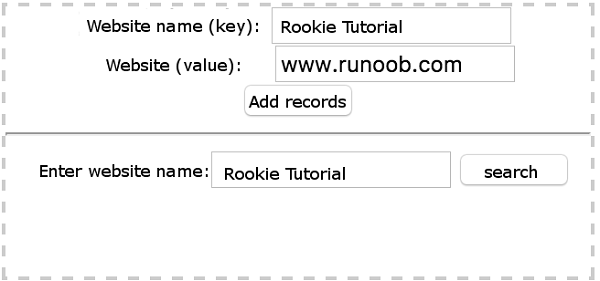
11.44.6. Web Storage develops a simple website listing program 
save()
and
find()
method ¶ //Save Data functionsave(){varsiteurl=document.getElementById("siteurl").value;varsitename=document.getElementById("sitename").value;localStorage.setItem(sitename,siteurl);alert("Added successfully");}//lookup functionfind(){varsearch_site=document.getElementById("search_site").value;varsitename=localStorage.getItem(search_site);varfind_result=document.getElementById("find_result");find_result.innerHTML=search_site+"The website address is:"+sitename;}
Example 
<divstyle="border: 2px dashed
#ccc;width:320px;text-align:center;"><labelfor="sitename">Website Name(key):</label><inputtype="text"id="sitename"name="sitename"class="text"/><br/><labelfor="siteurl">Website
(value):</label><inputtype="text"id="siteurl"name="siteurl"/><br/><inputtype="button"onclick="save()"value="adding record"/><hr/><labelfor="search_site">Enter website name:</label><inputtype="text"id="search_site"name="search_site"/><inputtype="button"onclick="find()"value="Find website"/><pid="find_result"><br/></p></div>
localStorage
storage and search, in more cases, the data we store will be more complex.
JSON.stringify
to store object data
JSON.stringify
you can convert an object to a string.varsite=newObject; ...varstr=JSON.stringify(site);//Convert objects to strings
JSON.parse
method to convert a string to a JSON object:varsite=JSON.parse(str);
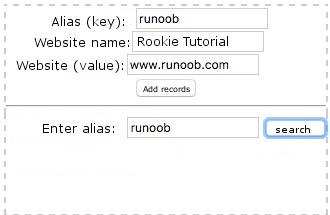
save()
and
find()
method ¶ //Save data functionsave(){varsite=newObject;site.keyname=document.getElementById("keyname").value;site.sitename=document.getElementById("sitename").value;site.siteurl=document.getElementById("siteurl").value;varstr=JSON.stringify(site);//Convert objects to strings localStorage.setItem(site.keyname,str);alert("Successfully saved");}//lookup functionfind(){varsearch_site=document.getElementById("search_site").value;varstr=localStorage.getItem(search_site);varfind_result=document.getElementById("find_result");varsite=JSON.parse(str);find_result.innerHTML=search_site+"The website name is:"+site.sitename+",The website is:"+site.siteurl;}
Example 
<divstyle="border: 2px dashed
#ccc;width:320px;text-align:center;"><labelfor="keyname">alias(key):</label><inputtype="text"id="keyname"name="keyname"class="text"/><br/><labelfor="sitename">Website Name:</label><inputtype="text"id="sitename"name="sitename"class="text"/><br/><labelfor="siteurl">
website:</label><inputtype="text"id="siteurl"name="siteurl"/><br/><inputtype="button"onclick="save()"value="adding record"/><hr/><labelfor="search_site">Enter alias(key):</label><inputtype="text"id="search_site"name="search_site"/><inputtype="button"onclick="find()"value="Find website"/><pid="find_result"><br/></p></div>
loadAll
after outputting all the stored data, you need to make sure
localStorage
the stored data is in JSON format, otherwise``JSON.parse(str)`` will report an error.