No matter what database we study, we should learn the basic concepts. The basic concepts in mongodb are documents, collections, and databases, which we will introduce one by one below.
The following table will help you understand some of the concepts in Mongo more easily:
SQL terminology / concept | MongoDB terminology / concept | Explanation / explanation |
|---|---|---|
Database | Database | Database |
Table | Collection | Database tables / collections |
Row | Document | Data record line / document |
Column | Field | Data field / domain |
Index | Index | Indexes |
Table joins | Table join, not supported by MongoDB | |
Primary key | Primary key | 主键,MongoDB自动将_id字段设置为主键 |
Through the following example, we can also get a more intuitive understanding of some of the concepts in Mongo:
Multiple databases can be set up in a mongodb. The default database for MongoDB is “db”, which is stored in the data directory. A single instance of MongoDB can hold multiple independent databases, each with its own collection and permissions, and different databases are placed in different files. “show dbs” Command to display a list of all data. Execution “db” Command to display the current database object or collection. Run the “use” command to connect to a specified database. In the above example command, “local” is the database you want to link to. We will explain the use of commands in MongoDB in detail in the next section. The database is also identified by name. The database name can be any UTF-8 string that meets the following conditions. Cannot be an empty string (“). Must not contain’’(spaces),., $, /,and0 (empty characters). It should be all lowercase. Up to 64 bytes. Some database names are reserved and you can access these special databases directly. admin From a permission perspective, this is the “root” database If you add a user to this database, the user automatically inherits the permissions of all databases. Some specific server-side commands can only be run from this database, such as listing all databases or shutting down the server. local: This data is never replicated and can be used to store any collection limited to a single local server. config When Mongo is used for sharding settings, the config database is used internally to store information about sharding. A document is a set of key-value pairs (that is, BSON). MongoDB documents do not need to set the same fields, and the same fields do not need the same data type, which is very different from relational databases, which is also a very prominent feature of MongoDB. An example of a simple document is as follows: The following table lists the terms corresponding to RDBMS and MongoDB: RDBMS MongoDB Database Database Form Set OK Document Column Field Table association Embed a document Primary key Primary key (MongoDB provides key for _ id) Database services and clients Mysqld/Oracle Mongodb Mysql/sqlplus Mongo It is important to note that: The key / value pairs in the document are ordered. The values in the document can be not only strings enclosed in double quotes, but also several other data types (or even the entire embedded document). MongoDB is type-and case-sensitive. MongoDB documents cannot have duplicate keys. The key of the document is a string. With a few exceptions, keys can use any UTF-8 character. Document key naming convention: The key cannot contain0 (empty characters). This character is used to indicate the end of the key. . And $have special meaning and can only be used in specific circumstances. The keys that begin with the underscore “_” are reserved (not strictly required). Collections are MongoDB document groups, similar to tables in RDBMS (Relational Database Management system: Relational Database Management System). The collection exists in the database, and the collection has no fixed structure, which means that you can insert different formats and types of data into the collection, but usually the data we insert into the collection will have certain relevance. For example, we can insert documents with the following different data structures into the collection: When the first document is inserted, the collection is created. The collection name cannot be an empty string’’. The collection name cannot contain the0 character (empty character), which represents the end of the collection name. 集合名不能以”system.”开头,这是为系统集合保留的前缀。 User-created collection names cannot contain reserved characters. Some drivers do support inclusion in the collection name because some system-generated collections contain this character. Never include $in your name unless you want to access a collection created by this system. The following is an example: A Capped collections is a fixed-size collection. It has high performance and queue expiration (in the order in which it is inserted). It is somewhat similar to the concept of “RRD”. Capped collections is a high-performance automatic maintenance of the insertion order of objects. It is very suitable for similar logging functions different from the standard collection, you have to explicitly create a capped collection, specifying the size of a collection, in bytes. The data storage space value of collection is allocated in advance. Capped collections can be saved to the collection according to the insertion order of documents, and the location of these documents on disk is also saved according to the insertion order, so when we update Capped collections documents, the updated documents cannot exceed the size of the previous documents, so that we can ensure that the location of all documents on disk remains the same. Because Capped collection determines the insertion location according to the order in which the document is inserted rather than using the index, this can improve the efficiency of adding data. The operation log file oplog.rs of MongoDB is implemented by Capped Collection. Note that the specified storage size contains the header information of the database. In capped collection, you can add new objects. Updates can be made, however, objects do not increase storage space. If increased, the update will fail. You cannot delete a document with Capped Collection, and you can delete all lines of collection using the drop () method. After deletion, you must explicitly recreate the collection. In 32bit machines, the maximum storage for capped collection is 1e9 (1X10 9 ) bytes. The information in the database is stored in the collection. They use the system’s namespace: In the MongoDB database, the namespace < dbname > .system.* is a special collection (Collection) that contains a variety of system information, as follows: Collection namespace Description dbname.system.namespaces List all namespaces. dbname.system.indexes List all indexes. dbname.system.profile Contains database profile (profile) information. dbname.system.users Lists all users who can access the database. dbname.local.sources Contains the server information and status of the replication peer (slave). There are the following restrictions on modifying objects in the system collection. Insert data in {{system.indexes}} to create an index. But otherwise, the table information is immutable (the special drop index command will automatically update the relevant information). {{system.users}} is modifiable. {{system.profile}} is removable. The following table shows several data types commonly used in MongoDB. Data type Description String String. Data types commonly used to store data. In MongoDB, a string encoded by UTF-8 is legal. Integer Integer value. Used to store numeric values. According to the server you use, it can be divided into 32-bit or 64-bit. Boolean Boolean value. Used to store Boolean values (true / false). Double Double precision floating point value. Used to store floating-point values. Min/Max keys Compare a value with the lowest and highest values of the BSON (binary JSON) element. Array Used to store an array or list or multiple values as a key. Timestamp Time stamp. Record when the document was modified or added. Object Used to embed documents. Null Used to create a null value. Symbol Symbols. This data type is basically equivalent to a string type, but it is generally used in languages with special symbolic types. Date Date, time. Stores the current date or time in UNIX time format. You can specify your own date and time: create a Date object and pass in the year, month and day information. Object ID Object ID. The ID used to create the document. Binary Data Binary data. Used to store binary data. Code Code type. Used to store JavaScript code in a document. Regular expression Regular expression type. Used to store regular expressions. The following are several important data types. ObjectId is similar to a unique primary key and can be quickly generated and sorted, including 12 bytes, which means: The first 4 bytes represent the creation of unix Time stamp, GMT UTC The time is 8 hours behind Beijing time. The next three bytes are machine identification codes. The next two bytes are made up of process id PID The last three bytes are random numbers. Documents stored in MongoDB must have a_ id key. The value of this key can be of any type, and the default is an ObjectId object Since the created timestamp is saved in ObjectId, you don’t need to save the timestamp field for your document. You can use the getTimestamp function to get the creation time of the document: Convert ObjectId to string BSON 字符串都是 UTF-8 编码。 BSON has a special timestamp type for internal use in MongoDB, which is not related to the normal date type. The timestamp value is a 64-bit value. Where: The first 32 bits are a time_t value (the number of seconds away from the Unix era) The last 32 bits are an incremental operation in a second. In a single mongod instance, the timestamp value is usually unique. In the replication set, oplog has a ts field. The value in this field uses a BSON timestamp to indicate the operation time. The BSON timestamp type is mainly used for internal use of MongoDB. In most cases of application development, you can use BSON date types. Represents the number of milliseconds from the current Unix era (January 1, 1970). The date type is signed, and a negative number represents a date before 1970. The time created in this way is a date type, and you can use the method of type Date in JS. Returns a string of time types: Or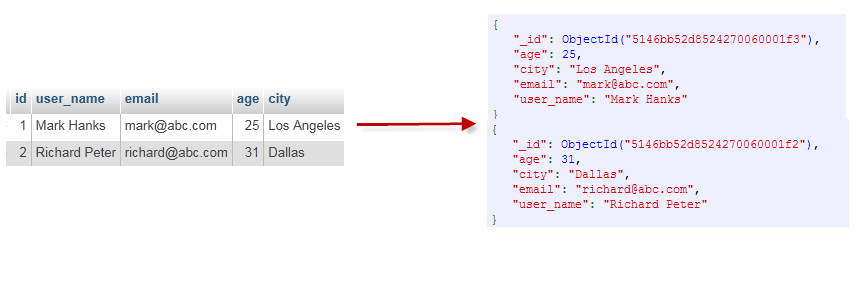
3.7.1. Database 
$ ./mongo
MongoDB shell version: 3.0.6
connecting to: test
> show dbs
local  0.078GB
test   0.078GB
>
$ ./mongo
MongoDB shell version: 3.0.6
connecting to: test
> db
test
>
> use local
switched to db local
> db
local
>
3.7.2. Document (Document) 
{"site":"www.runoob.com", "name":"菜鸟教程"}
3.7.3. Set 
{"site":"www.baidu.com"}
{"site":"www.google.com","name":"Google"}
{"site":"www.runoob.com","name":"菜鸟教程","num":5}
Legal collection name 
db.col.findOne()
Capped collections 
db.createCollection("mycoll", {capped:true, size:100000})
3.7.4. Meta data 
dbname.system.*
3.7.5. MongoDB data type 
ObjectId 

> var newObject = ObjectId()
> newObject.getTimestamp()
ISODate("2017-11-25T07:21:10Z")
> newObject.str
5a1919e63df83ce79df8b38f
String 
Time stamp 
序数
Date 
> var mydate1 = new Date()     //格林尼治时间
> mydate1
ISODate("2018-03-04T14:58:51.233Z")
> typeof mydate1
object
> var mydate2 = ISODate() //格林尼治时间
> mydate2
ISODate("2018-03-04T15:00:45.479Z")
> typeof mydate2
object
> var mydate1str = mydate1.toString()
> mydate1str
Sun Mar 04 2018 14:58:51 GMT+0000 (UTC)
> typeof mydate1str
string
> Date()
Sun Mar 04 2018 15:02:59 GMT+0000 (UTC)