4.4.1. MVC architecture 
<AppML> 采用了 MVC架构。
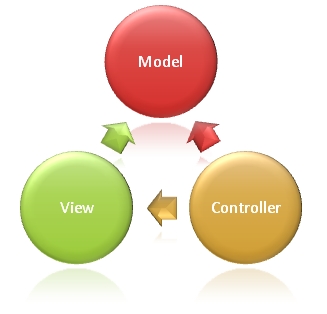
The full name of MVC is Model View Controller, which is the abbreviation of Model (Model)-View-Controller (Controller). It is a model of software design.
模型(Model) Describe your application.
视图(View) Show your data.
制器(Controller) Control your app.
Wikipedia:
4.4.2. Model (MODEL)-just a simple XML file 
The model describes your application and can be reused on different hardware and software platforms (PC, iPhone, Tablets, etc.). It doesn’t care about the user interface (UI) or presentation.
The model is written in xml and stored in the web server.
<appml>

<datasource>
  <database>
    <connection>Northwind</connection>
    <sql>SELECT CustomerName,ContactName,City,Country FROM Customers</sql>
  </database>
</datasource>

<filters>
<query>
  <field label="Customer">CustomerName</field>
  <field>City</field>
  <field>Country</field>
</query>
<order>
  <field label="Customer">CustomerName</field>
  <field>City</field>
  <field>Country</field>
</order>
</filters>

</appml>
The above example defines that the data source is from the Northwind database.
This model allows you to obtain data using a predefined SQL. It also allows you to query and sort data through Customer, City, and Country.
4.4.3. View (VIEW)-just a normal HTML file 
The view is UI (User Interface: user interface). It is usually a HTML page that displays and enters data (optional):
<!DOCTYPE html>
<html>
<head>
<link rel="stylesheet" href="appml.css" />
</head>
<body>
<h1>My First Web Application</h1>
<div id="Place01"></div>
<script src="appml.js"></script>
<script>
customers=new AppML("appml.html","Customers.xml");
customers.run("Place01");
</script>
</body>
</html>
The above HTML page creates an AppML object by executing the scripting language and displays the data in the div of the id= “Place01”.
The “appml.js” script file is used.
4.4.4. CONTROLLER (controller)-just a script on the server side of the browser 
Server-side scripts control applications in the following ways:
Receive request data from the browser
Return the model and data to the browser
Receive updated data from the browser
Update data on the server
During the data communication process, please verify the data security.
Browser scripts control applications in the following ways:
When the page loads, you can load the < AppML > controller onto the page.
Using the controller, you can create < AppML > objects on the page.
When the < AppML > object is executed, it requests data from the server.
The < AppML > object accepts data from the server (using the data model).
The < AppML > object (or your code) displays your data on the page.
(optional) web users modify data.
(optional) < AppML > can send a modification request to the server.
4.4.5. Typical Web files and folders: 
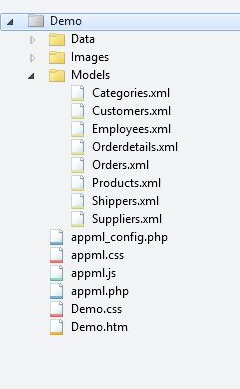
Web folder: Demo
Data folder: Data
Picture folder: Images
Model folder: Models
Application: Demo.htm
Style: Demo.css
< AppML > configuration file: appml_config.php (or .htmlx)
< AppML > style file: appml.css
< AppML > browser Controller: appml.js
< AppML > Server Controller: appml.php (or .htmlx)
4.4.6. Fast and flexible application development 
Rapid application development (Rapid Application Development, RAD) is not only a method of requirement extraction, but also a method of software development. The purpose of rapid application development is to release the system solution quickly, while the technical elegance is secondary to the speed of release.
< AppML > provides ultra-fast prototyping, 100 times faster than traditional software development methods.
The application prototype can be run directly from the application model without any coding.
Wikipedia: Rapid Application Development
Agile software development is a step-by-step approach based on the collaboration between users and developers.
< AppML > applications can be written and implemented step by step, from prototype to complete application.
4.4.7. Declarative programming 
Software development is often unable to complete within the expected time and budget. Software coding errors are also common. This is because computer code is difficult to develop, test, and maintain.
The code has been 过时了 . You should describe more about what to do than how to achieve it.
To use < AppML >, you need to be in the model 声明 Your app.
You can use < AppML > 少写或者不用编写代码 .
Wikipedia: Declarative Programming
4.4.8. Code first (Code First) 
Web application development can be done in two different ways:
1. 代码先行(Code First):使用预编程,预先测试的代码,只增加新的应用程序说明。
two。 Contract first (Contract First): instructions for using a complete application from scratch require that the application be written.
< AppML > adopt the most reasonable concept: 代码先行(Code First) .
4.4.9. Service oriented Architecture (service-oriented architecture,SOA) 
Web Service Is a data interface, specified by URL, just like a web page. But unlike web pages, it’s just a way to convey information.
A typical Web Service Provides data for the page.
Using < AppML >, HTML is displayed as the user interface, and < AppML > provides data.
Original Web Services The design uses the XML logo such as SOAP, WSDL and UDDI.
Modern Web Services For example, the < AppML > application is simpler.
Easier to understand-can be read by us
Lightweight-No unnecessary code or markup
Easy to implement-without the required development tools
Service-oriented architecture (service-oriented architecture,SOA) is a component model that connects different functional units of an application (called services) through well-defined interfaces and contracts between these services. Interfaces are defined in a neutral manner and should be independent of the hardware platform, operating system, and programming language that implements the service. This allows services built in various such systems to interact in a unified and common way.
4.4.10. Advantages of Web Services 
Web services requires only a small amount of code
Web services is designed to handle a limited set of tasks
Web services uses HTTP-based communication protocols
Web services is independent of the operating system
Web services is independent of programming language
Web services can connect different applications, systems and devices
Web Services can easily publish information.
Web Services facilitates rapid application development
An Web services, for example, could design an application for Mini Program that provides the latest trading prices for other stocks.
Web services uses the HTTP protocol to communicate with other systems, and Web services are independent of the operating system and programming language.
Applications that call Web services will always send requests using the HTTP protocol. Calling applications will never care about the operating system or programming language that other computers are running.
Web services can create new possibilities for more enterprises because it provides a simple way to distribute large amounts of information.
For example: flight schedule and ticket reservation system.
4.4.11. Cloud Computing (Cloud Computing) 
Cloud computing (Cloud Computing) is an extension of SOA: application as a Service (Application-as-a service), Storage as a Service (Storage-as-a-service), data as a Service (Data-as-a-service).
For most people, cloud computing stores data on web:
Send a special calendar
Documents and spreadsheets
Books, notes, to-do list
Music, pictures and movies
Databases and applications
The reason is obvious:
There is access data from all over the world.
Share my data with others
Hardware upgrade or crash
< AppML > makes it easy to put databases and applications in the cloud.