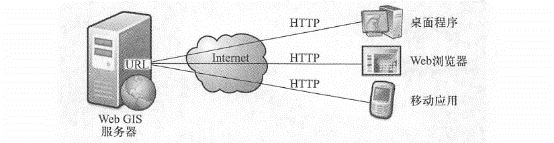
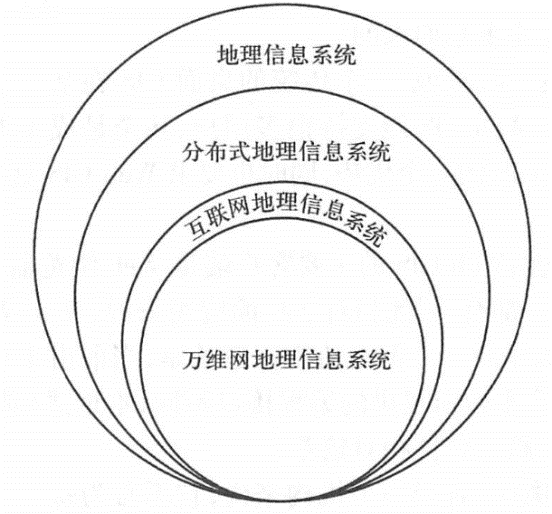
This section will analyze the concept of WebGIS, analyze its differences and connections with traditional desktop geographical information systems, and introduce the advantages of WebGIS. WebGIS was early considered to be a geographical information system running in a Web browser, but this definition is not complete. Broadly speaking, WebGIS is a variety of geographical information systems that use Web technology. In a narrow sense, WebGIS is a geographical information system that connects its components through Web technology. WebGIS is a distributed information system. It must have at least one server and one client. This client is not limited to a Web browser, but can also be a desktop application or a mobile application (Figure 1.9). Fig. 8 The World Wide Web GIS must have at least one Web application server and one client, which can be a web browser, desktop client or mobile client. The client finds the server through the URL and communicates with the server mainly through the HTTP protocol # To understand the concept of WebGIS, you need to pay attention to the following points: HTTP protocol: Among many Web technologies, HTTP is the main protocol used by servers and clients to communicate with each other. The simplest WebGIS is a two-tier architecture that includes a server and one or more clients. WebGIS includes not only the client you see, but also the server that the client relies on. It may be a server on the Internet or a cloud computing center. Sometimes the server and client can both be housed in the same computer, but logically speaking, they are still two separate units. A single WebGIS is typically a three-tier architecture, including a data layer, a logical layer (or middle layer), and a client (or presentation layer). With the popularity of geographical aggregation (mashup; see Chapter 4) methods, one WebGIS often leverages the services of one or more other WebGIS to form an n-tier ( \(n>3\) ) structure. WebGIS and desktop GIS are constantly permeating each other. On the one hand, WebGIS relies on desktop GIS to create basic resources such as data and maps; on the other hand, desktop GIS is also constantly expanding and gradually incorporating the functions of WebGIS. For example, ArcMap, a traditional desktop GIS, has also added the functions of WebGIS and can serve as a client of WebGIS. For example, you can use basemaps provided by ArcGIS Online, the U.S. Geological Survey, Microsoft Bing Maps, or other agencies in ArcMap without having to purchase and install the basemap data yourself. WebGIS is similar in concept to Internet Geographic Information System (Internet GIS). Strictly speaking, there are subtle differences between the two. The Internet supports many services, and the World Wide Web is only one of them. Therefore, Internet GIS( Peng and Tson, 2003) covers a wider range than WebGIS (Figure 1.10). But in reality, the World Wide Web is the most attractive and commonly used service on the Internet, and WebGIS is the main form of Internet GIS. The two are basically equivalent. Fig. 9 The relationship between WebGIS and other GIS terms. The meaning of the Internet geographical information system is slightly wider than that of WebGIS, but the two are basically the same # Another term related to WebGIS. GeoWeb has multiple understandings. One understanding refers to the combination of geospatial information and abstract information (i.e. non-geographical information such as web pages, pictures, videos and news)(Haklay, Singleton and Parker, 2008). This definition is closely related to geotagging and geoparsing (see Chapter 10). In addition,GeoWeb is often used to refer to WebGIS(Scharl and Tochtermann,2007). Geographic information systems are mainly composed of hardware, software, data and users, and the increasing distance and further separation between these components is interesting. In the 1960s and 1970s, these components of GIS were usually installed on a single computer. By the 1980s and early 1990s, these components were often installed on different computers on the same local area network, and they might be in different rooms in a building or in multiple buildings, forming a distributed geographical information system. In WebGIS, these components are further separated, and clients and servers can be separated. With the advent of technologies like Web services and aggregation (mashups; see Chapter 4), a client can use data from one server and analysis capabilities from another, allowing the components of GIS to be further separated. The Internet and the World Wide Web give people the freedom to choose time (open 24 hours a day, 7 days a week), and also free people from the shackles of distance. Their own global nature, low cost, efficiency and openness also give WebGIS many advantages. Broadness of communication: For developers, if you make a WebGIS application, the world can see you, and you can show your system to the world; for users, you can use WebGIS systems all over the world (except systems isolated by firewalls or other security measures) while sitting at home, using a browser or other software. Therefore, the spread of WebGIS is global. This advantage is due to the advantages of the Internet and Inherited from the HTTP transport protocol. Plurality of users: Generally speaking, a traditional desktop GIS is only used by one user at a time, while a WebGIS can support many users, even thousands of users, using it at the same time. This is an advantage of WebGIS, and it also requires WebGIS to have high performance and scalability. Good cross-platform nature: The main client of WebGIS is the Web browser, and the Web browser is available on all operating systems. Therefore, compared with desktop applications, WebGIS based on Web browsers has better cross-platform nature. However, it is worth noting that currently due to the diversity of mobile platform operating systems and the different programming interfaces provided by each platform, native (or embedded; see Section 5. 3 Section) Mobile GIS is relatively poor in cross-platform nature. Lowness of average costs: For an organization, it does not have to buy a desktop GIS for every GIS user, but can build a WebGIS that can be shared by multiple users. In this way, the average cost is often lower than the former. For end users, WebGIS such as a large number of electronic map websites and public information service map websites provided by government departments are free. Ease of use for end users: The main users of desktop GIS are professionals with years of training and experience, while users of WebGIS are often non-GIS professionals and Internet users. These popular users are not trained accordingly. They need WebGIS to be simple and easy to use, like point-and-shoot cameras, and at the same time have a good user experience. Their expectation is even-“If I don’t know how to use your website, it’s your fault.” This requires WebGIS developers Employees pay attention to designing a user-friendly operating interface to reduce the complexity of use. Unification of updates: If a desktop GIS has a new version or data, administrators need to install it on every computer. WebGIS is different. The administrator only needs to update the server, so the next time a user uses the system, most of the clients will automatically update and get the latest programs and data. Therefore, WebGIS can reduce the complexity of system maintenance in many cases and is also suitable for applications that require high timeliness, such as emergency management. Extensiveness of applications: In response to people’s diverse needs, government agencies, commercial organizations and enthusiasts have developed various WebGIS applications, such as the distribution of SARS epidemics, the distribution of environmental pollution sources in various places, the location of restaurants and bookstores, online dating, photo and video maps, news location maps, movie star address maps, and even the distribution map of public toilets (such as the national toilet electronic map website http://www.toiletmap.gov_au provided by Australia). WebGIS has contributed to the development of new geography. Neogeography refers to the use of geographical technologies and tools by non-professional users for personal or public purposes (Tumer, 2006). This phenomenon breaks through traditional barriers between experts and non-experts and promotes public participation and socialization of GIS. The above characteristics add many advantages to WebGIS, and also put forward corresponding requirements for the development of WebGIS. For example, the multitude of users requires the stability and scalability of the WebGIS system. Some systems run very fast when there is only one user, but slow down when there are 3 users and crash when there are 5 users. This cannot well support the pressure caused by multiple users using it at the same time. The simplicity of use reminds developers to pay attention to the user-friendly interface and take into account the operating capabilities and usage habits of non-GIS professionals.The concept of WebGIS #
advantages #