PostgreSQL can create a database in the following three ways:
1、使用 CREATE DATABASE SQL 语句来创建。
2、使用 createdb 命令来创建。
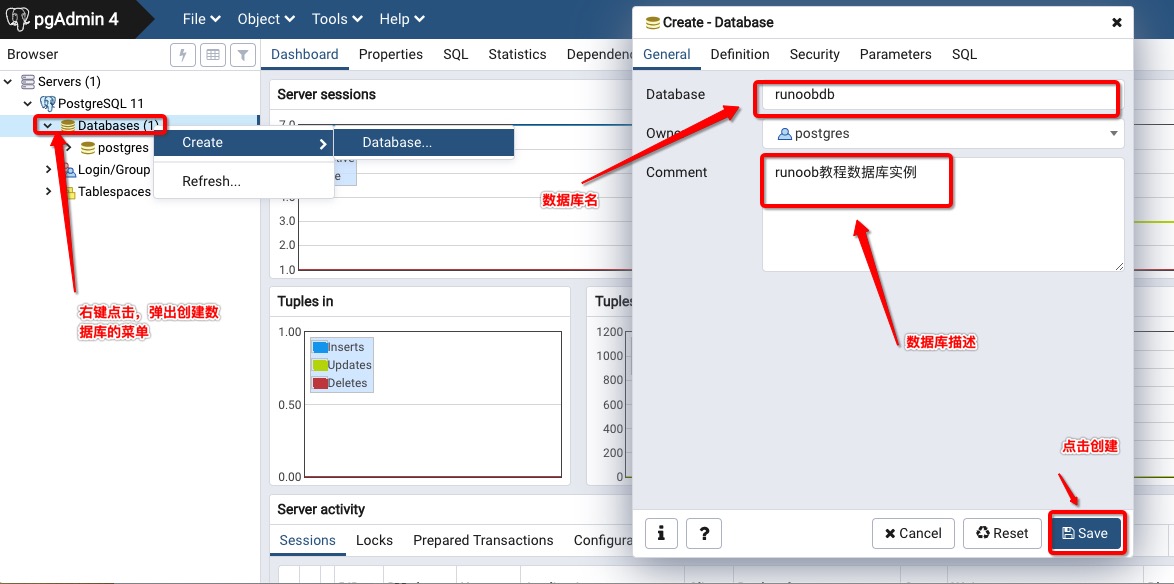
3、使用 pgAdmin 工具。
5.7.1. CREATE DATABASE creates a database 
The CREATE DATABASE command needs to be executed in the PostgreSQL command window and the syntax format is as follows:
CREATE DATABASE dbname;
For example, let’s create a database of runoobdb:
postgres=# CREATE DATABASE runoobdb;
5.7.2. Createdb command to create a database 
Createdb is an encapsulation of the SQL command CREATE DATABASE.
The syntax format of the createdb command is as follows:
createdb [option...] [dbname [description]]
参数说明:
dbname The name of the database to create
description Instructions about the newly created database
options The parameter is optional, which can be the following values:
Serial number | Option & description |
|---|---|
1 | -D tablespace Specifies the database default tablespace. |
2 | -e Send the commands generated by createdb to the server. |
3 | -E encoding Specifies the encoding of the database. |
4 | -l locale Specifies the locale of the database. |
5 | -T template Specify the template to create this database. |
6 | –help Displays help information for the createdb command. |
7 | -h host Specifies the hostname of the server. |
8 | -p port Specify the port on which the server listens, or the socket file. |
9 | -U username The user name to connect to the database. |
10 | -w Ignore entering password. |
11 | -W A password is required when connecting. |
Next we open a command window, go to the PostgreSQL installation directory, and go to the bin directory, where the createdb command is located PostgreSQL安装目录/bin Under, execute the command to create the database:
$ cd /Library/PostgreSQL/11/bin/
$ createdb -h localhost -p 5432 -U postgres runoobdb
password ******
In the above command, we used the superuser postgres to log in to the PostgreSQL database with host address localhost and port number 5432 and create the runoobdb database.
5.7.3. PgAdmin tool to create a database 
The pgAdmin tool provides complete functionality for manipulating the database: