MongoDB replication is the process of synchronizing data on multiple servers.
Replication provides redundant backup of data, and stores copies of data on multiple servers, which improves the availability of data and ensures the security of data.
Replication also allows you to recover data from hardware failures and service disruptions. Ensure the security of data High availability of data (2407) Disaster recovery No downtime maintenance (such as backup, re-indexing, compression) Distributed read data Replication of mongodb requires at least two nodes. One of them is the master node, which is responsible for handling client requests, and the rest are slave nodes, which are responsible for replicating the data on the master node. The common collocation of each node of mongodb is: one master, one slave, one master and multiple slaves. The master node records all operations on it oplog, and the slave node periodically polls the master node for these operations, and then performs these operations on its own data copy, thus ensuring that the data of the slave node is consistent with that of the master node. The MongoDB replication structure diagram is as follows: In the above structure diagram, the client reads data from the master node, and when the client writes data to the master node, the master node interacts with the slave node to ensure the consistency of the data. N-node cluster Any node can be used as the primary node All writes are on the primary node Automatic failover Automatic recovery In this tutorial, we use the same MongoDB to do the MongoDB master-slave experiment. The steps are as follows: 1、关闭正在运行的MongoDB服务器。 Now let’s start mongoDB by specifying the– replSet option. – the basic syntax format of replSet is as follows: The above instance starts a MongoDB instance named rs0 with port number 27017. After startup, open a command prompt and connect to the mongoDB service. Using commands on the Mongo client We can use it. View replica set status usage To add members of the replica set, we need to use multiple servers to start the mongo service. Go to the Mongo client and use the rs.add () method to add members of the replica set. Suppose you have started a program called In MongoDB, you can only add Mongo services to the replica set through the primary node to determine whether the currently running Mongo service can use commands on the primary node. The replica set of MongoDB is different from our common master and slave. All services of the master and slave will stop after the host goes down, while when the host goes down, the replica will take over the master node and become the master node without downtime. 3.23.1. What is replication? 
3.23.2. Principle of MongoDB replication 
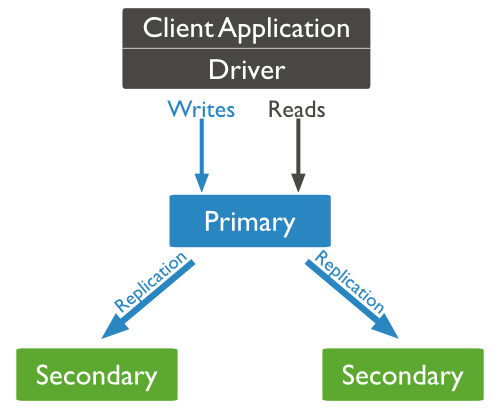
Copy set features: 
3.23.3. MongoDB replica set Settin 
mongod --port "PORT" --dbpath "YOUR_DB_DATA_PATH" --replSet "REPLICA_SET_INSTANCE_NAME"
Example 
mongod --port 27017 --dbpath "D:\set up\mongodb\data" --replSet rs0
rs.initiate()
To start a new replica set.
rs.conf()
To view the configuration of the replica set
rs.status()
Command 3.23.4. Copy set add member 
Grammar 
rs.add()
The basic syntax format of the command is as follows:>rs.add(HOST_NAME:PORT)
Example 
mongod1.net
The Mongo service with port number 27017 Use in the client command window
rs.add()
Command to add it to the replica set, as follows:>rs.add("mongod1.net:27017")
>
db.isMaster()
.