Maven usage prototype archetype The plug-in creates the project. To create a simple Java application, we will use the maven-archetype-quickstart Plug-in.
In the following example, we will create a maven-based java application project under the C:MVN folder.
The format of the command is as follows:
mvn archetype:generate "-DgroupId=com.companyname.bank" "-DartifactId=consumerBanking" "-DarchetypeArtifactId=maven-archetype-quickstart" "-DinteractiveMode=false"
Parameter description:
-DgroupId The name of the organization, the reverse of the company’s website and the name of the project
-DartifactId : project name-module name
-DarchetypeArtifactId Specify ArchetypeId,maven-archetype-quickstart to create a simple Java application
-DinteractiveMode Whether to use interactive mode or not
The resulting folder structure is as follows:
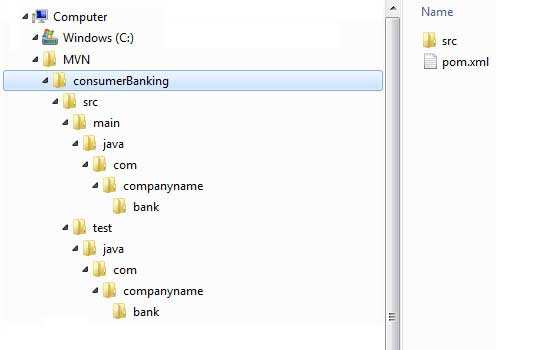
Description of each folder:
Folder structure | Description |
|---|---|
ConsumerBanking | Contains the src folder and pom.xml |
Src/main/java contains | The java code file is under the package structure (com/companyName/bank). |
Src/main/java test | The test code file is under the package structure (com/companyName/bank). |
Src/main/resources | Contains the image / properties file (in the above example, we need to create this structure manually). |
在 C:MVNconsumerBankingsrcmainjavacomcompanynamebank 文件夹中,可以看到一个 App.java,代码如下: 打开 C:MVNconsumerBankingsrctestjavacomcompanynamebank 文件夹,可以看到 Java 测试文件 AppTest.java。 For the rest of the development process, we just need to put it according to the structure mentioned in the table above, and Maven will help us take care of other things. 11.8.1. App.java 
packagecom.companyname.bank;/\*\* \* Hello world!
\*\*/publicclassApp{publicstaticvoidmain(String[]args){System.out.println("Hello
World!");}}
11.8.2. AppTest.java 
packagecom.companyname.bank;importjunit.framework.Test;importjunit.framework.TestCase;importjunit.framework.TestSuite;/\*\*
\* Unit test for simple App.\*/publicclassAppTestextendsTestCase{/\*\*
\* Create the test case \* \*@paramtestName name of the test
case\*/publicAppTest(StringtestName){super(testName);}/\*\* \*@returnthe
suite of tests being
tested\*/publicstaticTestsuite(){returnnewTestSuite(AppTest.class);}/\*\*
\* Rigourous Test :-)\*/publicvoidtestApp(){assertTrue(true);}}