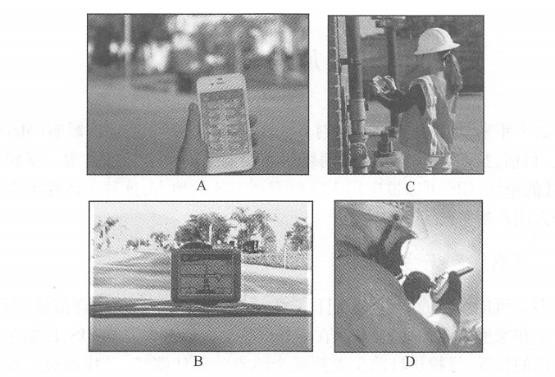
Over the past decade, computer network technology has had an unprecedented impact on GIS system architecture (Maguire,2007). Currently, we are in the process of rapid development from wired networks to wireless networks. Free from the shackles of cables and wires, GIS can be applied outdoors where GIS is needed. This flexibility brings a lot of convenience to both corporate users and individual users. Many people may not realize that we often need to use geographical information in our daily lives, not only on desktops in the office and at home, but sometimes on mobile devices outdoors, such as determining our location when we get lost, looking for the best path from our current location to a certain location, looking for nearby restaurants and friends, etc. Many professional tasks cannot be done in the office, such as outdoor surveying and mapping, delivery, line maintenance, equipment inspection and Incident Response Service. These field tasks often require the assistance of maps, such as investigating inventory, inspecting equipment, locating gas stations, locating pipelines, finding the best route to multiple destinations, and quickly understanding the situation of the incident area after an emergency occurs. These needs are the driving force for the emergence and development of mobile GIS. Mobile GIS is GIS used on mobile devices. A unique feature of mobile GIS is that its users and people of interest are often in the same place (Longley et al., 2005)。In theory, there are four locations in GIS: the location of the user (U), the location of data storage (D), the location of data processing (P), and the location of the object of interest (S). In traditional GIS, users are often in the office, and objects of interest can be anywhere in the world, so U#S. In mobile GIS, U=S, which means that users and the objects of concern are often in the same place, so users can observe, listen, and even feel the objects of concern through touch and smell. For example, the accident reporter is often at the scene of the accident. He can understand and record the situation at the scene through his own senses. These first-hand information can effectively help commanders who are not at the scene of the accident understand the situation at the scene. Early mobile GISs emerged in the 1990s. They were generally used for vehicle navigation and outdoor measurement. Their GIS data and software were pre-installed into the device and could only be run independently and offline. Over the past ten years, with the development of wireless communication technology, mobile GIS applications have begun to connect to the Internet, obtaining rich and powerful GIS services, obtaining the latest GIS data, and submitting the latest observation data through the Web. As a result, mobile GIS has evolved from offline to wireless connectivity, and has rapidly developed into an important client of WebGIS (Figures 5.1 and 5.2), which is why this book discusses mobile GIS in the context of WebGIS. Since the 21st century, the number of mobile users has grown at a rate of approximately 20% per year. According to statistics from the International Telecommunication Union (ITU), the number of mobile phone users exceeded that of fixed-line phone users in 2000. Fig. 55 Mobile GIS can be used for (A) determining location and direction in an unfamiliar city,(B) device statistics and inspections,(C) car navigation, and (D) emergency response # Fig. 56 Early mobile GIS mostly ran offline. With the application of wireless communication technology, mobile GIS is more connected to the World Wide Web, becoming an important client of WebGIS and an important part of the research field of WebGIS # Now it seems inevitable. Landline phones are generally one for each household, while mobile phones are often one for each person. The International Telecommunication Union estimates that the number of subscribers to global mobile wireless networks reached 6 billion by the end of 2011 (note: uneven distribution, with some people having multiple mobile phones and tablets)(International Telecommunication Union, 2011 ). These huge number of mobile devices such as mobile phones are potential platforms for mobile GIS. GIS can be used through various forms such as text messaging, Web browsing, and local applications, driving the development and widespread application of mobile GIS. Mobile GIS is better suited for the following functions: Information acquisition and update: Mobile GIS is an ideal platform for data collection and update. Mobile devices are easy to carry, and many have built-in GPS receivers for easy access to accurate geographical location and attribute information. In addition, mobile devices are often equipped with functions such as taking photos, recording and video recording, allowing them to collect rich multimedia geospatial information. Dissemination of information: Mobile devices can deliver GIS to hundreds of millions of users. Whether outdoors, in the office, at home or on the road, people can browse maps and check the situation around them anytime and anywhere. In general, mobile GIS is relatively weak in the following functions: Data storage: Mobile devices are not suitable for long-term storage of large amounts of data unless they are special purpose devices. In general, data collected by mobile devices should be synchronized to the GIS server every day or more frequently to prevent data loss. Data analysis: Mobile devices have limited computing resources and generally cannot provide powerful data analysis capabilities similar to desktops or servers. Therefore, mobile GIS applications often provide specialized computing functions for specific applications, such as vehicle navigation. Other, more diverse analyses often rely on customization of WebGIS servers. From an application perspective, mobile GIS can be divided into personal mobile GIS applications and enterprise (i.e. professional) mobile GIS applications. Personal mobile GIS application Such applications are aimed at individual users and generally need to answer the following public questions: “Where am I?””What’s around?””Where is the nearest restaurant, bank, ATM, gas station, or store?” and “How can I get there?” etc. These applications generally fall within the category of location-based services (LBS)(see Section 5. 4. Section 3). LBS refers to information services provided to users based on the location of a mobile device that are related to that location (Spiekermann and zu Berlin,2004). Personal mobile GIS applications have some things in common. For example, they both require basemaps and points of interest, and need to provide map query and navigation functions. When selecting, users often have to consider which manufacturer’s software can provide richer and more detailed maps and points of interest, who has a larger user base, whether it is easy to use, and whose interface is more fashionable. These apps are generally free to individual users, but are profitable through advertising and other methods. Typical personal applications include Google Maps mobile version, Foursquare, Nangu and other mobile maps, check-in and group buying applications cj Application of enterprise (or professional) mobile GIS Many organizations and institutions need to use mobile GIS, especially those with personnel engaged in field maintenance, surveying and mapping, police, fire protection, soldiers, census, etc., as well as government departments such as water and drainage companies, power telecommunications companies, public security, law enforcement and emergency response. Their main tasks are (ESRI,2009): Outdoor mapping, inquiry and decision support: People can view and query maps anytime and anywhere, and call the analysis functions of the server, thereby providing important information for decision-making. Inspection and inventory of outdoor equipment: Moving maps and GPS can help field personnel accurately record the location and other related information of objects such as substations, water meters, traffic signs and house renovation projects. This digital information can also be used as a legal basis for resolving disputes. Field measurement: Surveying and mapping personnel can obtain high-precision plane and elevation coordinates through GPS in mobile devices, and submit them to the server wirelessly in time, so that the collected data can be put into use as soon as possible. Accident reporting: Record and report the location and related circumstances of the accident. Collaborative cooperation: Office and field staff communicate and collaborate with each other. Location tracking: Track the location of moving vehicles or mobile users in real time and report the monitored information to the command center. Enterprise applications have a wider range than personal applications, and each application has a specific purpose and corresponding professional data requirements. For example, pipeline workers need accurate pipeline maps and street maps so that they can accurately find the valves that need to be closed and the exact locations that need to be excavated and repaired. After a disaster, insurance company employees need the insured’s information and location so they can locate the insured home and assess and collect asset damage. Emergency personnel such as public security and fire protection need a base map of the emergency location, location information of important infrastructure, and even a floor plan of the building, in order to understand the situation at the accident location and effectively carry out rescue work. In enterprise applications, each organization selects mobile devices, collects GIS data, and purchases and customizes GIS software based on its own needs. What they care about is: whether the application can meet the needs of the work process, whether it is easy for employees to understand and use, whether it can upload data to the office server in a timely manner, whether it can be integrated with the company’s office system (including email and scheduling), and whether the system is safe and reliable, etc., while the characteristics that individual users are more concerned about, such as whether the system interface is fashionable, are relatively secondary. Compared with traditional desktop GIS, mobile GIS has the following advantages: Instead of a paper-based workflow: Traditional paper-based workflows generally outline or write information collected in the field on paper, and then digitize it after returning to the office. This process results in repetitive work and is prone to errors in writing and recognizing handwritten fonts, affecting the accuracy of the data. Using mobile devices avoids the use of paper charts, simplifies work processes, reduces costs, improves work efficiency, and improves data accuracy. Mobility and portability: Mobile devices are free of wires and cables and are small enough to be held in your hands or placed in your pockets, while larger devices can also be carried in a backpack or secured in a car. Special-made equipment can also work in harsh or dangerous environments. Mobile devices can deliver GIS to places where GIS is needed but wires and cables are placed unconditionally, such as places that are too hot, too wet, or too far away. Huge number of users: The number of users on smartphones and tablets will far exceed the number of users on desktop computers. This huge user base is making mobile devices a universal and ubiquitous GIS platform, allowing more users to access GIS, expanding the GIS market, and providing huge potential for the development and application of geographical information science. Positioning function: The location of a mobile device can be determined through various technologies such as GPS (see Section 5. 2. Section 3). This positioning capability is unique to mobile GIS and is also a prerequisite for mobile GIS to provide location services such as surveying, navigation, emergency and surrounding inquiries. Multiple ways to communicate and work collaboratively: Mobile GIS can communicate through multiple methods such as audio, text messages, photos, video, email and the Web, making it easier for indoor and field employees to communicate with each other. Communication can improve work efficiency. Real-time: People often use mobile GIS when or during an event, allowing on-site situations to be published or submitted to a Web server with near-real-time efficiency. This ability greatly improves the current nature of GIS, that is, the temporal dimension, allowing us to monitor developments and changes in events around the world in real time or quasi-real time.from wired to wireless #

function and application #
Advantages of mobile GIS #