Maven is a Java-based tool, so the first thing to do is to install JDK.
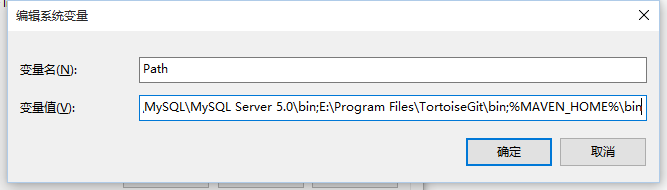
If you have not installed JDK, you can refer to our Java 开发环境配置 . Project Request JDK Maven 3.3 requires JDK 1.7 or above Maven 3.2 requires JDK 1.6 or above JDK 1.5 or above is required for Maven 3.0 Memory There is no minimum requirement Magnetic disk The installation of Maven itself requires approximately 10 MB space. In addition, the extra disk space will be used for your local Maven repository. The size of your local warehouse depends on usage, but expect at least 500 MB Operating system There is no minimum requirement Operating system Task Command Windows Open the command console Linux Open the command terminal Mac Open the terminal Maven download address: http://maven.apache.org/download.cgi Download the corresponding packages on different platforms: System Package name Windows Apache-maven-3.3.9-bin.zip Linux Apache-maven-3.3.9-bin.tar.gz Mac Apache-maven-3.3.9-bin.tar.gz After downloading the package, extract it to the corresponding directory: System Storage location (can be configured according to your own situation) Windows E:Mavenapache-maven-3.3.9 Linux / usr/local/apache-maven-3.3.9 Mac / usr/local/apache-maven-3.3.9 Add the environment variable MAVEN_HOME: System Configuration Windows Right-click “computer”, select “Properties”, then click “Advanced system Settings” and click “Environment variables” to set environment variables. The following system variables need to be configured: New system variabl Edit system variabl 注意 Note that multiple values need to be separated by semicolons, and then click OK. Linux Download and decompress: Editing Save the file and run the following command to make the environment variable take effect: Enter the following command in the console. If you can see the relevant version information of Maven, it means that Maven has been installed successfully: Mac Download and decompress: Editing Save the file and run the following command to make the environment variable take effect: Enter the following command in the console. If you can see the relevant version information of Maven, it means that Maven has been installed successfully: 11.2.1. System requirements 
11.2.2. Check Java installation 
c:\> java -version
# java -version
$ java -version
11.2.3. Maven download 
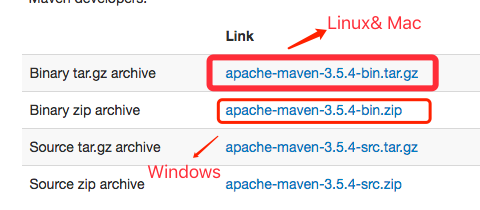
11.2.4. Set the Maven environment variable 
MAVEN_HOME
, variable value:
          E:\
          Maven\
          apache-maven-
          3.3.9

Path
, add the variable value:
          ;%
          MAVEN_HOME%\
          bin
# wget http://mirrors.hust.edu.cn/apache/maven/maven-3/3.3.9/binaries/apache-maven-3.3.9-bin.tar.gz
# tar -xvf  apache-maven-3.3.9-bin.tar.gz
# sudo mv -f apache-maven-3.3.9 /usr/local/
/etc/profile
File
          sudo
          vim
          /etc/profile
To add the following code at the end of the fileexport MAVEN_HOME=/usr/local/apache-maven-3.3.9
export PATH=${PATH}:${MAVEN_HOME}/bin
# source /etc/profile
# mvn -v
$ curl -O http://mirrors.hust.edu.cn/apache/maven/maven-3/3.3.9/binaries/apache-maven-3.3.9-bin.tar.gz
$ tar -xvf  apache-maven-3.3.9-bin.tar.gz
$ sudo mv -f apache-maven-3.3.9 /usr/local/
/etc/profile
File
          sudo
          vim
          /etc/profile
To add the following code at the end of the fileexport MAVEN_HOME=/usr/local/apache-maven-3.3.9
export PATH=${PATH}:${MAVEN_HOME}/bin
$ source /etc/profile
$ mvn -v
Apache Maven 3.3.9 (bb52d8502b132ec0a5a3f4c09453c07478323dc5; 2015-11-11T00:41:47+08:00)
Maven home: /usr/local/apache-maven-3.3.9
Java version: 1.8.0_31, vendor: Oracle Corporation
Java home: /Library/Java/JavaVirtualMachines/jdk1.8.0_31.jdk/Contents/Home/jre
Default locale: zh_CN, platform encoding: ISO8859-1
OS name: "mac os x", version: "10.13.4", arch: "x86_64", family: "mac"