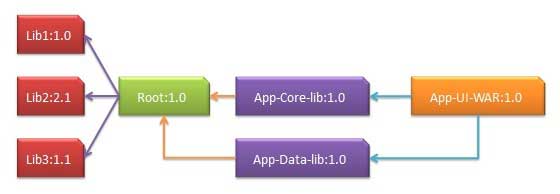
One of the core features of Maven is dependency management. When we deal with multi-module projects (including hundreds of modules or subprojects), the dependencies between modules become very complex and difficult to manage. In response to this situation, Maven provides a highly controlled method. A fairly common situation, such as A relying on other libraries B. If another project C wants to use A, then the C project also needs to use library B. Maven avoids the need to search all the required libraries. Maven finds out the dependencies between their projects by reading the project file (pom.xml). All we need to do is define the direct dependencies in the pom of each project. Maven will help us with everything else. Through transitivity dependency, the graphics of all included libraries will grow rapidly. When there is a duplicate library, the possible situation will continue to rise. Maven provides features to control the degree of transitive dependencies. Function Function description Dependent regulation Determine which dependent version will be used when multiple manually created versions appear at the same time. If the two dependency versions have the same depth in the dependency tree, the first declared dependency will be used. Dependency management Directly specify that a manually created version is used. For example, when a project C contains project B in its dependency management module, that is, B depends on A, then A can specify the version to be used when B is referenced. Dependent range Contains dependencies at each stage of the build process. Dependency exclusion Any transitive dependencies can be excluded through the “exclusion” element. For example, A depends on B and B depends on C, so A can mark C as “excluded”. Dependency optional Any transitive dependency can be marked as optional by using the “optional” element. For example, A depends on B and B depends on C. Therefore, B can mark C as optional so that A can no longer use C. Transitive dependency discovery can be limited by using the following dependency scope: Range Description Compilation phase This scope indicates that the related dependencies are valid only under the classpath of the project. Default value. Supply stage This scope indicates that the dependency is provided by the runtime JDK or network server. Operation stage This scope indicates that dependencies are not necessary at compile time, but are necessary at run time. Test phase This scope indicates that the relevant dependencies are only in the test compilation phase and execution phase. System phase This range indicates that you need to provide a system path. Import Pha This scope is used only if the dependency is a dependency defined in pom. At the same time, the current project’s POM file? Partially defined dependencies can replace a particular POM. Usually, under a common project, there are a series of projects. In this case, we can create a publicly dependent pom file that contains all the public dependencies, which we call the pom parent of the other child project pom. The next example will help you understand the concept better. The following is a detailed description of the dependency graph above: App-UI-WAR depends on App-Core-lib and App-Data-lib. Root is the parent project of App-Core-lib and App-Data-lib. Root defines Lib1, lib2, and Lib3 as dependencies in its dependencies section. The pom.xml file code for App-UI-WAR is as follows: The pom.xml file code for App-Core-lib is as follows: The pom.xml file code for App-Data-lib is as follows: The pom.xml file code for Root is as follows: Now when we build the App-UI-WAR project, Maven will find all the dependencies by traversing the dependency graph and build the application. Through the above example, we can learn the following key concepts: Common dependencies can be uniformly grouped together using the concept of pom parents. The dependencies of App-Data-lib and App-Core-lib projects are listed in the Root project (refer to Root’s package type, which is a POM). There is no need to declare in App-UI-W that Lib1, lib2, and Lib3 are its dependencies. Maven implements this detail by using a transitive dependency mechanism. 11.15.1. Transitive dependency discovery 
11.15.2. Dependent range 
11.15.3. Dependency management 
<projectxmlns="http://maven.apache.org/POM/4.0.0"xmlns:xsi="http://www.w3.org/2001/XMLSchema-instance"xsi:schemaLocation="http://maven.apache.org/POM/4.0.0
http://maven.apache.org/xsd/maven-4.0.0.xsd"><modelVersion>4.0.0</modelVersion><groupId>com.companyname.groupname</groupId><artifactId>App-UI-WAR</artifactId><version>1.0</version><packaging>war</packaging><dependencies><dependency><groupId>com.companyname.groupname</groupId><artifactId>App-Core-lib</artifactId><version>1.0</version></dependency></dependencies><dependencies><dependency><groupId>com.companyname.groupname</groupId><artifactId>App-Data-lib</artifactId><version>1.0</version></dependency></dependencies></project>
<projectxmlns="http://maven.apache.org/POM/4.0.0"xmlns:xsi="http://www.w3.org/2001/XMLSchema-instance"xsi:schemaLocation="http://maven.apache.org/POM/4.0.0
http://maven.apache.org/xsd/maven-4.0.0.xsd"><parent><artifactId>Root</artifactId><groupId>com.companyname.groupname</groupId><version>1.0</version></parent><modelVersion>4.0.0</modelVersion><groupId>com.companyname.groupname</groupId><artifactId>App-Core-lib</artifactId><version>1.0</version><packaging>jar</packaging></project>
<projectxmlns="http://maven.apache.org/POM/4.0.0"xmlns:xsi="http://www.w3.org/2001/XMLSchema-instance"xsi:schemaLocation="http://maven.apache.org/POM/4.0.0
http://maven.apache.org/xsd/maven-4.0.0.xsd"><parent><artifactId>Root</artifactId><groupId>com.companyname.groupname</groupId><version>1.0</version></parent><modelVersion>4.0.0</modelVersion><groupId>com.companyname.groupname</groupId><artifactId>App-Data-lib</artifactId><version>1.0</version><packaging>jar</packaging></project>
<projectxmlns="http://maven.apache.org/POM/4.0.0"xmlns:xsi="http://www.w3.org/2001/XMLSchema-instance"xsi:schemaLocation="http://maven.apache.org/POM/4.0.0
http://maven.apache.org/xsd/maven-4.0.0.xsd"><modelVersion>4.0.0</modelVersion><groupId>com.companyname.groupname</groupId><artifactId>Root</artifactId><version>1.0</version><packaging>pom</packaging><dependencies><dependency><groupId>com.companyname.groupname1</groupId><artifactId>Lib1</artifactId><version>1.0</version></dependency></dependencies><dependencies><dependency><groupId>com.companyname.groupname2</groupId><artifactId>Lib2</artifactId><version>2.1</version></dependency></dependencies><dependencies><dependency><groupId>com.companyname.groupname3</groupId><artifactId>Lib3</artifactId><version>1.1</version></dependency></dependencies></project>