Django provides good support for a variety of databases, including: PostgreSQL, MySQL, SQLite, Oracle.
Django provides a unified call to API for these databases. We can choose different databases according to our business needs.
MySQL is the most commonly used database in Web applications. In this chapter, we will take Mysql as an example. You can pass through this site. MySQL 教程 Learn more about the basics of MySQL.
If you do not have a mysql driver installed, you can install it by executing the following command:
sudo pip3 install pymysql
7.6.1. Django ORM 
The Django model uses its own ORM.
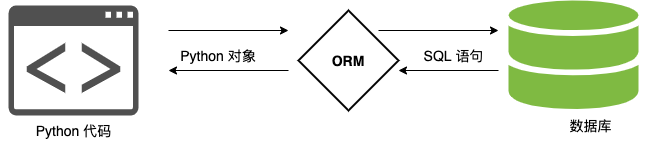
Object-relational mapping (Object Relational Mapping, referred to as ORM) is used to realize the conversion between data of different types of systems in object-oriented programming languages.
ORM acts as a bridge between the business logic layer and the database layer.
ORM automatically persists objects in the program to the database by using metadata that describes the mapping between the object and the database.
Benefits of using ORM:
Improve the efficiency of development.
Different databases can be switched smoothly.
Disadvantages of using ORM:
When ORM code is converted into SQL statements, it takes a certain amount of time, and the execution efficiency will be reduced.
Writing ORM code for a long time will reduce the ability to write SQL statements.
ORM parsing process:
1、ORM 会将 Python 代码转成为 SQL 语句。
2、SQL 语句通过 pymysql 传送到数据库服务端。
3、在数据库中执行 SQL 语句并将结果返回。
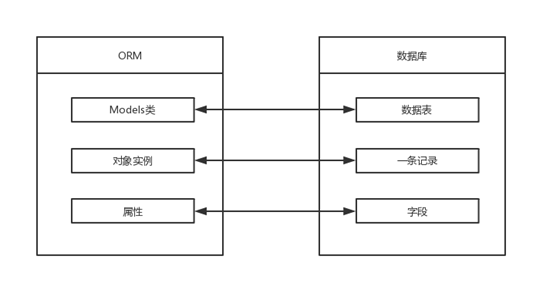
ORM correspondence table:
7.6.2. Database configuration 
7.6.3. How Django uses mysql Database 
Create a MySQL database (ORM cannot operate to the database level, only to data tables) syntax:
create database 数据库名称 default charset=utf8; # 防止编码问题,指定为 utf8
For example, we create a database called runoob, and the encoding is specified as utf8:
create database runoob default charset=utf8;
We found the DATABASES configuration item in the settings.py file of the project and modified its information as follows: If you use the Python2.x version, Chinese comments are added here, so you need to add #-to the header of the HelloWorld/settings.py file. - coding: UTF-8 - -. It contains the database name and user information, which are the same as the settings for the corresponding database and user in MySQL. Based on this setting, Django connects to the corresponding database and user in MySQL. Next, tell Django to connect to the mysql database using the pymysql module:HelloWorld/HelloWorld/settings.py: file code: 
DATABASES= {'default': {'ENGINE':'django.db.backends.mysql',#
数据库引擎'NAME':'runoob',# 数据库名称'HOST':'127.0.0.1',#
数据库地址,本机 ip 地址 127.0.0.1'PORT':3306,# 端口'USER':'root',#
数据库用户名'PASSWORD':'123456',# 数据库密码} }
Example 
# 在与 settings.py 同级目录下的 \__init__.py 中引入模块和进行配置
import pymysql
pymysql.install_as_MySQLdb()
7.6.4. Define the model 
7.6.5. Create APP 
Django states that if you want to use a model, you must create an app. Let’s create an app for TestModel using the following command:
django-admin startapp TestModel
The directory structure is as follows:
HelloWorld
|-- HelloWorld
|-- manage.py
...
|-- TestModel
|   |-- __init__.py
|   |-- admin.py
|   |-- models.py
|   |-- tests.py
|   `-- views.py
Let’s modify the TestModel/models.py file with the following code: The above class name represents the database table name and inherits models.Model. The fields in the class represent the fields in the data table (name). The data types are CharField (equivalent to varchar) and DateField (equivalent to datetime), and the length is limited by the max_length parameter. Next, find the INSTALLED_APPS item in settings.py, as follows: Run on the command line: See a few lines of “Creating table…” Your datasheet will be created. 表名组成结构为:应用名_类名(如:TestModel_test)。 注意: Although we do not set a primary key for the table in models, Django automatically adds an id as the primary key.HelloWorld/TestModel/models.py: file code: 
#
models.pyfromdjango.dbimportmodelsclassTest(models.Model):name=models.CharField(max_length=20)
INSTALLED_APPS = (
    'django.contrib.admin',
    'django.contrib.auth',
    'django.contrib.contenttypes',
    'django.contrib.sessions',
    'django.contrib.messages',
    'django.contrib.staticfiles',
    'TestModel',               # 添加此项
)
$ python3 manage.py migrate   # 创建表结构

$ python3 manage.py makemigrations TestModel  # 让 Django 知道我们在我们的模型有一些变更
$ python3 manage.py migrate TestModel   # 创建表结构
Creating tables ...
……
Creating table TestModel_test  #我们自定义的表
……
7.6.6. Common error message 
If you execute the above command, the following error message appears:

The reason is that MySQLclient only supports Python3.4, so if you use a later version of python, you need to modify it as follows:
通过报错信息的文件路径找到 …site-packagesDjango-2.0-py3.6.eggdjangodbbackendsmysql 这个路径里的 base.py 文件,把这两行代码注释掉(代码在文件开头部分):
if version < (1, 3, 13):
    raise ImproperlyConfigured('mysqlclient 1.3.13 or newer is required; you have %s.' % Database.__version__)

In general, the code file path information of the error report will automatically jump to the number of lines in the error file, and at this time we comment out the number of code lines reported.
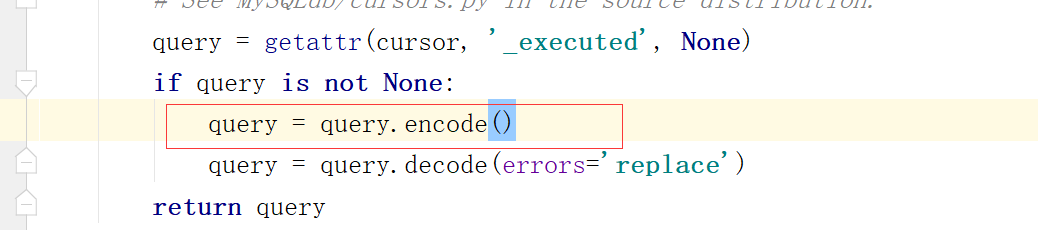
If the following error message appears:

We click on the path of the error code file and jump to the number of lines in the error file. In this case, we add the following before the number of code lines reported:
query = query.encode()
7.6.7. Database operation 
Next, let’s add the testdb.py file to the HelloWorld directory (described below) and modify the urls.py:HelloWorld/HelloWorld/urls.py: file code: 
fromdjango.urlsimportpathfrom.importviews,testdburlpatterns=[path('runoob/',views.runoob),path('testdb/',testdb.testdb),]
7.6.8. Add data 
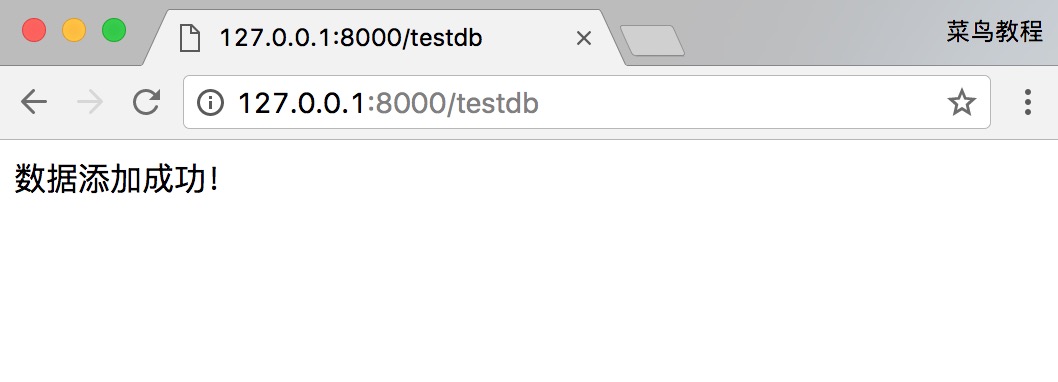
To add data, you need to create an object before executing the save function, which is equivalent to INSERT in SQL: Visit http://127.0.0.1:8000/testdb You can see the prompt that the data was added successfully. The output is as follows:HelloWorld/HelloWorld/testdb.py: file code: 
# -*- coding: utf-8
-*-fromdjango.httpimportHttpResponsefromTestModel.modelsimportTest#
数据库操作deftestdb(request):test1=Test(name='runoob')test1.save()returnHttpResponse("<p>数据添加成功!</p>")
7.6.9. Get data 
Django provides several ways to get the contents of the database, as shown in the following code:HelloWorld/HelloWorld/testdb.py: file code: 
# -*- coding: utf-8
-*-fromdjango.httpimportHttpResponsefromTestModel.modelsimportTest#
数据库操作deftestdb(request):# 初始化response=""response1=""#
通过objects这个模型管理器的all()获得所有数据行,相当于SQL中的SELECT \*
FROMlist=Test.objects.all()#
filter相当于SQL中的WHERE,可设置条件过滤结果response2=Test.objects.filter(id=1)#
获取单个对象response3=Test.objects.get(id=1)# 限制返回的数据 相当于 SQL
中的 OFFSET 0 LIMIT
2;Test.objects.order_by('name')[0:2]#数据排序Test.objects.order_by("id")#
上面的方法可以连锁使用Test.objects.filter(name="runoob").order_by("id")#
输出所有数据forvarinlist:response1+=var.name+""response=response1returnHttpResponse("<p>"+response+"</p>")
7.6.10. Update data 
You can use save () or update () to modify the data:HelloWorld/HelloWorld/testdb.py: file code: 
# -*- coding: utf-8
-*-fromdjango.httpimportHttpResponsefromTestModel.modelsimportTest#
数据库操作deftestdb(request):#
修改其中一个id=1的name字段,再save,相当于SQL中的UPDATEtest1=Test.objects.get(id=1)test1.name='Google'test1.save()#
另外一种方式#Test.objects.filter(id=1).update(name='Google')#
修改所有的列#
Test.objects.all().update(name='Google')returnHttpResponse("<p>修改成功</p>")
7.6.11. Delete data 
To delete an object in the database, simply call the object’s delete () method:HelloWorld/HelloWorld/testdb.py: file code: 
# -*- coding: utf-8
-*-fromdjango.httpimportHttpResponsefromTestModel.modelsimportTest#
数据库操作deftestdb(request):#
删除id=1的数据test1=Test.objects.get(id=1)test1.delete()# 另外一种方式#
Test.objects.filter(id=1).delete()# 删除所有数据#
Test.objects.all().delete()returnHttpResponse("<p>删除成功</p>")