9.32.1. Brief introduction 
Use Sqlite to process data in IOS. If you already know SQL, you can easily master the operation of SQLite database.
9.32.2. Instance step 
1、创建一个简单的View based application
2、选择项目文件,然后选择目标,添加libsqlite3.dylib库到选择框架
3、通过选择” File-> New -> File… -> “选择 Objective C class 创建新文件,单击下一步
4、”sub class of”为NSObject”,类命名为DBManager
5、选择创建
6、更新DBManager.h,如下所示
#import <Foundation/Foundation.h>
#import <sqlite3.h>

@interface DBManager : NSObject
{
    NSString *databasePath;
}

+(DBManager*)getSharedInstance;
-(BOOL)createDB;
-(BOOL) saveData:(NSString*)registerNumber name:(NSString*)name
  department:(NSString*)department year:(NSString*)year;
-(NSArray*) findByRegisterNumber:(NSString*)registerNumber;

@end
7、更新DBManager.m,如下所示
#import "DBManager.h"
static DBManager *sharedInstance = nil;
static sqlite3 *database = nil;
static sqlite3_stmt *statement = nil;

@implementation DBManager

+(DBManager*)getSharedInstance{
    if (!sharedInstance) {
        sharedInstance = [[super allocWithZone:NULL]init];
        [sharedInstance createDB];
    }
    return sharedInstance;
}

-(BOOL)createDB{
    NSString *docsDir;
    NSArray *dirPaths;
    // Get the documents directory
    dirPaths = NSSearchPathForDirectoriesInDomains
    (NSDocumentDirectory, NSUserDomainMask, YES);
    docsDir = dirPaths[0];
    // Build the path to the database file
    databasePath = [[NSString alloc] initWithString:
    [docsDir stringByAppendingPathComponent: @"student.db"]];
    BOOL isSuccess = YES;
    NSFileManager *filemgr = [NSFileManager defaultManager];
    if ([filemgr fileExistsAtPath: databasePath ] == NO)
    {
        const char *dbpath = [databasePath UTF8String];
        if (sqlite3_open(dbpath, &database) == SQLITE_OK)
        {
            char *errMsg;
            const char *sql_stmt =
            "create table if not exists studentsDetail (regno integer
            primary key, name text, department text, year text)";
            if (sqlite3_exec(database, sql_stmt, NULL, NULL, &errMsg)
               != SQLITE_OK)
            {
                isSuccess = NO;
                NSLog(@"Failed to create table");
            }
            sqlite3_close(database);
            return  isSuccess;
        }
        else {
            isSuccess = NO;
            NSLog(@"Failed to open/create database");
        }
    }
    return isSuccess;
}

- (BOOL) saveData:(NSString*)registerNumber name:(NSString*)name
  department:(NSString*)department year:(NSString*)year;
{
    const char *dbpath = [databasePath UTF8String];
    if (sqlite3_open(dbpath, &database) == SQLITE_OK)
    {
        NSString *insertSQL = [NSString stringWithFormat:@"insert into
        studentsDetail (regno,name, department, year) values
        (\"%d\",\"%@\", \"%@\", \"%@\")",[registerNumber integerValue],
        name, department, year];
        const char *insert_stmt = [insertSQL UTF8String];
        sqlite3_prepare_v2(database, insert_stmt,-1, &statement, NULL);
        if (sqlite3_step(statement) == SQLITE_DONE)
        {
            return YES;
        }
        else {
            return NO;
        }
        sqlite3_reset(statement);
    }
    return NO;
}

- (NSArray*) findByRegisterNumber:(NSString*)registerNumber
{
    const char *dbpath = [databasePath UTF8String];
    if (sqlite3_open(dbpath, &database) == SQLITE_OK)
    {
        NSString *querySQL = [NSString stringWithFormat:
        @"select name, department, year from studentsDetail where
        regno=\"%@\"",registerNumber];
        const char *query_stmt = [querySQL UTF8String];
        NSMutableArray *resultArray = [[NSMutableArray alloc]init];
        if (sqlite3_prepare_v2(database,
           query_stmt, -1, &statement, NULL) == SQLITE_OK)
        {
            if (sqlite3_step(statement) == SQLITE_ROW)
            {
                NSString *name = [[NSString alloc] initWithUTF8String:
                 (const char *) sqlite3_column_text(statement, 0)];
                [resultArray addObject:name];
                NSString *department = [[NSString alloc] initWithUTF8String:
                (const char *) sqlite3_column_text(statement, 1)];
                [resultArray addObject:department];
                NSString *year = [[NSString alloc]initWithUTF8String:
                (const char *) sqlite3_column_text(statement, 2)];
                [resultArray addObject:year];
                return resultArray;
            }
            else{
                NSLog(@"Not found");
                return nil;
            }
            sqlite3_reset(statement);
        }
    }
    return nil;
}
8、如图所示,更新ViewController.xib文件
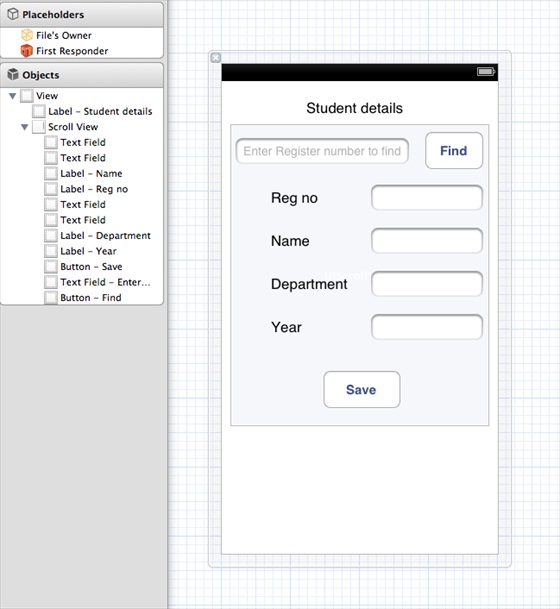
9、为上述文本字段创建IBOutlets
10、为上述按钮创建IBAction
11、如下所示,更新ViewController.h
#import <UIKit/UIKit.h>
#import "DBManager.h"

@interface ViewController : UIViewController<UITextFieldDelegate>
{
    IBOutlet UITextField *regNoTextField;
    IBOutlet UITextField *nameTextField;
    IBOutlet UITextField *departmentTextField;
    IBOutlet UITextField *yearTextField;
    IBOutlet UITextField *findByRegisterNumberTextField;
    IBOutlet UIScrollView *myScrollView;
}

-(IBAction)saveData:(id)sender;
-(IBAction)findData:(id)sender;

@end
12、更新ViewController.m,如下所示
#import "ViewController.h"

@interface ViewController ()

@end

@implementation ViewController

- (id)initWithNibName:(NSString *)nibNameOrNil bundle:(NSBundle *)
  nibBundleOrNil
{
    self = [super initWithNibName:nibNameOrNil bundle:nibBundleOrNil];
    if (self) {
        // Custom initialization
    }
    return self;
}

- (void)viewDidLoad
{
    [super viewDidLoad];
    // Do any additional setup after loading the view from its nib.
}

- (void)didReceiveMemoryWarning
{
    [super didReceiveMemoryWarning];
    // Dispose of any resources that can be recreated.
}

-(IBAction)saveData:(id)sender{
    BOOL success = NO;
    NSString *alertString = @"Data Insertion failed";
    if (regNoTextField.text.length>0 &&nameTextField.text.length>0 &&
    departmentTextField.text.length>0 &&yearTextField.text.length>0 )
    {
        success = [[DBManager getSharedInstance]saveData:
        regNoTextField.text name:nameTextField.text department:
        departmentTextField.text year:yearTextField.text];
    }
    else{
        alertString = @"Enter all fields";
    }
    if (success == NO) {
        UIAlertView *alert = [[UIAlertView alloc]initWithTitle:
        alertString message:nil
        delegate:nil cancelButtonTitle:@"OK" otherButtonTitles:nil];
        [alert show];
    }
}

-(IBAction)findData:(id)sender{
    NSArray *data = [[DBManager getSharedInstance]findByRegisterNumber:
    findByRegisterNumberTextField.text];
    if (data == nil) {
        UIAlertView *alert = [[UIAlertView alloc]initWithTitle:
        @"Data not found" message:nil delegate:nil cancelButtonTitle:
        @"OK" otherButtonTitles:nil];
        [alert show];
        regNoTextField.text = @"";
        nameTextField.text =@"";
        departmentTextField.text = @"";
        yearTextField.text =@"";
    }
    else{
        regNoTextField.text = findByRegisterNumberTextField.text;
        nameTextField.text =[data objectAtIndex:0];
        departmentTextField.text = [data objectAtIndex:1];
        yearTextField.text =[data objectAtIndex:2];
    }
}

#pragma mark - Text field delegate
-(void)textFieldDidBeginEditing:(UITextField *)textField{
    [myScrollView setFrame:CGRectMake(10, 50, 300, 200)];
    [myScrollView setContentSize:CGSizeMake(300, 350)];
}
-(void)textFieldDidEndEditing:(UITextField *)textField{
    [myScrollView setFrame:CGRectMake(10, 50, 300, 350)];

}
-(BOOL) textFieldShouldReturn:(UITextField *)textField{

    [textField resignFirstResponder];
    return YES;
}
@end
9.32.3. Output 
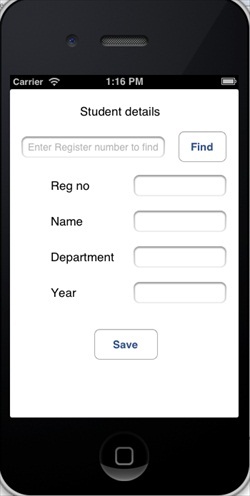
Now when we run the application, we will get the following output, where we can add and find student details