MongoDB provides a 64-bit installation package on the OSX platform, which you can download from the official website.
Download address: https://www.mongodb.com/download-center#community
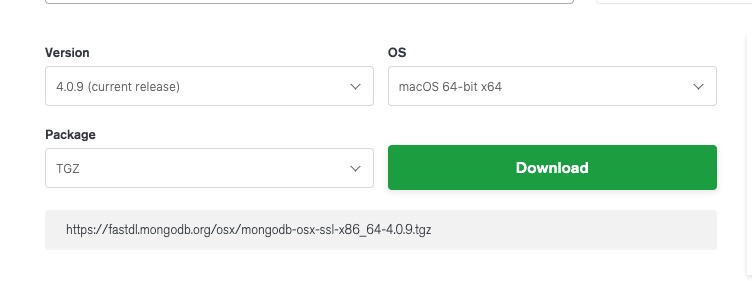
Starting with MongoDB 3.0, only OS X 10.7 (Lion) and newer systems are supported.
Next we use the curl command to download the installation:
# 进入 /usr/local
cd /usr/local

# 下载
sudo curl -O https://fastdl.mongodb.org/osx/mongodb-osx-ssl-x86_64-4.0.9.tgz

# 解压
sudo tar -zxvf mongodb-osx-ssl-x86_64-4.0.9.tgz

# 重命名为 mongodb 目录

sudo mv mongodb-osx-x86_64-4.0.9/ mongodb
After the installation is complete, we can add the MongoDB binary command file directory (installation directory / bin) to the PATH path:
export PATH=/usr/local/mongodb/bin:$PATH
Create a directory for logs and data storage:
Data storage path:
sudo mkdir -p /usr/local/var/mongodb
Log file path:
sudo mkdir -p /usr/local/var/log/mongodb
Next, make sure that the current user has read and write permissions to the above two directories:
sudo chown runoob /usr/local/var/mongodb
sudo chown runoob /usr/local/var/log/mongodb
Above runoob It is a user on my computer. You need to modify it according to your current user name.
Next, let’s start mongodb in the background using the following command:
mongod --dbpath /usr/local/var/mongodb --logpath /usr/local/var/log/mongodb/mongo.log --fork
–dbpath Set up the data storage directory
–logpath Set the log storage directory
–fork Run in the background
If you do not want to run on the backend, but view the running process on the console, you can directly set up the configuration file to start:
mongod --config /usr/local/etc/mongod.conf
Check to see if the mongod service starts:
ps aux | grep -v grep | grep mongod
Using the above command, if you see a record of mongod, the operation is successful.
After startup, we can use the
mongo
Command to open a terminal:
$ cd /usr/local/mongodb/bin
$ ./mongo
MongoDB shell version v4.0.9
connecting to: mongodb://127.0.0.1:27017/?gssapiServiceName=mongodb
Implicit session: session { "id" : UUID("3c12bf4f-695c-48b2-b160-8420110ccdcf") }
MongoDB server version: 4.0.9
……
> 1 + 1
2
>
3.6.1. Install using brew 
You can also use OSX’s brew to install mongodb:
brew tap mongodb/brew
brew install mongodb-community@4.4
After the @ symbol 4.4 It’s the latest version number.
Installation information:
Configuration file: /usr/local/etc/mongod.conf
Log file path: /usr/local/var/log/mongodb
Data storage path: /usr/local/var/mongodb
Run MongoDB 
We can use the brew command or the mongod command to start the service.
Brew launch:
brew services start mongodb-community@4.4
Brew stop:
brew services stop mongodb-community@4.4
Mongod command background process method:
mongod --config /usr/local/etc/mongod.conf --fork
To enable and shut down in this way, you can enter the mongo shell console to achieve:
> db.adminCommand({ "shutdown" : 1 })