9.36.1. Brief introduction 
IOS maps help us locate locations, and IOS maps use the MapKit framework.
9.36.2. Instance step 
1.创建一个简单的 View based application
two。 Select the project file, then select the target, and then add MapKit.framework.
3.添加 Corelocation.framework
4.向 ViewController.xib 添加地图查看和创建 ibOutlet 并且命名为mapView。
5.通过”File-> New -> File… -> “选择 Objective C class创建一个新的文件,单击下一步
6.”sub class of”为 NSObject,类作命名为MapAnnotation
7.选择创建
8.更新MapAnnotation.h ,如下所示
#import <Foundation/Foundation.h>
#import <MapKit/MapKit.h>

@interface MapAnnotation : NSObject<MKAnnotation>
@property (nonatomic, strong) NSString *title;
@property (nonatomic, readwrite) CLLocationCoordinate2D coordinate;

- (id)initWithTitle:(NSString *)title andCoordinate:
  (CLLocationCoordinate2D)coordinate2d;

@end
9.更新MapAnnotation.m ,如下所示
#import "MapAnnotation.h"

@implementation MapAnnotation
-(id)initWithTitle:(NSString *)title andCoordinate:
 (CLLocationCoordinate2D)coordinate2d{
    self.title = title;
    self.coordinate =coordinate2d;
    return self;
}
@end
10.更新ViewController.h ,如下所示
#import <UIKit/UIKit.h>
#import <MapKit/MapKit.h>
#import <CoreLocation/CoreLocation.h>
@interface ViewController : UIViewController<MKMapViewDelegate>
{
    MKMapView *mapView;
}
@end
11.更新ViewController.m ,如下所示
#import "ViewController.h"
#import "MapAnnotation.h"

@interface ViewController ()

@end

@implementation ViewController

- (void)viewDidLoad
{
   [super viewDidLoad];
   mapView = [[MKMapView alloc]initWithFrame:
   CGRectMake(10, 100, 300, 300)];
   mapView.delegate = self;
   mapView.centerCoordinate = CLLocationCoordinate2DMake(37.32, -122.03);
   mapView.mapType = MKMapTypeHybrid;
   CLLocationCoordinate2D location;
   location.latitude = (double) 37.332768;
   location.longitude = (double) -122.030039;
   // Add the annotation to our map view
   MapAnnotation *newAnnotation = [[MapAnnotation alloc]
   initWithTitle:@"Apple Head quaters" andCoordinate:location];
   [mapView addAnnotation:newAnnotation];
   CLLocationCoordinate2D location2;
   location2.latitude = (double) 37.35239;
   location2.longitude = (double) -122.025919;
   MapAnnotation *newAnnotation2 = [[MapAnnotation alloc]
   initWithTitle:@"Test annotation" andCoordinate:location2];
   [mapView addAnnotation:newAnnotation2];
   [self.view addSubview:mapView];
}
// When a map annotation point is added, zoom to it (1500 range)
- (void)mapView:(MKMapView *)mv didAddAnnotationViews:(NSArray *)views
{
   MKAnnotationView *annotationView = [views objectAtIndex:0];
   id <MKAnnotation> mp = [annotationView annotation];
   MKCoordinateRegion region = MKCoordinateRegionMakeWithDistance
   ([mp coordinate], 1500, 1500);
   [mv setRegion:region animated:YES];
   [mv selectAnnotation:mp animated:YES];
}

- (void)didReceiveMemoryWarning
{
    [super didReceiveMemoryWarning];
    // Dispose of any resources that can be recreated.
}

@end
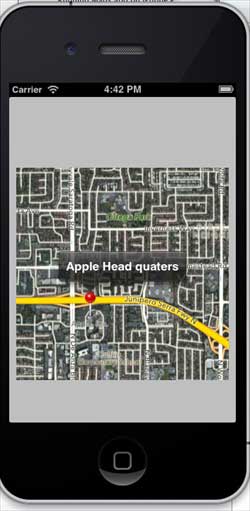
9.36.3. Output 
When you run the application, the output is as follows
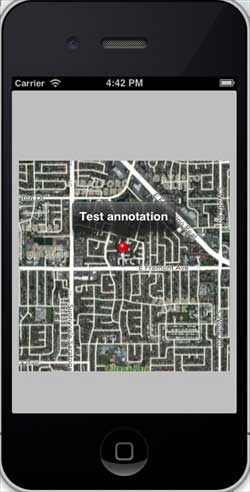
When we scroll up the map, the output is as follows