Fragments are part of the activity, which makes the activity more modular. We can think of debris as a seed activity.
Here are some important points of knowledge about fragments:
Fragments have their own layout, their own behavior and their own lifecycle callback.
When the activity is running, you can add or remove fragments in the activity.
You can merge multiple fragments into a single activity to build a multi-column UI.
Fragments can be used in multiple activities.
The life cycle of a fragment is closely related to its host activity. This means that the activity is suspended and all fragments in the activity are stopped.
Fragments can implement behavior without user interface components.
Fragments are added to Android API in Android API version 11.
通过继承
Fragment
类来创建碎片。可以通过使用 元素在活动的布局文件中声明碎片来在你的活动中插入碎片。
Before the introduction of fragmentation, we had a limitation because only a single activity could be displayed on the screen at a given point in time. We cannot split the device screen and control different parts independently. With the introduction of fragments, we have gained more flexibility and made it possible to remove the restriction of a single activity on the screen at a point in time. Now we can have a single activity, but each activity is assembled by multiple fragments, each with its own layout, events, and complete life cycle.
The following is a typical example of how to combine two UI modules defined by fragments in activities designed for tablets and separate in activities designed for handheld devices.

当运行在在平板尺寸的设备上,这个应用程序可以在活动A中嵌入两个碎片。在手机设备屏幕上, 由于没有足够的空间,活动A仅包含有文章列表的碎片, 当用户点击文章时,启动包含第二个碎片的活动B来阅读文章。 Fragments of Android have their own lifecycle, similar to the activities of Android. The following is a brief introduction to the different stages of its life cycle. 这是在类 Here are the simple steps for creating fragments. First decide how many fragments you need to use in the activity. For example, we need to use two fragments to deal with the horizontal and vertical modes of the device. 下一步,基于碎片数量,创建继承自类 For each fragment, you need to create a layout in the XML file. These files contain the layout of the defined fragments. Finally, the activity file is modified based on the requirements to define the actual fragment replacement logic. The basic fragments can be divided into three types as follows: 单帧碎片: 单帧碎片被如移动电话之类的手持设备使用。一个碎片如同一个视频一样显示。 列表碎片: 包含有特殊列表视图的碎片被叫做列表碎片。 碎片过渡: 与碎片事务一起使用。可以从一个碎片移动到另外一个碎片。 3.14.1. The life cycle of the fragment 
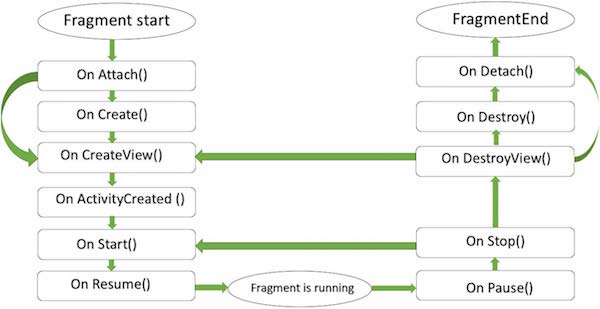
fragment
中你可以重写的方法列表:
onAttach()
: 碎片实例被关联到活动实例。碎片和活动还没有完全初始化。通常, 你在该方法中获取到活动的引用,在碎片将来的初始化工作中被使用。
onCreate()
: 当创建碎片时,系统调用该方法。你需要初始化一些碎片的必要组件。 这些组件是当碎片被暂停、停止时需要保留的,以便被恢复。
onCreateView()
: 当碎片将要第一次绘制它的用户界面时系统调用该方法。为了绘制碎片的UI, 你需要从该方法中返回一个代表碎片根布局的View组件。如果该碎片不提供用户界面,直接返回
null
。
onActivityCreated
: 当宿主活动被创建,在
onCreateView()
方法之后调用该方法。 活动和碎片实例与活动的视图层级被创建。这时,视图可以通过
findViewById()
方法来访问。 在这个方法中,你可以实例化需要
Context
对象的对象。
onStart()
: 碎片可见时调用该方法。
onResume()
: 碎片可交互时调用该方法。
onPause()
: 当首次表明用户将要离开碎片时系统调用该方法。通常,这里你需要提交任何的会超出用户会话的持久化的变化。
onStop()
: 碎片将要被停止时调用。
onDestroyView()
: 调用该方法后,碎片将要被销毁。
onDestroy()
: 该方法被用来清理碎片的状态。但在Android平台并不保证一定被调用。 3.14.2. How do I use fragments? 
Fragment
的类。类
Fragment
包含上面提到的回调函数。 根据你的需求重写任意的方法。 3.14.3. Fragment type 