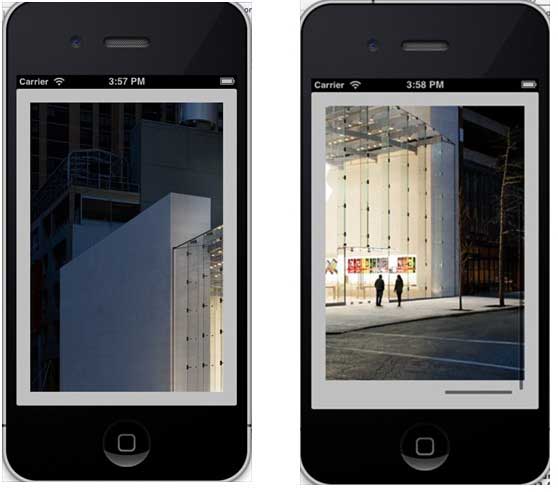
If the content exceeds the size of the screen, the scrolling view is used to show the hidden part.
It can contain all other user interface elements such as image views, tags, text views, or even another scrolling view. ContentSize ContentInset ContentOffset Delegate In ViewController.h, add a scroll view and declare a scroll view to make the class conform to the delegate agreement, as shown below: Add a custom method addScrollView 注意: 我们必须添加一个命名为”AppleUSA1.jpg”到我们的项目,可以通过将图像拖到我们导航区域,其中列出了我们的项目文件所做的图像。图像应高于设备的高度。 Now when we run the application, we will see the following output. Once you scroll the view, you will be able to view the rest of the image: 9.18.1. Important attribute 
An important method 
- (void)scrollRectToVisible:(CGRect)rect animated:(BOOL)animated
- (void)setContentOffset:(CGPoint)contentOffset animated:(BOOL)animated
9.18.2. An important delegation method 
#import <UIKit/UIKit.h>

@interface ViewController : UIViewController<UIScrollViewDelegate>
{
    UIScrollView *myScrollView;
}

@end
-(void)addScrollView{
    myScrollView = [[UIScrollView alloc]initWithFrame:
    CGRectMake(20, 20, 280, 420)];
    myScrollView.accessibilityActivationPoint = CGPointMake(100, 100);
    imgView = [[UIImageView alloc]initWithImage:
    [UIImage imageNamed:@"AppleUSA.jpg"]];
    [myScrollView addSubview:imgView];
    myScrollView.minimumZoomScale = 0.5;
    myScrollView.maximumZoomScale = 3;
    myScrollView.contentSize = CGSizeMake(imgView.frame.size.width,
    imgView.frame.size.height);
    myScrollView.delegate = self;
    [self.view addSubview:myScrollView];
}
Implementing scrollView delegation in ViewController.m 
 -(UIView *)viewForZoomingInScrollView:(UIScrollView *)scrollView{
    return imgView;
}
-(void)scrollViewDidEndDecelerating:(UIScrollView *)scrollView{
    NSLog(@"Did end decelerating");
}
-(void)scrollViewDidScroll:(UIScrollView *)scrollView{
//    NSLog(@"Did scroll");
}
-(void)scrollViewDidEndDragging:(UIScrollView *)scrollView
  willDecelerate:(BOOL)decelerate{
    NSLog(@"Did end dragging");
}
-(void)scrollViewWillBeginDecelerating:(UIScrollView *)scrollView{
    NSLog(@"Did begin decelerating");
}
-(void)scrollViewWillBeginDragging:(UIScrollView *)scrollView{
    NSLog(@"Did begin dragging");
}
Update viewDidLoad in ViewController.m, as shown below 
(void)viewDidLoad
{
   [super viewDidLoad];
   [self addScrollView];
   //Do any additional setup after loading the view, typically from a nib
}
9.18.3. Output