The following table contains a complete list of metacharacters and their behavior in the context of regular expressions:
Character | Description |
|---|---|
| 将下一个字符标记为一个特殊字符、或一个原义字符、或一个 向后引用、或一个八进制转义符。例如, |
| Matches the starting position of the input string. If the Multiline property of the RegExp object is set, ^ also matches the position after’n’or’r’. |
| Matches the end position of the input string. If the Multiline property of the RegExp object is set, $also matches the position before’n’or’r’. |
| 匹配前面的子表达式零次或多次。例如,zo* 能匹配 “z” 以及 “zoo”。* 等价于{0,}。 |
| Matches the previous subexpression one or more times. For example, ‘zo+’ can match “zo” and “zoo”, but not “z”. + is equivalent to {1,}. |
| Matches the previous subexpression zero or once. For example, “do (es)?” Can match “do” or “does”. ? It is equivalent to {0jue 1}. |
| N is a non-negative integer. Match the determined n times. For example,’o {2} ‘does not match the’ o’in ‘Bob’, but does match the two o in ‘food’. |
| N is a non-negative integer. Match at least n times. For example,’o {2,} ‘does not match’ o’in ‘Bob’, but does match all o in ‘foooood’. O {1,}’is equivalent to ‘oasis’. O {0,}’is equivalent to ‘oval’. |
| M and n are non-negative integers, where n < = m. There are at least n matches and a maximum of m matches. For example, “o {1pm 3}” will match the first three o in “fooooood”.’ O {0jue 1}’is equivalent to ‘oval’. Please note that there can be no spaces between commas and two numbers. |
| 当该字符紧跟在任何一个其他限制符 ( |
| 匹配除换行符(n、r)之外的任何单个字符。要匹配包括 ‘n’ 在内的任何字符,请使用像”(.|n)”的模式。 |
| Match pattern and get the match. The obtained match can be obtained from the resulting Matches collection, which uses the SubMatches collection in VBScript and $0 in JScript. $9 attribute. To match parenthesis characters, use’(‘or’)’. |
| Matches the pattern but does not get the match result, which means that it is a non-acquisition match and is not stored for later use. This is useful when using the “or” character (|) to combine parts of a pattern. For example, ‘industr (?: y | ies) is a simpler expression than’ industry | industries’. |
| Positive look ahead positive assert, matching the lookup string at the beginning of any string that matches the pattern. This is a non-acquisition match, that is, the match does not need to be fetched for later use. For example, “Windows (? = 95” |98| NT | 2000) “can match” Windows “in” Windows2000 “, but not” Windows “in” Windows3.1 “. Pre-checking does not consume characters, that is, after a match occurs, the next match starts immediately after the last match, rather than after containing the pre-checked characters. |
| Forward negative precheck (negative assert) matches the lookup string at the beginning of any string that does not match the pattern. This is a non-acquisition match, that is, the match does not need to be fetched for later use. For example, “Windows (?! 95” |98| NT | 2000) “can match” Windows “in” Windows3.1 “, but not” Windows “in” Windows2000 “. Pre-checking does not consume characters, that is, after a match occurs, the next match starts immediately after the last match, rather than after containing the pre-checked characters. |
| Look behind positive pre-check is similar to positive positive pre-check, but in the opposite direction. For example, “(? < = 95 |98| NT | 2000) Windows “can match” Windows “in” 2000Windows “, but not” Windows “in” 3.1Windows “. |
| Reverse negative pre-examination is similar to positive negative pre-examination, but in the opposite direction. For example, “(? <! 95” |98| NT | 2000) Windows “can match” Windows “in” 3.1Windows “, but not” Windows “in” 2000Windows “. |
| Match x or y. For example,’z | food’ can match’z’or ‘food’. (Z | f) ood’ matches “zood” or “food”. |
| A collection of characters. Matches any of the characters contained. For example,’ [abc] ‘can match the’a’in ‘plain’. |
| A collection of negative characters. Matches any characters that are not included. For example,’ [^abc] ‘can match’p’,’l’,’i’,’n’ in “plain”. |
| Character range. Matches any character within the specified range. For example,’ [a-z] ‘can match any lowercase character in the range’a’to’z’. |
| Range of negative characters. Matches any character that is not within the specified range. For example,’ [^a-z] ‘can match any character that is not in the range of’a’to’z’. |
| Match a word boundary, that is, the position between the word and the space. For example,’erb ‘can match’ er’,’in ‘never’ but not ‘er’’ in ‘verb’. |
| Matches non-word boundaries.’ ErB’ can match ‘er’,’ in ‘verb’ but not ‘er’’ in ‘never’. |
| Matches the control characters indicated by x. For example,cM matches a Control-M or carriage return. The value of x must be one of Amurz or aMuz. Otherwise, c is treated as a literal’c ‘character. |
| Matches a numeric character. Equivalent to [0-9] . |
| Matches a non-numeric character. Equivalent to [^0-9] . |
| Matches a feed character. Equivalent tox0c andcL. |
| Matches a newline character. Equivalent tox0a andcJ. |
| Matches a carriage return. Equivalent tox0d andcM. |
| 匹配任何空白字符,包括空格、制表符、换页符等等。等价于 [ fnrtv]。 |
| 匹配任何非空白字符。等价于 [^ fnrtv]。 |
| Matches a tab. Equivalent tox09 andcI. |
| Matches a vertical tab. Equivalent tox0b andcK. |
| Match letters, numbers, underscores. Equivalent to |
| Matches non-letters, numbers, and underscores. Equivalent to |
| Matches n, where n is the hexadecimal escape value. The hexadecimal escape value must be a determined two-digit length. For example,’x41 ‘matches “A”.’ x041’ is equivalent to’x04’ & “1”. ASCII encoding can be used in regular expressions. |
| Matches num, where num is a positive integer. A reference to the obtained match. For example,’(.)1’ matches two consecutive identical characters. |
| Identifies an octal escape value or a backward reference. If there are at least n previous acquired subexpressions, n is a backward reference. Otherwise, if n is an octal number (0-7), n is an octal escape value. |
| Identifies an octal escape value or a backward reference. If there are at least nm acquired subexpressions beforenm, nm is a backward reference. If there are at least n fetches beforenm, n is a backward reference followed by the text m. If none of the previous conditions are met, if both n and m are octal numbers (0-7),nm will match the octal escape value nm. |
| If n is an octal number (0-3) and m and l are both octal numbers (0-7), the octal escape value nml is matched. |
| Matches n, where n is a Unicode character represented by four hexadecimal digits. For example,u00A9 matches the copyright symbol. |
13.3.1. Example 
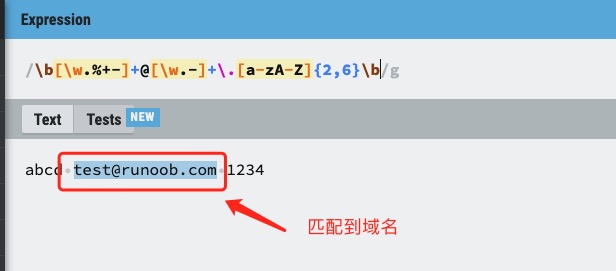
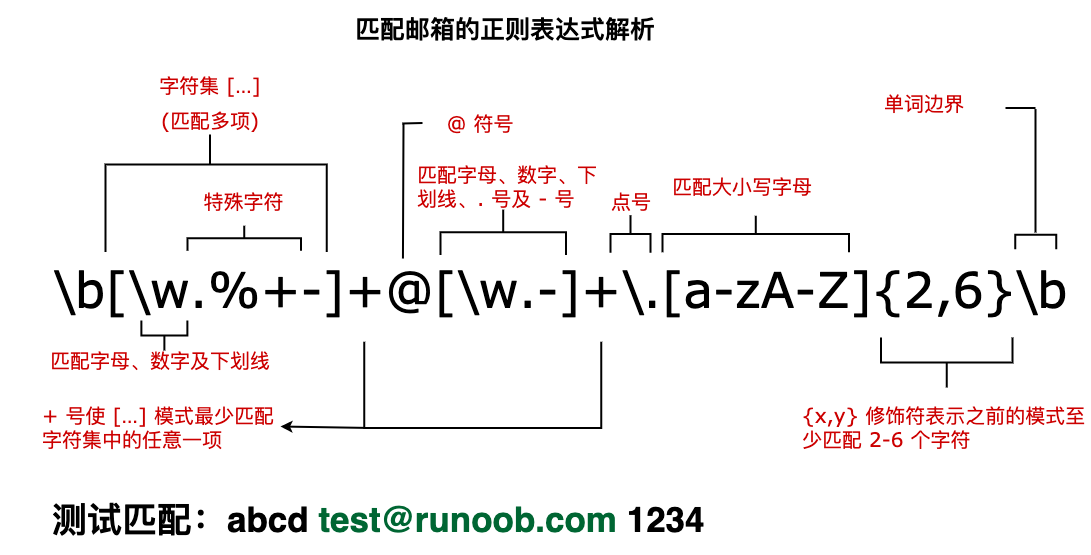
Next, we analyze a regular expression that matches the mailbox, as shown in the following figure: The text of the following tag is the obtained matching expression:Example 
varstr="abcd test@runoob.com 1234";varpatt1=
/\\b[\\w.%+-]+@[\\w.-]+\.[a-zA-Z]{2,6}\\b/g;document.write(str.match(patt1));
test@runoob.com