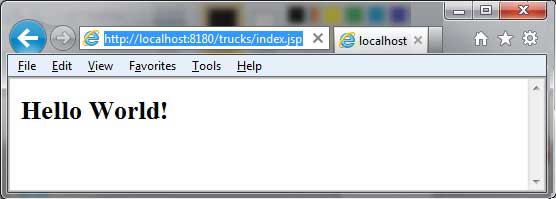
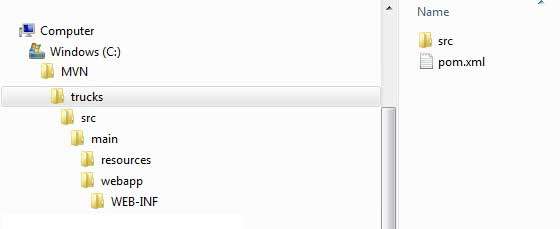
In this section we will learn how to use the version control system Maven to manage a web-based project and how to create, build, and deploy an already running web application. We can use the maven-archetype-webapp plug-in to create a simple Java web application. Open the command console, go to the C:MVN folder, and execute the following mvn command: After execution, Maven will start processing and create a complete directory structure for the Java Web project. After execution, we can see the trucks project under the C:/MVN folder and view the directory structure of the project: The Maven directory structure is standard, and the functions of each directory are shown in the following table: Folder structure Description Trucks Contains the src folder and the pom.xml file. Src/main/webapp Contains index.jsp files and WEB-INF folders. Src/main/webapp/WEB-INF Include web.xml files Src/main/resources Contains pictures and properties resource files. The pom.xml file code is as follows: Next, open the C:> MVN > trucks > src > main > webapp > folder, and you can see a created index.jsp file with the following code: Open the command console, change to the C:MVNtrucks directory, and execute the following mvn command: Maven will begin to build the project: Open the C:< MVN < trucks < target < folder, locate the trucks.war file, copy it to your web server’s web application directory, and restart the web server. Visit the following URL to run the web application: Verification results: 11.17.1. Create a Web application 
C:\MVN>mvn archetype:generate -DgroupId=com.companyname.automobile -DartifactId=trucks -DarchetypeArtifactId=maven-archetype-webapp -DinteractiveMode=false
[INFO] Scanning for projects...
[INFO] Searching repository for plugin with prefix: 'archetype'.
[INFO] -------------------------------------------------------------------
[INFO] Building Maven Default Project
[INFO]    task-segment: [archetype:generate] (aggregator-style)
[INFO] -------------------------------------------------------------------
[INFO] Preparing archetype:generate
[INFO] No goals needed for project - skipping
[INFO] [archetype:generate {execution: default-cli}]
[INFO] Generating project in Batch mode
[INFO] --------------------------------------------------------------------
[INFO] Using following parameters for creating project
from Old (1.x) Archetype: maven-archetype-webapp:1.0
[INFO] --------------------------------------------------------------------
[INFO] Parameter: groupId, Value: com.companyname.automobile
[INFO] Parameter: packageName, Value: com.companyname.automobile
[INFO] Parameter: package, Value: com.companyname.automobile
[INFO] Parameter: artifactId, Value: trucks
[INFO] Parameter: basedir, Value: C:\MVN
[INFO] Parameter: version, Value: 1.0-SNAPSHOT
[INFO] project created from Old (1.x) Archetype in dir: C:\MVN\trucks
[INFO] -------------------------------------------------------------------
[INFO] BUILD SUCCESSFUL
[INFO] -------------------------------------------------------------------
[INFO] Total time: 16 seconds
[INFO] Finished at: Tue Jul 17 11:00:00 IST 2012
[INFO] Final Memory: 20M/89M
[INFO] -------------------------------------------------------------------
<projectxmlns="http://maven.apache.org/POM/4.0.0"xmlns:xsi="http://www.w3.org/2001/XMLSchema-instance"xsi:schemaLocation="http://maven.apache.org/POM/4.0.0
http://maven.apache.org/maven-v4_0_0.xsd"><modelVersion>4.0.0</modelVersion><groupId>com.companyname.automobile</groupId><artifactId>trucks</artifactId><packaging>war</packaging><version>1.0-SNAPSHOT</version><name>trucks
Maven
Webapp</name><url>http://maven.apache.org</url><dependencies><dependency><groupId>junit</groupId><artifactId>junit</artifactId><version>3.8.1</version><scope>test</scope></dependency></dependencies><build><finalName>trucks</finalName></build></project>
<html><body><h2>Hello World!</h2></body></html>
11.17.2. Build Web application 
C:\MVN\trucks>mvn clean package
[INFO] Scanning for projects...
[INFO] -------------------------------------------------------------------
[INFO] Building trucks Maven Webapp
[INFO]    task-segment: [clean, package]
[INFO] -------------------------------------------------------------------
[INFO] [clean:clean {execution: default-clean}]
[INFO] [resources:resources {execution: default-resources}]
[WARNING] Using platform encoding (Cp1252 actually) to
copy filtered resources,i.e. build is platform dependent!
[INFO] Copying 0 resource
[INFO] [compiler:compile {execution: default-compile}]
[INFO] No sources to compile
[INFO] [resources:testResources {execution: default-testResources}]
[WARNING] Using platform encoding (Cp1252 actually) to
copy filtered resources,i.e. build is platform dependent!
[INFO] skip non existing resourceDirectory
C:\MVN\trucks\src\test\resources
[INFO] [compiler:testCompile {execution: default-testCompile}]
[INFO] No sources to compile
[INFO] [surefire:test {execution: default-test}]
[INFO] No tests to run.
[INFO] [war:war {execution: default-war}]
[INFO] Packaging webapp
[INFO] Assembling webapp[trucks] in [C:\MVN\trucks\target\trucks]
[INFO] Processing war project
[INFO] Copying webapp resources[C:\MVN\trucks\src\main\webapp]
[INFO] Webapp assembled in[77 msecs]
[INFO] Building war: C:\MVN\trucks\target\trucks.war
[INFO] -------------------------------------------------------------------
[INFO] BUILD SUCCESSFUL
[INFO] -------------------------------------------------------------------
[INFO] Total time: 3 seconds
[INFO] Finished at: Tue Jul 17 11:22:45 IST 2012
[INFO] Final Memory: 11M/85M
[INFO] -------------------------------------------------------------------
11.17.3. Deploy Web applications 
11.17.4. Test the Web application 
http://:/trucks/index.jsp