The front-end controller pattern (Front Controller Pattern) is used to provide a centralized request processing mechanism, and all requests will be processed by a single handler. The handler can do authentication / authorization / log, or track the request and then pass the request to the appropriate handler. The following are the entities of this design pattern.
前端控制器(Front Controller) -A single handler that handles all types of requests from an application, either web-based or desktop-based.
调度器(Dispatcher) -the front-end controller may use a scheduler object to schedule requests to the corresponding specific handler.
视图(View) -views are objects created for requests.
6.32.1. Realize 
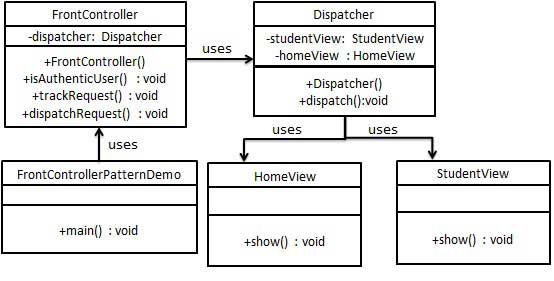
We will create FrontController 、 Dispatcher As a front-end controller and a scheduler, respectively. HomeView And StudentView Represents various views created for requests received by the front-end controller.
FrontControllerPatternDemo Our demo class uses the FrontController To demonstrate the front-end controller design pattern.
6.32.2. Step 1 
Create a view.HomeView.java 
publicclassHomeView{publicvoidshow(){System.out.println("Displaying Home
Page");}}
StudentView.java 
publicclassStudentView{publicvoidshow(){System.out.println("Displaying
Student Page");}}
6.32.3. Step 2 
Create a scheduler Dispatcher.Dispatcher.java 
publicclassDispatcher{privateStudentViewstudentView;privateHomeViewhomeView;publicDispatcher(){studentView=newStudentView();homeView=newHomeView();}publicvoiddispatch(Stringrequest){if(request.equalsIgnoreCase("STUDENT")){studentView.show();}else{homeView.show();}}}
6.32.4. Step 3 
Create the front controller FrontController.FrontController.java 
publicclassFrontController{privateDispatcherdispatcher;publicFrontController(){dispatcher=newDispatcher();}privatebooleanisAuthenticUser(){System.out.println("User
is authenticated
successfully.");returntrue;}privatevoidtrackRequest(Stringrequest){System.out.println("Page
requested:"+request);}publicvoiddispatchRequest(Stringrequest){//记录每一个请求trackRequest(request);//对用户进行身份验证if(isAuthenticUser()){dispatcher.dispatch(request);}}}
6.32.5. Step 4 
Use FrontController To demonstrate the front-end controller design pattern.FrontControllerPatternDemo.java 
publicclassFrontControllerPatternDemo{publicstaticvoidmain(String[]args){FrontControllerfrontController=newFrontController();frontController.dispatchRequest("HOME");frontController.dispatchRequest("STUDENT");}}
6.32.6. Step 5 
Execute the program and output the result:
Page requested: HOME
User is authenticated successfully.
Displaying Home Page
Page requested: STUDENT
User is authenticated successfully.
Displaying Student Page