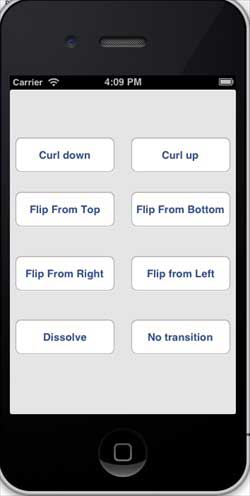
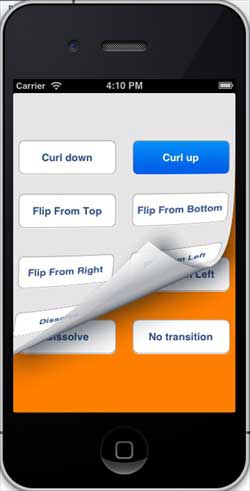
View switching is achieved through a series of animation effects, including folding switching, explosion switching, card switching, and so on. The operation of creating a button in xib Declare instances of the two views in the ViewController class. The ViewController.h file code is as follows: We will add a custom method setUpView to initialize the view. We will also create another method, doTransitionWithType: implement view1 to switch to view2, and vice versa. Later, we will perform the method of the operation created earlier, that is, call the doTransitionWithType: method and switch types. The ViewController.m code is as follows: Now when we run the application, we will see the following output You can select different buttons to see how the switch works. Select the curl switch and the effect is as follows 9.22.1. Modify the ViewController.xib as follows 
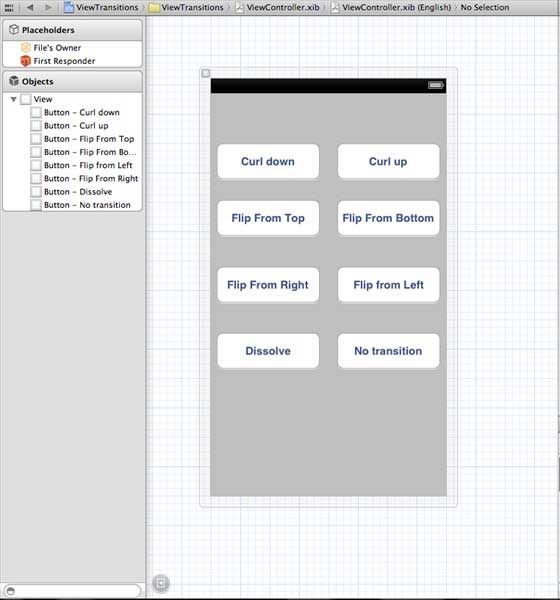
Modify ViewController.h 
#import <UIKit/UIKit.h>

@interface ViewController : UIViewController
{
    UIView *view1;
    UIView *view2;
}

-(IBAction)flipFromLeft:(id)sender;
-(IBAction)flipFromRight:(id)sender;
-(IBAction)flipFromTop:(id)sender;
-(IBAction)flipFromBottom:(id)sender;
-(IBAction)curlUp:(id)sender;
-(IBAction)curlDown:(id)sender;
-(IBAction)dissolve:(id)sender;
-(IBAction)noTransition:(id)sender;

@end
9.22.2. Modify ViewController.m 
#import "ViewController.h"

@interface ViewController ()

@end

@implementation ViewController

- (void)viewDidLoad
{
    [super viewDidLoad];
    [self setUpView];
    // Do any additional setup after loading the view, typically from a nib.
}

-(void)setUpView{
    view1 = [[UIView alloc]initWithFrame:self.view.frame];
    view1.backgroundColor = [UIColor lightTextColor];
    view2 = [[UIView alloc]initWithFrame:self.view.frame];
    view2.backgroundColor = [UIColor orangeColor];
    [self.view addSubview:view1];
    [self.view sendSubviewToBack:view1];

}

-(void)doTransitionWithType:(UIViewAnimationTransition)animationTransitionType{
    if ([[self.view subviews] containsObject:view2 ]) {
        [UIView transitionFromView:view2
                            toView:view1
                          duration:2
                           options:animationTransitionType
                        completion:^(BOOL finished){
                            [view2 removeFromSuperview];
                        }];
        [self.view addSubview:view1];
        [self.view sendSubviewToBack:view1];
    }
    else{

        [UIView transitionFromView:view1
                            toView:view2
                          duration:2
                           options:animationTransitionType
                        completion:^(BOOL finished){
                            [view1 removeFromSuperview];
                        }];
        [self.view addSubview:view2];
        [self.view sendSubviewToBack:view2];

    }
}


-(IBAction)flipFromLeft:(id)sender
{
    [self doTransitionWithType:UIViewAnimationOptionTransitionFlipFromLeft];

}
-(IBAction)flipFromRight:(id)sender{
    [self doTransitionWithType:UIViewAnimationOptionTransitionFlipFromRight];

}
-(IBAction)flipFromTop:(id)sender{
    [self doTransitionWithType:UIViewAnimationOptionTransitionFlipFromTop];

}
-(IBAction)flipFromBottom:(id)sender{
    [self doTransitionWithType:UIViewAnimationOptionTransitionFlipFromBottom];

}
-(IBAction)curlUp:(id)sender{
    [self doTransitionWithType:UIViewAnimationOptionTransitionCurlUp];

}
-(IBAction)curlDown:(id)sender{
    [self doTransitionWithType:UIViewAnimationOptionTransitionCurlDown];

}
-(IBAction)dissolve:(id)sender{
    [self doTransitionWithType:UIViewAnimationOptionTransitionCrossDissolve];

}
-(IBAction)noTransition:(id)sender{
    [self doTransitionWithType:UIViewAnimationOptionTransitionNone];

}

- (void)didReceiveMemoryWarning
{
    [super didReceiveMemoryWarning];
    // Dispose of any resources that can be recreated.
}

@end
9.22.3. Output