WebGIS application adds GIS functions to Web applications and is an extension of Web applications.
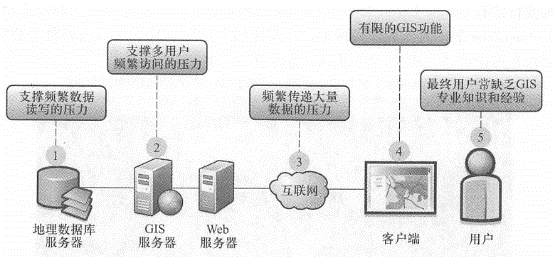
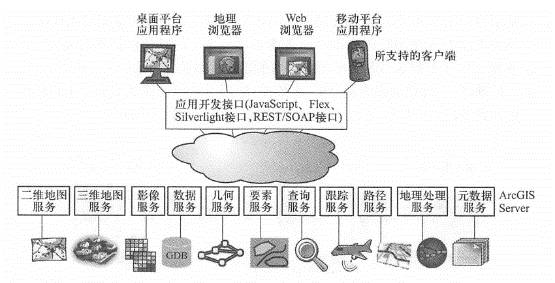
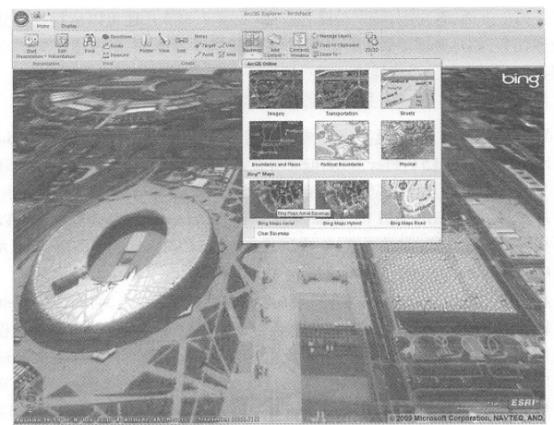
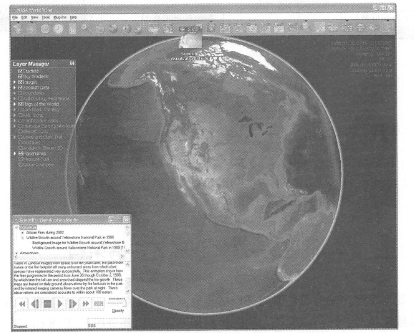
The basic architecture of WebGIS is shown in Figure 2.3. Similar to Web applications, the basic workflow of WebGIS is that users use a Web client (which can be a Web browser, mobile client or desktop application) to send HTTP requests to a Web server; The Web server forwards requests about GIS functions to the GIS server. The GIS server reads the required data from the GIS database and processes the request accordingly, such as generating maps, performing queries or related analysis, and returning the data, maps, or other operation results to the client for display through an HTTP response. The basic components of WebGIS are introduced one by one. Fig. 14 Basic architecture of WebGIS and request/reply process between client and server # WebGIS server is the most important part of WebGIS architecture. The ability and quality of a WebGIS application largely depend on the WebGIS server it uses. Its functions, degree of customization, scalability and performance are important factors related to the success of a WebGIS application. Since the emergence of WebGIS, the development of WebGIS server technology has undergone many iterative changes. Taking Esri products as an example, the first generation of WebGIS server products, ArcView IMS(Internet Map Server) and MapObjects IMS, were released in 1996, marking the beginning of GIS software products to march into the Web platform; the second generation product was ArcIMS released in 1998, which mainly enhanced and expanded the first generation server in terms of performance and functions; the third generation product was ArcGIS Server released in 2004, which provides a relatively complete series of functions (Figure 2.4). Taking ArcGIS Server as an example, a modern and complete WebGIS Server roughly provides the following series of functions: Using the Internet as the media, publish two-dimensional and three-dimensional map browsing, map query, retrieval, element editing, data extraction, tracking, address and location query, path analysis, geometric processing (such as coordinate system transformation), metadata retrieval and geographical processing functions; Publish its functions as a Web service and support mainstream REST interfaces (see Chapter 3); Provide (^^^13,’?^ 3,’^^’3Jia, 0!^ and 1^See Chapter 3), which supports interoperability between products from different manufacturers at the Web services level; Use caching, optimization, cloud computing and other methods to improve system efficiency, with fast performance and strong scalability; Highly customizable, providing server-side development interfaces, browser-side development interfaces, and desktop and mobile platform program development interfaces to support the development of rich Internet applications. Fig. 15 WebGIS server functional system (taking ArcGIS Server as an example) # A geographical database is a collection of data about the characteristics of certain geographical elements in a certain area. It can store different types of geographical data, such as vector data (such as points, lines, and polygons) and raster data (satellite and aerial images); some dedicated GIS databases also support the storage of data types such as CAD, 3D, transportation networks, GPS coordinates, triangulation, and LiDAR (light detection and ranging (LiDAR). GIS database software includes small databases that are only used by a small number of users, or it can be as large as an enterprise-level database that allows a large number of users to read and write simultaneously. Geographical databases are the basic support of WebGIS applications, and the value of a WebGIS application often depends on the quality of its data. GIS database products can generally provide the following functions: Ability to store multiple types of spatial data in a centralized or distributed manner; Support complex relationships and constraint rules between spatial data; Support the definition of geographical relationship models (such as topology, road networks); Ensure the consistency and integrity of spatial data; Support multi-user access and online editing environment, and provide version management mechanism; Provide reliable data security, backup, recovery and transaction rollback mechanisms; High system performance can be maintained even with increased data and increased users. The client plays two roles in WebGIS applications: on the one hand, it represents the final user interface of the entire system and is responsible for interacting with users, such as collecting user input, sending requests to the server, and displaying results to the user. Most end users do not understand or need to understand the specific implementation details of the backend server. They only evaluate the speed, stability and friendliness of a system based on the client experience. On the other hand, clients, especially fat clients (see Section 2.3), can also run some analysis and other processing tasks, such as dynamically classifying geographical features to make thematic maps, clustering excessively dense points, and interpolating point-point information to generate heat maps. Currently, WebGIS clients mainly include the following types. Web browser client: This type of client runs in a Web browser. In recent years, technologies such as Java-Script(and HTML5), Flex, and SilVerlight have been able to create rich, dynamic, friendly and attractive Internet application interfaces (see Section 2. 4. Section 2). Coupled with some GIS application programming interfaces, such as the ArcGIS APIs for JavaScript, Flex, and Silverlight, Web browsers can perform a variety of GIS functions (see Chapter 4). Typical representatives include ArcGIS.com’s map browser, Arc-GIS Explorer Online and Google Maps. Desktop application clients: These clients run directly on the operating system, not in the Web browser, and are therefore not limited by the browser’s “sandbox” environment (a strictly controlled safe operating environment set up for JavaScript and plug-ins in the browser). Desktop clients can easily access local resources such as local files, databases and peripherals, making them particularly suitable for resource-intensive Web applications. Typical representatives include Google Earth and ArcGIS Explorer Desktop (Figure 2. 5)and ArcGIS Desktop, etc. For professional users of WebGIS, the functions of browser clients are sometimes not strong enough, so using desktop clients is a good choice. For example, ArcGIS Desktop can flexibly use multiple map and analysis services on the Internet or cloud centers, and can be combined with local data to provide complex analysis operations that cannot be completed by multiple browser clients. Mobile clients: Currently, WebGIS mobile clients are becoming increasingly popular. They can be roughly divided into two categories: one is based on mobile browsers; the other is based on native applications (or embedded programs)(see Chapter 5). Typical representatives of such clients include the smartphone version of ArcGIS(Figure 2. 6)and Google Earth Mobile. Clients of WebGIS applications are often developed for a specific application and are not universal, but some clients are more universal. WebGIS clients that can display and invoke standardized Web services and data are called GeobroWSers. typical examples include Carbon Project Gaia is a two-dimensional geographical browser that can serve as a client for a series of geographical Web resources, such as OGC WMS, WMTS, WCS, WFS, KML, GML, Microsoft Bing Maps, Yahoo Maps, and OpenStreetMap; Standard data and services such as GeoRSS and ArcGIS Server services. Virtual globe is a popular WebGIS client. Virtual Earth is a three-dimensional software model of the earth or other world (Butler, 2006; Foresman, 2008). Virtual Earth allows users to change the viewing angle and position to observe a three-dimensional virtual environment. Many virtual globes obtain and display data and maps directly from the Web, so they are called online virtual globes. than Fig. 16 ArcGIS Explorer desktop is both a desktop WebGIS client, a geographic browser and virtual earth. It can use a range of map services, such as ArcGISOnline maps, Microsoft BingMaps, and OGC map services, and can integrate them with data on local computers. This picture uses ArcGISExplorer to display images of Microsoft Bing Maps near the Bird’s Nest and Water Cube in Beijing. (Thanks: Microsoft Corporation, NAVTEQ and AND Automotive Navigation Data) # Fig. 17 ArcGIS Mobile (left) and ArcGIS for iPhone (right) are examples of mobile WebGIS clients. (Thanks:Tele Atlas North America,Inc and Trimble) # More popular ones include Google Earth, ArcGIS Explorer Desk:top, and NASA World Wind(Figure 2. 7)and SkylineGlobe, etc. Most online virtual earths can superimpose and display multiple specifications of spatial information and services on the surface of the virtual earth, so most of them also belong to a geographical browser. Fig. 18 NASA WorldWind is the first widely used online virtual Earth (released in 2004). It can superimpose satellite images, aerial images, topographic maps and map services from other sources on the Internet from NASA and the U.S. Geological Survey. (Acknowledgements: NASA and U.S. Geological Survey) # 与传统桌面GIS相比,WebGIS应用系统面临着一些限制瓶颈(图2_ 8), mainly manifested in the following aspects: GIS servers need to support the pressure of multiple users to visit frequently; Geodatabases need to support the pressure of frequent data reading and writing; The Internet needs to support the pressure of frequently transmitting large amounts of data; Inadequate functionality of client-side (especially Web browsers) GIS; End users often lack GIS expertise and experience. Faced with the above challenges, a variety of solutions will be introduced in detail later in this book, including optimization of Web services such as pre-caching, algorithm and system optimization, Load Balancer, and efficient use of Internet bandwidth (see Section 3.5); division of work between servers and clients (see Section 2. Section 3); user experience design principles, etc.(see Section 2.4). Fig. 19 Compared with traditional desktop GIS running on a stand-alone basis, WebGIS faces some bottlenecks and pressures, which are important factors that need to be considered in WebGIS application development # 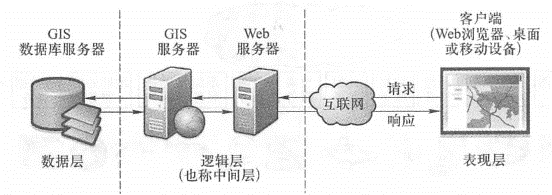
WebGIS server #
the geodatabase #
WebGIS client #

the challenges facing #