A text field is a user interface element that gets user input through an application.
A UITextfield is as follows:
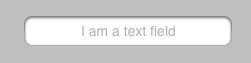
Properties of important text fields
Displays placeholders when there is no user input
Normal text
Automatic correction type
Keyboard Typ
Returns the key type
Clear button mode
Alignment mode
Entrust
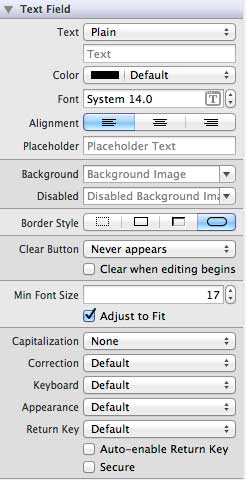
9.9.1. Update properties in xib 
You can change the text field properties of xib in the property viewer in Utility area (utility area, on the right side of the window).
9.9.2. Text field delegation 
We can set the delegate and connect it to the owner of the file by right-clicking in the UIElement interface generator, as shown below:
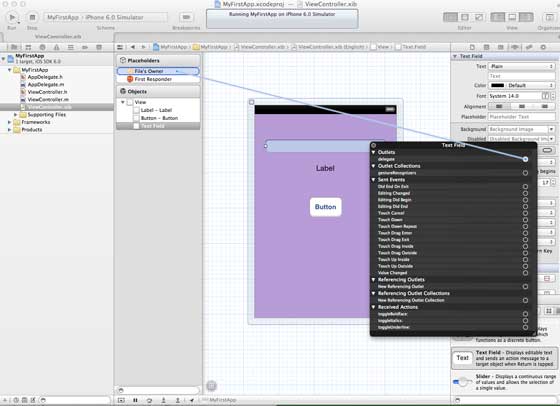
To use a delegate:
1.设置委托如上图所示
2.添加委托到您的响应类
3.执行文本字段代表,重要的文本字段代表如下:
4.正如其名称所暗示,上述两个委托分别叫做编辑的文本字段和结束编辑
For other delegates, please refer to the UITextDelegate Protocol reference manual.
9.9.3. Example 
Let’s use a simple example to create the UI element
The ViewController class will take UITextFieldDelegate and modify the ViewController.h file, as shown below:
Add the method addTextField to our ViewController.m file
Then call this method in the viewDidLoad method
在ViewController.m中更新viewDidLoad,如下所示
#import "ViewController.h"
@interface ViewController ()

@end

@implementation ViewController

- (void)viewDidLoad
{
    [super viewDidLoad];
    //The custom method to create our textfield is called
    [self addTextField];
    // Do any additional setup after loading the view, typically from a nib.
}

- (void)didReceiveMemoryWarning
{
    [super didReceiveMemoryWarning];
    // Dispose of any resources that can be recreated.
}

-(void)addTextField{
   // This allocates a label
   UILabel *prefixLabel = [[UILabel alloc]initWithFrame:CGRectZero];
   //This sets the label text
   prefixLabel.text =@"## ";
   // This sets the font for the label
   [prefixLabel setFont:[UIFont boldSystemFontOfSize:14]];
   // This fits the frame to size of the text
   [prefixLabel sizeToFit];

   // This allocates the textfield and sets its frame
   UITextField *textField = [[UITextField  alloc] initWithFrame:
   CGRectMake(20, 50, 280, 30)];

   // This sets the border style of the text field
   textField.borderStyle = UITextBorderStyleRoundedRect;
   textField.contentVerticalAlignment =
   UIControlContentVerticalAlignmentCenter;
   [textField setFont:[UIFont boldSystemFontOfSize:12]];

   //Placeholder text is displayed when no text is typed
   textField.placeholder = @"Simple Text field";

   //Prefix label is set as left view and the text starts after that
   textField.leftView = prefixLabel;

   //It set when the left prefixLabel to be displayed
   textField.leftViewMode = UITextFieldViewModeAlways;

   // Adds the textField to the view.
   [self.view addSubview:textField];

   // sets the delegate to the current class
   textField.delegate = self;
}

// pragma mark is used for easy access of code in Xcode
#pragma mark - TextField Delegates

// This method is called once we click inside the textField
-(void)textFieldDidBeginEditing:(UITextField *)textField{
   NSLog(@"Text field did begin editing");
}

// This method is called once we complete editing
-(void)textFieldDidEndEditing:(UITextField *)textField{
   NSLog(@"Text field ended editing");
}

// This method enables or disables the processing of return key
-(BOOL) textFieldShouldReturn:(UITextField *)textField{
    [textField resignFirstResponder];
    return YES;
}

- (void)viewDidUnload {
   label = nil;
   [super viewDidUnload];
}

@end
Run the application and you will see the following output
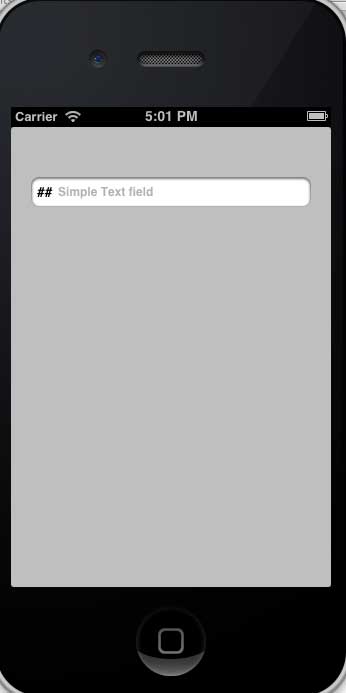
The method called by the delegate is based on the user action. To know, refer to the console output when calling the delegate.