React can be downloaded and used directly, and many learning examples are provided in the download package.
This tutorial uses version 16.4.0 of React. You can download the latest version on the official website https://reactjs.org/ .
You can also use Staticfile CDN’s React CDN library directly at the following address:
<scriptsrc="https://cdn.staticfile.org/react/16.4.0/umd/react.development.js">
</script><scriptsrc="https://cdn.staticfile.org/react-dom/16.4.0/umd/react-dom.development.js">
</script><!--Not recommended for use in production environments--><scriptsrc="https://cdn.staticfile.org/babel-standalone/6.26.0/babel.min.js"></script>
Official CDN address:
<scriptsrc="https://unpkg.com/react@16/umd/react.development.js"></script><scriptsrc="
https://unpkg.com/react-dom@16/umd/react-dom.development.js"></script><!--Not recommended for use in production environments-->
<scriptsrc="https://unpkg.com/babel-standalone@6.15.0/babel.min.js"></script>
Note: it is very inefficient to use Babel to compile JSX in a browser. The following example outputs Hello, world! Instance resolution: In the example, we introduced three libraries: The above code inserts an H1 title into the id= “example” node. Note: If we need to use JSX, then If your system doesn’t support it, We recommend using CommonJS module systems in React, such as Domestic use So that you can use the More information can be found at http://npm.taobao.org/ . Execute the following command to create the project: Open http://localhost:3000/ in the browser, and the result is as follows: The directory structure of the project is as follows: Try to modify After modification, open http://localhost:3000/ (usually automatically refresh), and the output is as follows: When the browser opens http://localhost:3000/ , it will output: 3.2.1. Use an example 
React instance 
<!DOCTYPEhtml><html><head><metacharset="UTF-8"/><title>Hello
React!</title><scriptsrc="https://cdn.staticfile.org/react/16.4.0/umd/react.development.js">
</script><scriptsrc="https://cdn.staticfile.org/react-dom/16.4.0/umd/react-dom.development.js">
</script><scriptsrc="https://cdn.staticfile.org/babel-standalone/6.26.0/babel.min.js"></script>
</head><body><divid="example"></div><scripttype="text/babel">ReactDOM.render(<h1>Hello,
world!</h1>, document.getElementById('example')
);</script></body></html>
react.development.min.js
、
react-dom.development.min.js
and
babel.min.js
:
react.min.js
-Core library of React
react-dom.min.js
-provide DOM-related functionality
babel.min.js
-Babel can convert ES6 code to ES5 code so that we can execute React code on currently unsupported ES6 browsers.
Babel
Embedded support for JSX. By setting the
Babel
and
babel-sublime
Package (package) used together can take the syntax rendering of source codeto a whole new level.ReactDOM.render(<h1>Hello,world!</h1>,document.getElementById('example'));
<script>
labelled
type
property needs to be set to
text/babel
. 3.2.2. Using React with npm 
Node.js
and NPM can refer to our
Node.js
tutorials.
browserify
or
webpack
this tutorial uses the
webpack
.
npm
the speed is very slow, you can use Taobao customized
cnpm
(gzip compression support) command-line tools replace the default
npm
:$ npm install -g cnpm --registry=https://registry.npmmirror.com
$ npm config set registry https://registry.npmmirror.com
cnpm
command to install the module:$ cnpm install [name]
3.2.3. Use
create-react-app
papid construction
React
development environment 
create-react-app
comes from Facebook, and with this command we can quickly build a React development environment without configuration.
create-react-app
automatically created projects are based on Webpack + ES6.$ cnpm install -g create-react-app
$ create-react-app my-app
$ cd my-app/
$ npm start
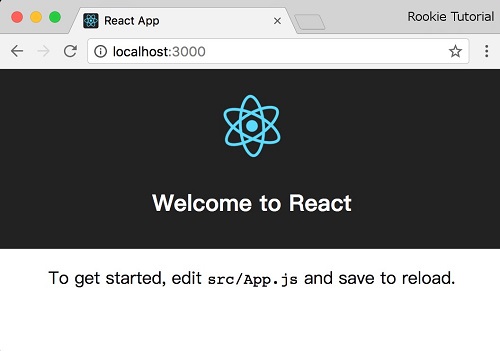
my-app/
  README.md
  node_modules/
  package.json
  .gitignore
  public/
    favicon.ico
    index.html
    manifest.json
  src/
    App.css
    App.js
    App.test.js
    index.css
    index.js
    logo.svg
manifest.json
the start page is specified
index.html
all starts here, so this is the source of code execution.
src/App.js
file code:src/App.js 
importReact,{Component}from'react';importlogofrom'./logo.svg';import'./App.css';
classAppextendsComponent{render(){return(<divclassName="App">
<divclassName="App-header">
<imgsrc={logo}className="App-logo"alt="logo"/> <h2>Welcome to the Rookie Tutorial</h2>
</div> <pclassName="App-intro"> You can check in the <code>src/App.js</code>
Modify in the file.</p> </div>);}}exportdefaultApp;
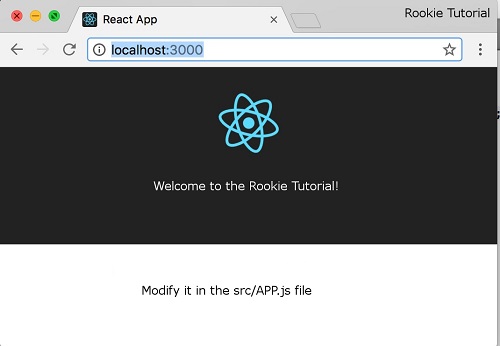
src/index.js
is an entry file, we can try to modify it directly
src/index.js
file code:Example 
import React from 'react';
import ReactDOM from 'react-dom';
function Hello(props) {
  return <h1>Hello World!</h1>;
}
ReactDOM.render(<Hello />, document.getElementById('root'));
Hello World!