9.41.1. Brief introduction 
Automatic layout is introduced in iOS 6.0. only IOS6.0 and later versions are supported. It can help us create interfaces for multiple devices.
9.41.2. Instance step 
1.创建一个简单的 View based application
two。 Modify the contents of the ViewController.m file, as shown below
#import "ViewController.h"
@interface ViewController ()
@property (nonatomic, strong) UIButton *leftButton;
@property (nonatomic, strong) UIButton *rightButton;
@property (nonatomic, strong) UITextField *textfield;

@end
@implementation ViewController

- (void)viewDidLoad{
    [super viewDidLoad];
    UIView *superview = self.view;
    /*1. Create leftButton and add to our view*/
    self.leftButton = [UIButton buttonWithType:UIButtonTypeRoundedRect];
    self.leftButton.translatesAutoresizingMaskIntoConstraints = NO;
    [self.leftButton setTitle:@"LeftButton" forState:UIControlStateNormal];
    [self.view addSubview:self.leftButton];
    /* 2. Constraint to position LeftButton's X*/
    NSLayoutConstraint *leftButtonXConstraint = [NSLayoutConstraint
    constraintWithItem:self.leftButton attribute:NSLayoutAttributeCenterX
    relatedBy:NSLayoutRelationGreaterThanOrEqual toItem:superview attribute:
    NSLayoutAttributeCenterX multiplier:1.0 constant:-60.0f];
    /* 3. Constraint to position LeftButton's Y*/
    NSLayoutConstraint *leftButtonYConstraint = [NSLayoutConstraint
    constraintWithItem:self.leftButton attribute:NSLayoutAttributeCenterY
    relatedBy:NSLayoutRelationEqual toItem:superview attribute:
    NSLayoutAttributeCenterY multiplier:1.0f constant:0.0f];
    /* 4. Add the constraints to button's superview*/
    [superview addConstraints:@[ leftButtonXConstraint,
    leftButtonYConstraint]];
    /*5. Create rightButton and add to our view*/
    self.rightButton = [UIButton buttonWithType:UIButtonTypeRoundedRect];
    self.rightButton.translatesAutoresizingMaskIntoConstraints = NO;
    [self.rightButton setTitle:@"RightButton" forState:UIControlStateNormal];
    [self.view addSubview:self.rightButton];
    /*6. Constraint to position RightButton's X*/
    NSLayoutConstraint *rightButtonXConstraint = [NSLayoutConstraint
    constraintWithItem:self.rightButton attribute:NSLayoutAttributeCenterX
    relatedBy:NSLayoutRelationGreaterThanOrEqual toItem:superview attribute:
    NSLayoutAttributeCenterX multiplier:1.0 constant:60.0f];
    /*7. Constraint to position RightButton's Y*/
    rightButtonXConstraint.priority = UILayoutPriorityDefaultHigh;
    NSLayoutConstraint *centerYMyConstraint = [NSLayoutConstraint
    constraintWithItem:self.rightButton attribute:NSLayoutAttributeCenterY
    relatedBy:NSLayoutRelationGreaterThanOrEqual toItem:superview attribute:
    NSLayoutAttributeCenterY multiplier:1.0f constant:0.0f];
    [superview addConstraints:@[centerYMyConstraint,
    rightButtonXConstraint]];
   //8. Add Text field
    self.textfield = [[UITextField alloc]initWithFrame:
    CGRectMake(0, 100, 100, 30)];
    self.textfield.borderStyle = UITextBorderStyleRoundedRect;
    self.textfield.translatesAutoresizingMaskIntoConstraints = NO;
    [self.view addSubview:self.textfield];
    //9. Text field Constraints
    NSLayoutConstraint *textFieldTopConstraint = [NSLayoutConstraint
    constraintWithItem:self.textfield attribute:NSLayoutAttributeTop
    relatedBy:NSLayoutRelationGreaterThanOrEqual toItem:superview
    attribute:NSLayoutAttributeTop multiplier:1.0 constant:60.0f];
    NSLayoutConstraint *textFieldBottomConstraint = [NSLayoutConstraint
    constraintWithItem:self.textfield attribute:NSLayoutAttributeTop
    relatedBy:NSLayoutRelationGreaterThanOrEqual toItem:self.rightButton
    attribute:NSLayoutAttributeTop multiplier:0.8 constant:-60.0f];
    NSLayoutConstraint *textFieldLeftConstraint = [NSLayoutConstraint
    constraintWithItem:self.textfield attribute:NSLayoutAttributeLeft
    relatedBy:NSLayoutRelationEqual toItem:superview attribute:
    NSLayoutAttributeLeft multiplier:1.0 constant:30.0f];
    NSLayoutConstraint *textFieldRightConstraint = [NSLayoutConstraint
    constraintWithItem:self.textfield attribute:NSLayoutAttributeRight
    relatedBy:NSLayoutRelationEqual toItem:superview attribute:
    NSLayoutAttributeRight multiplier:1.0 constant:-30.0f];
    [superview addConstraints:@[textFieldBottomConstraint ,
    textFieldLeftConstraint, textFieldRightConstraint,
    textFieldTopConstraint]];
}
- (void)didReceiveMemoryWarning
{
    [super didReceiveMemoryWarning];
    // Dispose of any resources that can be recreated.
}
@end
9.41.3. Output 
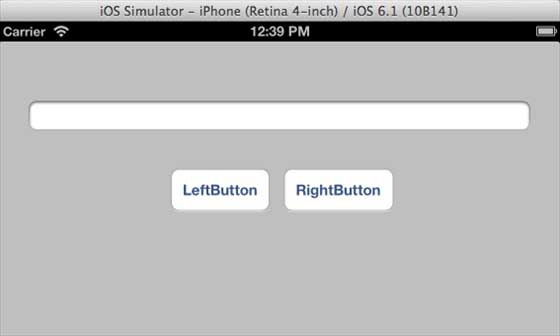
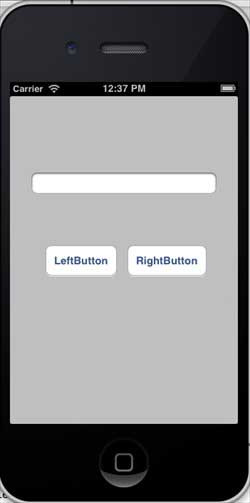
If you run the application, you will have the following output on the iPhone simulator
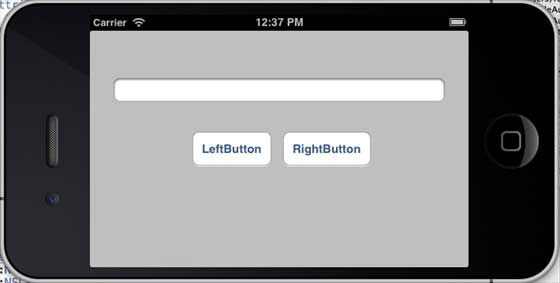
When we change the simulator to the horizontal direction, the output is as follows
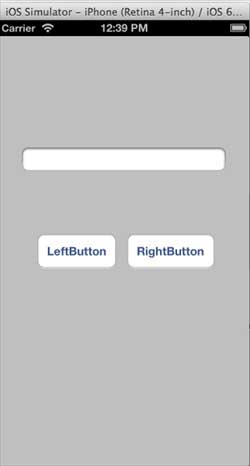
When we run the same application on the iPhone 5 simulator, the output is as follows
When we change the simulator to the horizontal direction, the output is as follows: