In the previous section, we have shown how to install the Memcached service,and then we will show you how PHP uses the Memcached service. PHP Memcache expansion pack download address: http://pecl.php.net/package/memcache , you can download the latest stable pack (stable). Note: You will be displayed after the installation is successful Finally, we need to add this extension to the Restart after adding If it is Check the installation result If the installation is successful, it will output: Or access it through a browser For more PHP operations Memcached, please see: http://php.net/manual/zh/book.memcache.php 1.21.1. PHP Memcache extension installation 
wget http://pecl.php.net/get/memcache-2.2.7.tgz
tar -zxvf memcache-2.2.7.tgz
cd memcache-2.2.7
/usr/local/php/bin/phpize
./configure --with-php-config=/usr/local/php/bin/php-config
make && make install
/usr/local/php/
for
php
the installation path needs to be adjusted according to the actual directory of your installation.
memcache.so
Expanded location, such as mine:Installing shared extensions: /usr/local/php/lib/php/extensions/no-debug-non-zts-20090626/
php
, open yours
php.ini
add the following at the end of the file:[Memcache]
extension_dir = "/usr/local/php/lib/php/extensions/no-debug-non-zts-20090626/"
extension = memcache.so
php
I am using the
nginx+php-fpm
process, so the command is as follows:kill -USR2 `cat /usr/local/php/var/run/php-fpm.pid`
apache
use the following command:/usr/local/apache2/bin/apachectl restart
/usr/local/php/bin/php -m | grep memcache
memcache
.
phpinfo()
function, as shown in the following figure: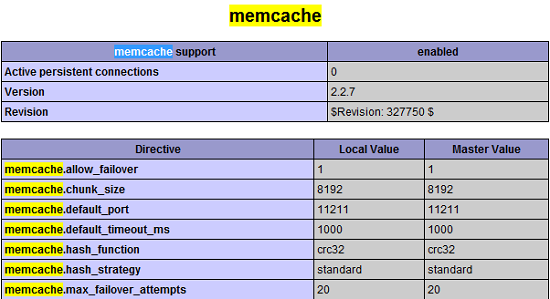
1.21.2. PHP connection Memcached 
<?php
$memcache = new Memcache;             //Create a memcache object
$memcache->connect('localhost', 11211) or die ("Could not connect"); //Connect to Memcached server
$memcache->set('key', 'test');        //Set a variable to memory with the name key and the value test
$get_value = $memcache->get('key');   //Retrieve the value of the key from memory
echo $get_value;
?>