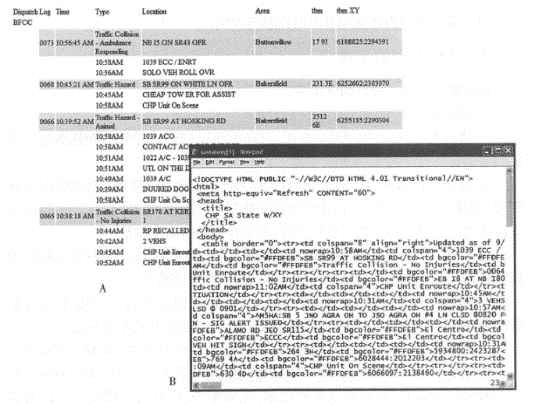
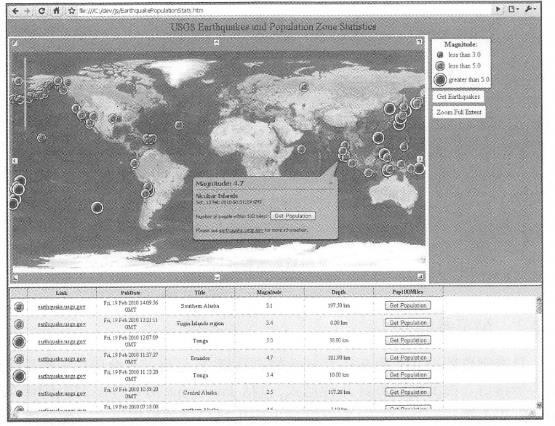
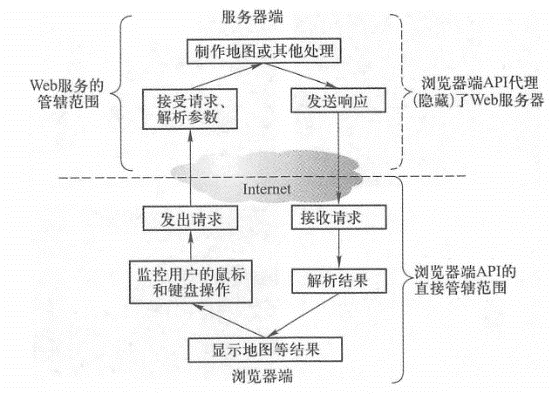
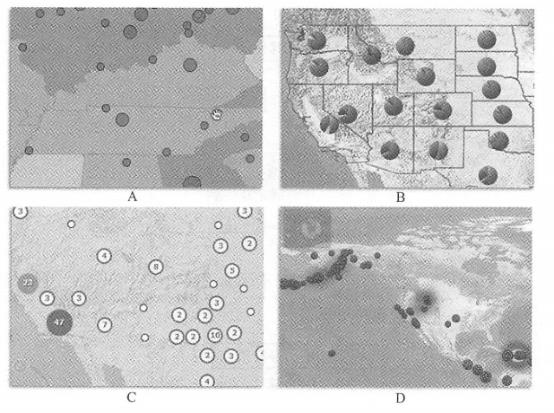
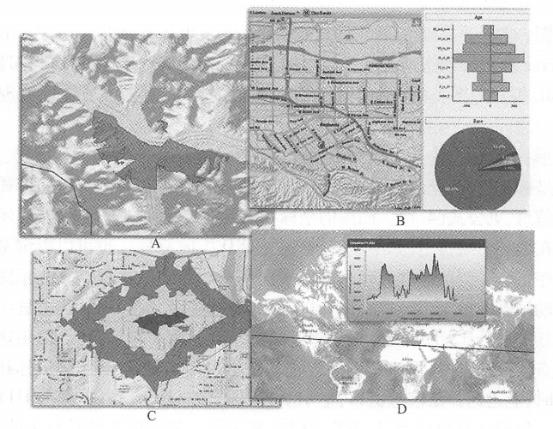
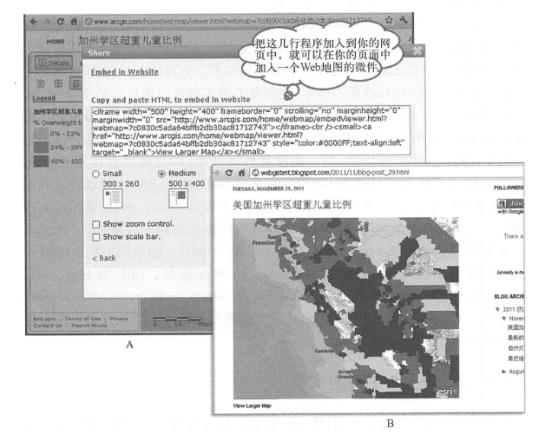
Web resources, including Web content and functionality, are the basis for building aggregations. These Web resources can be divided into two categories, namely resources with programming interfaces and resources without programming interfaces (Figure 4. 5)。Resources with programming interfaces mainly include Web services and client-side APIs, especially browser-side APIs. Such resources are relatively easy to aggregate. Resources without programming interfaces are mainly HTML documents. Due to the need for more complex data extraction, such resources are difficult to directly aggregate. Fig. 44 Web resources are classified by programming interface # Web resources with browser-side APIs are relatively easy to aggregate and are currently the most popular interface in aggregation applications. There are several forms of this type of interface, including JavaScript API, FlexAPI, Silverlight API, and Web widgets. JavaScript is the most widely used programming language on the Internet. Coupled with toolkits like Dojo, JavaScript supports complex graphical displays and user interactions (Figure 4. 6)。Flex and Silverlight APIs have excellent graphics support, animation effects and flexible user interaction performance, which can provide a good user experience and are especially suitable for developing rich Internet applications. table 4. 1 Comparing browser-side APIs and Web services, the former is easier to use than the latter, making it easier to build WebGIS applications faster. See Figure 4. As shown in Figure 7, the functions of Web services are limited to the server side, but the user interaction tasks on the browser side are beyond reach, and cannot solve tasks such as monitoring user mouse events, calculating map parameters, sending requests, receiving response results, parsing results, and displaying maps. However, the browser-side API is capable of these tasks. It can interact with the user. When the user drags the map, the browser-side API can automatically detect the user’s mouse movement, calculate the new map range, and issue requests to the background Web service. After receiving the response result from the server, the result is parsed and the map is displayed. This process is completed without the user realizing it. Therefore, the browser-side API solves the problem of interacting with Web services on one hand, and makes it easy to interact with users on the other hand. To use a metaphor:Web services are like chefs in the background, while browser-side APIs are like serving servers. They convey your request to the chef and serve you the cooked dishes. Many organizations provide their Web resources through browser-side APIs such as the well-known street maps, image maps, address and location positioning, path analysis and other functions of Google and Microsoft. EsriArc- GIS Online provides a wider variety of maps and thematic maps. Users can also use ArcGIS forServer to publish their own map services or analysis services. These resources also automatically have browser-side APIs that can be easily called. Fig. 45 An example of using the ArcGIS Online basic basemap and population data service uses ArcGIS AF*IforJavaScript to display the location and magnitude of recent earthquakes from the U.S. Geological Survey and calculate the population within 160km of the source. (Acknowledgements: U.S. National Park Service and U.S. Geological Survey) # Table 4.1 Comparison of Web Services and Browser-Side APIs Web service Browser API perform location Web server browser use language Independent of the programming language, can be written and called in any language Depending on the specific programming language, the JavaScript, Flex and Silverlight APIs require the corresponding development language performance Provides server-side functions and can operate database; does not provide user interface and user interaction functions Provides browser-side functions, including user interaction and mouse control relationship Wait for browser-side API or other language calls Web services are often wrapped, especially RESTful ones; Web services can be automatically invoked based on user interactions Fig. 46 The browser-side AI> I encapsulates Web services and has the ability to interact with users, making WebGIS application development faster and easier # For the three parts of the aggregated design pattern: the basic basemap, business layers and tasks (see Section 2. 3. Section 3), ArcGIS’s browser-side API provides corresponding classes. Map: Corresponding to the basic basemap (sometimes used to show actionable layers), it supports dynamic maps and tile maps produced by ArcGIS for Server, Microsoft Bing Maps, WMS, WMTS,&KML, etc. The map class has built-in listening functions for mouse and keyboard events, which can easily realize interactive operations between the map and the user. Graphics: Usually used to express actionable layers, including query and analysis results. Graphics are vector, have coordinates and attributes, and can be displayed in a certain symbol, or can also display detailed information in the form of small windows or pop-up windows. See Formula (4.1). The coordinates and attributes of the graph are downloaded to the browser side, and its display symbols can be specified on the server side (such as symbols in MXD that inherits the service) or by browser-side programs. The browser-side program can display graphics based on a single attribute or multiple attributes, such as using animated icons to display helicopters in flight, classifying earthquakes by magnitude, using pie charts to display the percentages of states and ethnic groups, or displaying points that are adjacent to each other in clusters. You can also use a heat map to represent the distribution density of points (Figure 4.8). Graphics can interact quickly with users. When the user clicks or clicks the mouse, an information window can quickly pop up, displaying attributes, charts, photos, audio, video or HTML links. It is worth noting that the number of vector graphics that the browser can display at the same time is limited, roughly thousands. After this limit is exceeded, the performance of the browser will be reduced. If the amount of data on an operable layer is large, you can use scale dependence (that is, the operational layer will only be displayed when zoomed in to a certain scale) or use map classes (including tile maps and dynamic maps). Fig. 47 The programming interface on the ArcGIS browser side can display graphics in multiple ways # (A)根据某属性值进行分类, 用不同大小或不同颜色的符号来显示;(B)用饼状图显示多个属性,如各民族的人口比重; (C)把相互邻近的点显示为点簇(cluster);(D)使用热度地图表达点的密度分布。 (致谢:美国国家公园管理局、 美国地质调查局 和美国人口普查局) Fig. 48 The browser-side API can call the functions of ArcGISServer to perform a variety of query and geographical analysis tasks, such as (A) view analysis model to calculate the visible area of a certain point on the mountain;(B) spatial query to obtain population information of a certain area, such as age and ethnicity;(C) service area analysis to calculate the service range of a fire station or retail store (calculate the areas that can be reached in 1, 2, and 3 minutes respectively);(D) terrain profile analysis to obtain the change in surface elevation along a certain straight line. (Acknowledgements:AND Automotive Navigation Data,Thle Atlas North America,Inc. and the National Park Service) # Task: That is, the browser interacts with the backend ArcGIS Server to perform geoprocessing tasks such as query, editing, geocoding, path analysis, and geometric projection (Figure 4. 9)。 Web widgets further simplify aggregated application development. It is short code that is easy to embed into web pages. It encapsulates several lines of HTML and JavaScript code, and there are also widgets based on Flex or Microsoft Silverlight. Figure 4.10 shows ArcGIS. com, which only has a few simple lines of HTML source code. Embed it into an HTML web page, and the web page can display a widget from ArcGIS. com. Fig. 49 ArcGIS Online provides a variety of sharing functions, one of which is to provide you with a few lines of HTML source (A), which is actually a widget. Add these lines to your web page, such as a blog, and it will add a Web map (B) to your web page. (Acknowledgement: U.S. Census Bureau) # ArcGIS also provides development interfaces for smartphones and tablets. The principle is similar to browser-side interfaces. They can also call and combine Web services in ArcGIS Server or ArcGIS Online. These interfaces can also interact with users through touch screens. It is worth mentioning that these interfaces for mobile platforms need to use languages such as Object C, C#or Java, which is slightly more difficult than the above-mentioned browser-side interfaces, but they can achieve a stylish mobile application interface and obtain a good user experience (see Section 5. Section 3). In the aggregation arena, the browser-side API has most of its aura, but many of its advantages come from the Web services behind the scenes. There are two styles of Web services: SOAP and REST. Among them, REST style Web services can make better use of the advantages of the Web and are more efficient. The browser-side API is mainly based on REST-style Web services. Geographic information portals such as ArcGIS. There are thousands of Web services published on. com that can be queried and used by users. If the resources they need are not available on the Web, organizations can use their own data to publish their own Web services. Government agencies such as the U.S. Geological Survey, the U.S. National Oceanic and Atmospheric Administration, and the U.S. Environmental Protection Agency have released many valuable Web services. Enterprises and scientific research institutions are also important Web service providers. It is worth mentioning that GeoNames converts RSS into GeoRSS Web services, which is very useful for geographical aggregation applications. RSS documents (see Section 3.4) usually contain real-time information, but generally do not have geographical coordinates, making it difficult to use directly in GIS. GeoNames is a Web service that converts RSS into GeoRSS. It can extract addresses and place names from RSS, find their latitude and longitude, and then add coordinates to RSS to generate GeoRSS. For example, the U.S. Centers for Disease Control and Prevention has an RSS report on the latest incidents of E. coli infection and morbidity ( http://www2c.cdc.gov/podcasts/createrss.asp ? t=r&c=280 )。If you want to 7K these events on a map, you can use the GeoNames Web service mentioned above at http://ws.geonames.org/rssToGeoRSS ? feedUrl=http//www2c.cdc.gov/podcasts/creat-erss.asp? t=r&c=280 , you can get a GeoRSS format with coordinates, so that it can be aggregated into WebGIS. There are hundreds of millions of HTML pages on the World Wide Web. They are the most important resource on the World Wide Web. There is a lot of valuable information in these massive pages that can be integrated into other application systems. However, HTML web pages are for people to read and understand. They mix content and styles (such as font size and color, page layout, etc.)(Figure 4.11). They do not have a formal programming interface, and it is difficult to extract information from them. Developers need to carefully analyze the HTML code of these web pages to find character patterns. Writing targeted programs that process HTML source code strings and grab information from them is called screen grabbing or screen grabbing. If there are no geographical coordinates in the content crawled from the Web, the content needs to be geographically resolved (see Section 10.1.4) to extract the address or place name from it, perform address matching or place name lookup, and convert it into coordinates. Fig. 50 A web page (A) and its HTML source code (B) of a traffic police website in a certain area of California, the United States display real-time traffic accident information on the highway. This web page does not have a formal programming interface. Aggregating such resources requires a screen-grabbing method to extract the time, coordinates and accident description of each traffic accident from it. # Web crawling and geo-resolution functions usually need to be developed on the server side because the process is complex and lightweight programming languages are difficult to do. In addition, processing on the server only needs to be processed once, and this result can be used by all browsers. The results of web scraping and geographical parsing often use XML(such as GeoRSS) JS0N or other structured formats for easy aggregation and use. Screen grabbing is often considered an indecent solution. One reason is that there is no universal screen-grabbing tool. Developers often have to write targeted programs for the specific situation of each or each type of Web resource, and this program is not universal. Once the Web resource changes, sometimes even if the appearance changes or just adds a space, the original screen-grabbing program may no longer apply. The second reason is that websites that do not provide programming interfaces often do not consider or do not want to be used by secondary development of other websites. As a result, the service relationship between the caller and the provider is not very clear, and sometimes disputes may arise.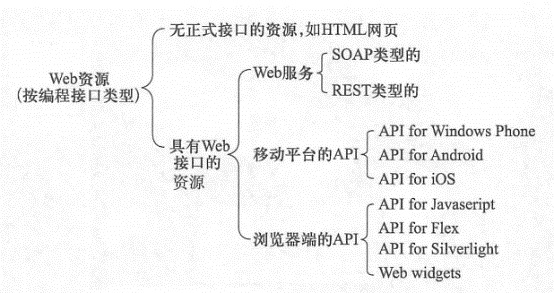
Browser API #

<iframe width = " 500 " height =" 400 " frameborder = " 0 " scrolling
="no"
marginheight = "0 " marginwidth = "0 "
<iframe widt^^»"500,, heiQht»"400" frameborder^O" scrbHrng="non'marg^
imarginwidth»"0”src*"http://www.arc〇is,com;tiome/webmap/embedViewer.html?
API for mobile platforms #
Hero behind the scenes Web Services #
Web resources without formal interfaces #