9.28.1. Brief introduction 
The accelerometer detects the change in the position of the device according to the x, y and z directions.
The position of the current equipment relative to the ground can be known through the accelerometer.
The following example code needs to run on a real device and does not work on the simulator.
9.28.2. Instance step 
1、创建一个简单的视图应用程序
2、在ViewController.xib中添加三个标签,并创建一个ibOutlets分别为:xlable、ylabel和zlabel
3、如下所示,更新ViewController.h
#import <UIKit/UIKit.h>

@interface ViewController : UIViewController<UIAccelerometerDelegate>
{
    IBOutlet UILabel *xlabel;
    IBOutlet UILabel *ylabel;
    IBOutlet UILabel *zlabel;

}
@end
4、如下所示,更新ViewController.m
#import "ViewController.h"

@interface ViewController ()

@end

@implementation ViewController

- (void)viewDidLoad
{
    [super viewDidLoad];
    [[UIAccelerometer sharedAccelerometer]setDelegate:self];
    //Do any additional setup after loading the view,typically from a nib
}

- (void)didReceiveMemoryWarning
{
    [super didReceiveMemoryWarning];
    // Dispose of any resources that can be recreated.
}
- (void)accelerometer:(UIAccelerometer *)accelerometer didAccelerate:
  (UIAcceleration *)acceleration{
    [xlabel setText:[NSString stringWithFormat:@"%f",acceleration.x]];
    [ylabel setText:[NSString stringWithFormat:@"%f",acceleration.y]];
    [zlabel setText:[NSString stringWithFormat:@"%f",acceleration.z]];
}

@end
9.28.3. Output 
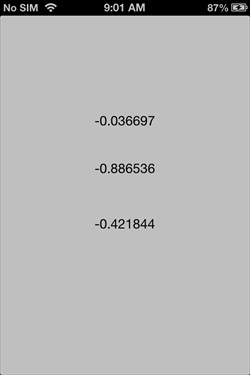
When we run the application on the iPhone device, the output is shown below.