This tutorial will show you how to install MongoDB extensions on Linux, window, and Mac platforms. You can install the PHP extension driver for MongoDB by executing the following command in Linux Pecl installation commands that use php must ensure that network connections are available and that root permissions are available. If you want to compile the extension driver from the source code. You have to manually compile the source package, which is good because the latest modified bug is included in the source package. You can download the MongoDB PHP driver package from PHP’s official website at http://pecl.php.net/package/mongodb . The full installation command is as follows: If your php is compiled by yourself, the installation method is as follows (assuming it is compiled in the / usr/local/php directory): After a successful installation, the following installation directory information will be output similar to: After executing the above command, you need to modify the php.ini file and add the mongo configuration to the php.ini file as follows: 注意: You need to specify You can view the directory address with the following command: A precompiled php mongodb driver binary package for Window platform is available on PECL (download address: https://pecl.php.net/package/mongodb ), you can download the version corresponding to your php, but you need to pay attention to the following questions: VC6 runs on an Apache server Thread safe (thread safety) runs on Apache as a module. If you run PHP in CGI mode, please choose non-thread safe mode (non-thread safe). VC9 runs on an IIS server. After downloading the binary package you need, extract the package and add the php_mongodb.dll file to your PHP extension directory (ext). The ext directory is usually located in the ext directory under the PHP installation directory. Open the php configuration file php.ini to add the following configuration: Restart the server. Access phpinfo through a browser, and if the installation is successful, you will see the following type of information: You can use autoconf to install the MongoDB PHP extension driver. You can use Xcode to install the MongoDB PHP extension driver. If you use XAMPP, you can install the MongoDB PHP extension driver using the following command: If the above command doesn’t work in XMPP or MAMP, you need to download a compatible precompiled package on Github. Then add 3.28.1. Install the MongoDB PHP extension on Linux 
Install on the terminal 
$ sudo pecl install mongodb
Installation manual 

$ wget http://pecl.php.net/get/mongodb-1.5.2.tgz
$ cd /mongodb-1.5.2
$ phpize
$ ./configure
$ make && make install
$ wget http://pecl.php.net/get/mongodb-1.5.2.tgz
$ cd /mongodb-1.5.2
$ /usr/local/php/bin/phpize
$ ./configure --with-php-config=/usr/local/php/bin/php-config
$ make && make install
...
Installing shared extensions:     /usr/lib/php/extensions/debug-non-zts-20151012/
extension_dir=/usr/lib/php/extensions/debug-non-zts-20151012/
extension=mongodb.so
extension_dir
The path to the configuration item.$ php -i | grep extension_dir
extension_dir => /usr/lib/php/extensions/debug-non-zts-20151012 =>
/usr/lib/php/extensions/debug-non-zts-20151012
3.28.2. Install the MongoDB PHP extension on Window 
extension=php_mongodb.dll
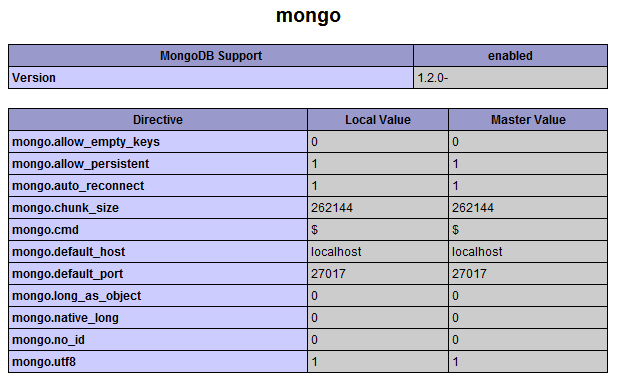
3.28.3. Install the MongoDB PHP extension driver in MAC 
sudo /Applications/XAMPP/xamppfiles/bin/pecl install mongo
extension=mongodb.so
Configure it to your php.ini file.