如果我们需要引入第三方库文件到项目,该怎么操作呢?
Pom.xml ‘s dependencies list lists all the external dependencies that our project needs to build.
To add dependencies, we usually add the lib folder under the src folder, and then copy the jar files you need for the project to the lib folder.
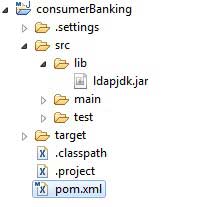
Then add the following dependencies to the pom.xml file:
<dependencies><!--在这里添加你的依赖--><dependency><groupId>ldapjdk</groupId><!--库名称,也可以自定义--><artifactId>ldapjdk</artifactId><!--库名称,也可以自定义--><version>1.0</version><!--版本号--><scope>system</scope><!--作用域--><systemPath>${basedir}\src\lib\ldapjdk.jar</systemPath><!--项目根目录下的lib文件夹下--></dependency></dependencies>
The complete code of the pom.xml file is as follows:
<projectxmlns="http://maven.apache.org/POM/4.0.0"xmlns:xsi="http://www.w3.org/2001/XMLSchema-instance"xsi:schemaLocation="http://maven.apache.org/POM/4.0.0
http://maven.apache.org/maven-v4_0_0.xsd"><modelVersion>4.0.0</modelVersion><groupId>com.companyname.bank</groupId><artifactId>consumerBanking</artifactId><packaging>jar</packaging><version>1.0-SNAPSHOT</version><name>consumerBanking</name><url>http://maven.apache.org</url><dependencies><dependency><groupId>junit</groupId><artifactId>junit</artifactId><version>3.8.1</version><scope>test</scope></dependency><dependency><groupId>ldapjdk</groupId><artifactId>ldapjdk</artifactId><scope>system</scope><version>1.0</version><systemPath>${basedir}\src\lib\ldapjdk.jar</systemPath></dependency></dependencies></project>