The adapter pattern (Adapter Pattern) acts as a bridge between two incompatible interfaces. This type of design pattern is a structural pattern, which combines the functions of two separate interfaces.
This pattern involves a single class that is responsible for adding independent or incompatible interface functions. To take a real example, the card reader acts as an adapter between the memory card and the notebook. You insert the memory card into the card reader, and then the card reader into the notebook, so that you can read the memory card through the notebook.
We demonstrate the use of the adapter pattern through the following example. Audio player devices can only play mp3 files, and vlc and mp4 files can be played by using a more advanced audio player. 意图: Convert the interface of one class to another interface that the customer wants. The adapter pattern allows classes that cannot work together because the interfaces are not compatible. 主要解决: The main solution is that in the software system, it is often necessary to put some “existing objects” into the new environment, but the interface required by the new environment can not be satisfied by the current object. 何时使用: 1. The system needs to use the existing class, and the interface of this kind does not meet the needs of the system. 2. Want to create a reusable class to work with some classes that are not much related to each other, including some classes that may be introduced in the future, these source classes do not necessarily have a consistent interface. 3. Insert one class into another through interface transformation. (for example, tigers and birds, now there is a flying tiger, without the need to increase the entity, add an adapter, in which a tiger object is included to implement the flying interface. ) 如何解决: Inherit or depend (recommended). 关键代码: The adapter inherits or relies on existing objects to implement the desired target interface. 应用实例: 1. American electrical appliances 110V and Chinese 220V require an adapter to convert 110V to 220V. 2. JAVA JDK 1.1 provides Enumeration interface, while Iterator interface is provided in 1.2. if you want to use JDK of 1.2, you need to convert the Enumeration interface of the previous system into Iterator interface, which requires the adapter pattern. 3. Run WINDOWS program on LINUX. 4. Jdbc in JAVA. 优点: 1. You can have any two unrelated classes run together. 2. The reuse of classes is improved. 3. Increase the transparency of the class. 4. Good flexibility. 缺点: 1. Excessive use of adapters will make the system very messy and difficult to grasp as a whole. For example, it is obvious that interface An is called, but in fact, it is internally adapted to the implementation of interface B. if this happens in too many systems, it is tantamount to a disaster. So if it is not necessary, the system can be refactored directly without using an adapter. two。 Because JAVA inherits at most one class, at most one adaptor class can be adapted, and the target class must be an abstract class. 使用场景: When you are motivated to modify the interface of a functioning system, you should consider using the adapter pattern. 注意事项: The adapter is not added at the time of detailed design, but rather solves the problem of the project in service. We have one. MediaPlayer Interface and an implementation of the MediaPlayer The entity class of the interface AudioPlayer . By default AudioPlayer You can play audio files in mp3 format. We have another interface. AdvancedMediaPlayer And realized AdvancedMediaPlayer The entity class of the interface. This class can play files in vlc and mp4 formats. We want to make AudioPlayer Play audio files in other formats. In order to do this, we need to create an implementation MediaPlayer The adapter class of the interface MediaAdapter And use the AdvancedMediaPlayer Object to play the desired format. AudioPlayer Use adapter classes MediaAdapter Transfer the required audio type without knowing the actual class that can play the desired format audio. AdapterPatternDemo Class usage AudioPlayer Class to play various formats. Create interfaces for media players and more advanced media players. Create and implement the AdvancedMediaPlayer The entity class of the interface. Create and implement the MediaPlayer The adapter class for the interface. Create and implement the MediaPlayer The entity class of the interface. Use AudioPlayer to play different types of audio formats. Execute the program and output the result: 6.8.1. Introduction 
6.8.2. Realize 
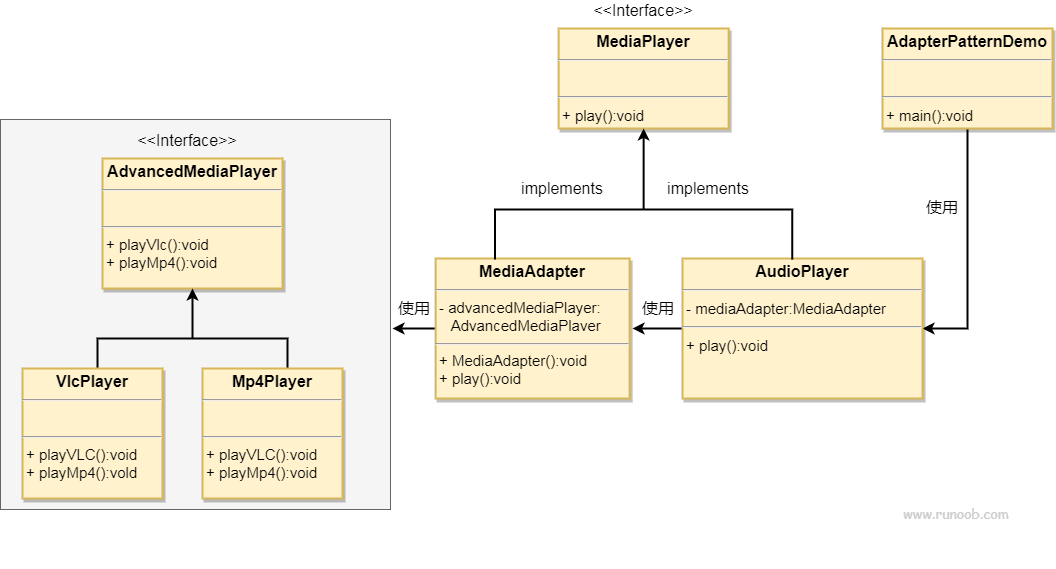
6.8.3. Step 1 
MediaPlayer.java 
publicinterfaceMediaPlayer{publicvoidplay(StringaudioType,StringfileName);}
AdvancedMediaPlayer.java 
publicinterfaceAdvancedMediaPlayer{publicvoidplayVlc(StringfileName);publicvoidplayMp4(StringfileName);}
6.8.4. Step 2 
VlcPlayer.java 
publicclassVlcPlayerimplementsAdvancedMediaPlayer{@OverridepublicvoidplayVlc(StringfileName){System.out.println("Playing
vlc file.
Name:"+fileName);}@OverridepublicvoidplayMp4(StringfileName){//什么也不做}}
Mp4Player.java 
publicclassMp4PlayerimplementsAdvancedMediaPlayer{@OverridepublicvoidplayVlc(StringfileName){//什么也不做}@OverridepublicvoidplayMp4(StringfileName){System.out.println("Playing
mp4 file. Name:"+fileName);}}
6.8.5. Step 3 
MediaAdapter.java 
publicclassMediaAdapterimplementsMediaPlayer{AdvancedMediaPlayeradvancedMusicPlayer;publicMediaAdapter(StringaudioType){if(audioType.equalsIgnoreCase("vlc")){advancedMusicPlayer=newVlcPlayer();}elseif(audioType.equalsIgnoreCase("mp4")){advancedMusicPlayer=newMp4Player();}}@Overridepublicvoidplay(StringaudioType,StringfileName){if(audioType.equalsIgnoreCase("vlc")){advancedMusicPlayer.playVlc(fileName);}elseif(audioType.equalsIgnoreCase("mp4")){advancedMusicPlayer.playMp4(fileName);}}}
6.8.6. Step 4 
AudioPlayer.java 
publicclassAudioPlayerimplementsMediaPlayer{MediaAdaptermediaAdapter;
@Overridepublicvoidplay(StringaudioType,StringfileName){//播放 mp3
音乐文件的内置支持if(audioType.equalsIgnoreCase("mp3")){System.out.println("Playing
mp3 file. Name:"+fileName);}//mediaAdapter
提供了播放其他文件格式的支持elseif(audioType.equalsIgnoreCase("vlc")\|\|audioType.equalsIgnoreCase("mp4")){mediaAdapter=newMediaAdapter(audioType);mediaAdapter.play(audioType,fileName);}else{System.out.println("Invalid
media."+audioType+"format not supported");}}}
6.8.7. Step 5 
AdapterPatternDemo.java 
publicclassAdapterPatternDemo{publicstaticvoidmain(String[]args){AudioPlayeraudioPlayer=newAudioPlayer();audioPlayer.play("mp3","beyond
the
horizon.mp3");audioPlayer.play("mp4","alone.mp4");audioPlayer.play("vlc","far
far away.vlc");audioPlayer.play("avi","mind me.avi");}}
6.8.8. Step 6 
Playing mp3 file. Name: beyond the horizon.mp3
Playing mp4 file. Name: alone.mp4
Playing vlc file. Name: far far away.vlc
Invalid media. avi format not supported