One of the ultimate goals of NSDI is “democratization of data” to support organizations and the public in making the most of this data to create new data products and services (Nebert, 2004). At present, the technical methods of aggregating Web services to build applications are becoming more and more diverse and simplified. Chapter 4 of this book introduces several 地理信息聚合 , including application development through Web AH, such as the ArcGIS API for JavaScripuFlex and Silverlight, and introduces relevant cases. This section will not repeat it, but will briefly introduce aggregation methods based on cloud GIS and geo-browsers. Combining these methods, NSDI 2.0 will support more elastic and flexible GIS applications. Fig. 93 ArcGIS Online provides dozens of application templates for users to create WebGIS applications. (Acknowledgements: U.S. Geological Survey, U.S. Census, and U.S. Park Service) # 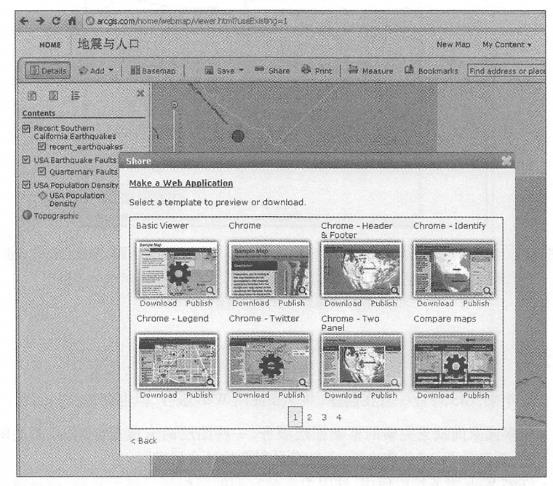
To make it easier for people to find the Web services they need, providers should register these services with the geographic information portal (see Chapter 6). To make it easier for providers to register their services, geographic portals should simplify the registration process, such as using tags, rather than requiring lengthy metadata. Publishers can also promote and introduce their services through a variety of methods, including Social networks.
Services in cloud GIS provide building blocks for building a variety of government, business and scientific research applications. Cloud GIS itself can also serve as a development platform for Web applications. Taking ArcGIS Online cloud GIS as an example, developers or users can find the Web services registered in it, view the metadata of these services, 并把这些Web服务组合起来、叠加显示、为这些图层定制符号、配置弹出信息窗口以及加人统计图和图片等(见第10.1_ Section 8). ArcGIS Online also provides a large number of WebGIS application templates (Figure 7.12). Users can preview their own Web applications by selecting these templates. After selecting the template they are satisfied with, they can directly host their applications on ArcGIS Online, or download the application’s source program, modify and process it, and then deploy this aggregated application on other web servers.
The new generation of NSDI should benefit non-professional GIS institutions and personnel and help them use geographical information. Geobrowsers such as ArcGIS Explorer online and desktop, Gaia, Google Earth, and NASA World Wind are easy to use and can be used by GIS professionals to casual users to view maps or the earth, open layers, and add other data layers or services (Figure 7. 13)。For example, locally Fig. 94 Geo-browsers do not require programming to be used to access and integrate geo-Web services scattered across the Internet. In this figure, the desktop version of ArcGISExplorei·integrates basemaps from ArcGISOnline, real-time K.ML earthquake information from USGS, and photos of the Los Angeles area from Flickr online albums. (Thanks: Yahoo!, US Geological Survey and Tele Atlas North America, Inc.) # 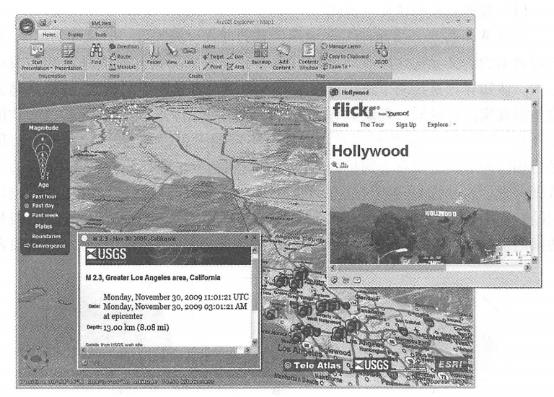
Real-time traffic information, earthquake information, forest wildfire information, location-tagged photos or videos, social media information, etc. are superimposed on the map to obtain the information you need for your work or hobbies. Users with strong GIS technical background can also load their local data into a geographical browser and comprehensively display or analyze it with information from the Web to achieve more professional functions.
In recent years, the development and widespread application of geographical browsers have promoted GIS to the public, allowed the public to understand and feel GIS, and guided the public to join the use and construction of NSDI. The public’s need for GIS data and functions has in turn guided the development of GIS, prompting the production of geographical information and services to correspond to society’s needs and helping achieve NSDI goals.