The Android intention is an abstract description of the operation to be performed. It can start an activity through startActivity, broadcastIntent to send broadcasts to any broadcast receiver component that is interested in it, startService (Intent) or bindService (Intent, ServiceConnection, int) to communicate with the background service.
The intention itself (an Intent object) is a passive data structure that holds an abstract description of the operation to be performed.
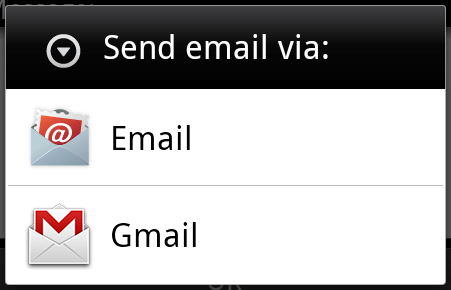
For example, you have an activity that requires you to open an email client and send mail through the Android device. To this end, your activity needs to send an ACTION_SEND with the appropriate selector to the Android intention handler. The specified selector gives the appropriate interface for the user to decide how to send his mail data.
Intent email = new Intent(Intent.ACTION_SEND, Uri.parse("mailto:"));
email.putExtra(Intent.EXTRA_EMAIL, recipients);
email.putExtra(Intent.EXTRA_SUBJECT, subject.getText().toString());
email.putExtra(Intent.EXTRA_TEXT, body.getText().toString());
startActivity(Intent.createChooser(email, "Choose an email client from..."));
The above syntax calls the startActivity method to start the mail activity, and the code runs like this:
For example, you have an activity that requires you to open a URL through a browser on an Android device. To this end, your activity sends the ACTION_WEB_SEARCH intent to the Android intent processor to open the given URL in the browser. The intention processor parses a series of activities and selects the one that best suits your intentions, in this case, the Web browser activity. The intended processor passes your web address to the Web browser and opens the Web browser activity.
String q = "https://www.runoob.com";
Intent intent = new Intent(Intent.ACTION_WEB_SEARCH );
intent.putExtra(SearchManager.QUERY, q);
startActivity(intent);
上面的例子将在Android搜索引擎上查找”www.runoob.com”,并在一个活动上给出关键词的结果。
For each component-activities, services, and broadcast receivers-there is an independent mechanism for conveying intentions.
Serial number | Method and description |
|---|---|
1 | Context.startActivity (): the intention is to pass it to the method to start a new activity or to make an existing activity do something new. |
2 | Context.startService (): intended to be passed to this method, a service will be initialized, or new information will be sent to a persistent service. |
3 | Context.sendBroadcast (): intended to be passed to this method, the information will be passed to all interested broadcast receivers. |
3.18.1. Intention object 
The intention object is a packet of information, and the intent received by the component is like the information received by the Android system.
The intent object includes the following components, depending on what is being communicated or executed.
3.18.2. Action (Action) 
This is a necessary part of the intention object and is represented as a string. In the intention of the broadcast, once the action occurs, it will be reported. The action will largely determine how the rest of the intention is organized. The Intent class defines a series of action constants that correspond to different intentions. Here is a copy Android意图标准动作 List.
The actions in the intention object can be set by the setAction () method and read by the getAction () method.
3.18.3. Data (Data) 
Add data specifications to the intention filter. This specification can be just a data type (such as a meta-type property), a URI, or both data type and URI. URI is specified by the properties of different parts.
These properties that specify the URL format are optional, but are also independent of each other-
If the intent filter does not specify a mode, all other URI attributes are ignored.
If no host is specified for the filter, the port properties and all path properties are ignored.
The setData () method can only specify data as URI, setType () can only specify data as metatypes, and setDataAndType () can specify both URI and metatypes. The URI is read through getData () and the type is read through getType ().
Here are some examples of actions / data sets-
Serial number | Actions / data sets and descriptions |
|---|---|
1 | ACTION_VIEW content://contacts/people/1: displays information for users with an ID of 1. |
2 | ACTION_DIAL content://contacts/people/1: displays the phone dialer and populates the data for user 1. |
3 | ACTION_VIEW tel:123 : displays the phone dialer and populates the given number. |
4 | ACTION_DIAL tel:123 : displays the phone dialer and populates the given number. |
5 | ACTION_EDIT content://contacts/people/1: edit user information with an ID of 1. |
6 | ACTION_VIEW content://contacts/people/: displays a list of users for easy viewing. |
7 | ACTION_SET_WALLPAPER:显示选择壁纸设置。 |
8 | ACTION_SYNC:同步数据,默认的值为:android.intent.action.SYNC |
9 | ACTION_SYSTEM_TUTORIAL:开启平台定义的教程(默认教程或者启动教程) |
10 | ACTION_TIMEZONE_CHANGED:当时区被改变时通知 |
11 | ACTION_UNINSTALL_PACKAGE:运行默认的卸载器 |
3.18.4. Category 
A category is an optional part of the intention and is a string that contains additional information about the intent that the type of component needs to handle. The addCategory () method adds categories to the intention object, the removeCategory () method deletes the previously added categories, and getCategories () gets all the categories that are set to the intention object. This is Android意图标准类别 List.
You can see the intention filter in the following section to see how we can use categories to select the appropriate activity based on the corresponding intention.
3.18.5. Additional data 
This is additional information described by key-value pairs to components that need to process intentions. It is set by the putExtras () method and read by the getExtras () method. This is Android意图标准附加数据 List.
3.18.6. Marking 
These tags are optional parts of the intent, explaining how the Android system starts the activity, how to handle it after startup, and so on.
Serial number | Marking and description |
|---|---|
1 | FLAG_ACTIVITY_CLEAR_TASK: if set in intent and passed through Context.startActivity, this flag will cause all existing tasks associated with the activity to be emptied before the activity starts. The activity will become the root of an empty task, and all old activities will be ended. This tag can be used in conjunction with FLAG_ACTIVITY_NEW_TASK. |
2 | FLAG_ACTIVITY_CLEAR_TOP: if you set this flag, the activity will be started in the currently running task. This does not start a new activity instance, all activities above it are closed, and this intention is passed as a new intention to the existing (currently at the top) activity. |
3 | FLAG_ACTIVITY_NEW_TASK: this flag is generally used to enable activities to be used in “initiator” style behavior: to provide the user with data that can be run independently, and to start a complete independent activity. |
3.18.7. Component name 
The component name object is an optional domain that represents an activity, service, or broadcast receiver class. If set, the intention object is passed to an instance of the class that implements the design; otherwise, Android uses other information in other intentions to locate an appropriate target. The component name is set by setComponent (), setClass (), or setClassName (), and obtained by getComponent ().
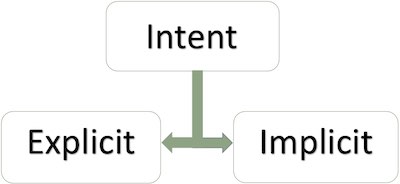
3.18.8. Type of intention 
Android supports two types of intentions.
3.18.9. Explicit intention 
The explicit intention is used to connect the internal world of the application. Suppose you need to connect one activity to another, we can show the intention by displaying the intention. The following figure shows connecting the first activity to the second activity by clicking a button.
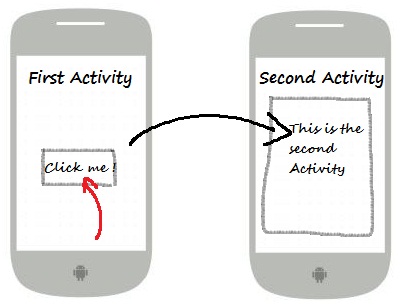
These intentions specify the target component by name and are typically used for internal information within the application-such as an activity initiating a subordinate activity or a sibling activity. For example:
// 通过指定类名的显式意图
Intent i = new Intent(FirstActivity.this, SecondAcitivity.class);

// 启动目标活动
startActivity(i);
3.18.10. Implicit intention 
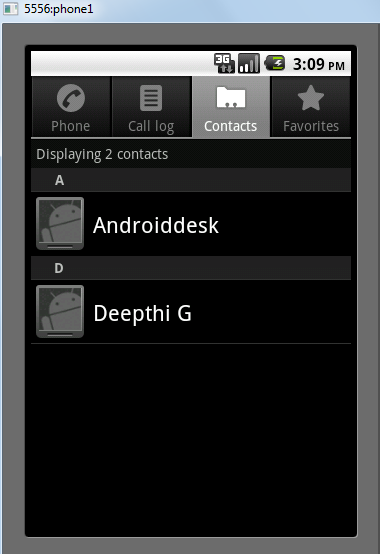
These intentions do not name the target, and the domain of the component name is empty. Implicit intentions are often used to activate components of other applications. For example:
Intent read1=new Intent();
read1.setAction(android.content.Intent.ACTION_VIEW);
read1.setData(ContactsContract.Contacts.CONTENT_URI);
startActivity(read1);
The above code gives the following results:
The target component receives the intention and can use the getExtras () method to get the additional data sent by the source component. For example:
// 在代码中的合适位置获取包对象
Bundle extras = getIntent().getExtras();

// 通过键解压数据
String value1 = extras.getString("Key1");
String value2 = extras.getString("Key2");
3.18.11. Example 
The following example demonstrates the ability to use Android intent to start various Android built-in applications.
Steps | Description |
|---|---|
1 | Create an Android application using Android Studio IDE and name it Intent filter, and the package name is com.runoob.intentfilter. When creating a project, make sure that the target SDK and compile with the latest version of Android SDK use the advanced API. |
2 | 修改src/com.runoob.intentfilter/MainActivity.java文件,并添加代码定义两个监听器来对应两个按钮”启动浏览器”和”启动电话” |
3 | 修改res/layout/activity_main.xml布局文件,在线性布局中添加3个按钮。 |
4 | Start the Android emulator to run the application and verify the results of the application’s changes. |
以下是src/com.runoob.intentfilter/MainActivity.java文件的内容:
package com.runoob.intentfilter;

import android.content.Intent;
import android.net.Uri;
import android.support.v7.app.ActionBarActivity;
import android.os.Bundle;
import android.view.Menu;
import android.view.MenuItem;
import android.view.View;
import android.widget.Button;


public class MainActivity extends ActionBarActivity {
    Button b1,b2;

    @Override
    protected void onCreate(Bundle savedInstanceState) {
        super.onCreate(savedInstanceState);
        setContentView(R.layout.activity_main);

        b1=(Button)findViewById(R.id.button);
        b1.setOnClickListener(new View.OnClickListener() {

            @Override
            public void onClick(View v) {
                Intent i = new Intent(android.content.Intent.ACTION_VIEW, Uri.parse("https://www.runoob.com"));
                startActivity(i);
            }
        });

        b2=(Button)findViewById(R.id.button2);
        b2.setOnClickListener(new View.OnClickListener() {
            @Override
            public void onClick(View v) {
                Intent i = new Intent(android.content.Intent.ACTION_VIEW,Uri.parse("tel:9510300000"));
                startActivity(i);
            }
        });
    }

    @Override
    public boolean onCreateOptionsMenu(Menu menu) {
        getMenuInflater().inflate(R.menu.menu_main, menu);
        return true;
    }

    @Override
    public boolean onOptionsItemSelected(MenuItem item) {
        // Handle action bar item clicks here. The action bar will
        // automatically handle clicks on the Home/Up button, so long
        // as you specify a parent activity in AndroidManifest.xml.

        int id = item.getItemId();

        //noinspection SimplifiableIfStatement
        if (id == R.id.action_settings) {
            return true;
        }
        return super.onOptionsItemSelected(item);
    }
}
下面是res/layout/activity_main.xml文件的内容:
<RelativeLayout xmlns:android="http://schemas.android.com/apk/res/android"
    xmlns:tools="http://schemas.android.com/tools"
    android:layout_width="match_parent"
    android:layout_height="match_parent"
    android:paddingLeft="@dimen/activity_horizontal_margin"
    android:paddingRight="@dimen/activity_horizontal_margin"
    android:paddingTop="@dimen/activity_vertical_margin"
    android:paddingBottom="@dimen/activity_vertical_margin"
    tools:context=".MainActivity">

    <TextView
        android:id="@+id/textView1"
        android:layout_width="wrap_content"
        android:layout_height="wrap_content"
        android:text="意图实例"
        android:layout_alignParentTop="true"
        android:layout_centerHorizontal="true"
        android:textSize="30dp" />

    <TextView
        android:id="@+id/textView2"
        android:layout_width="wrap_content"
        android:layout_height="wrap_content"
        android:text="www.runoob.com"
        android:textColor="#ff87ff09"
        android:textSize="30dp"
        android:layout_below="@+id/textView1"
        android:layout_centerHorizontal="true" />

    <ImageButton
        android:layout_width="wrap_content"
        android:layout_height="wrap_content"
        android:id="@+id/imageButton"
        android:src="@drawable/ic_launcher"
        android:layout_below="@+id/textView2"
        android:layout_centerHorizontal="true" />

    <EditText
        android:layout_width="wrap_content"
        android:layout_height="wrap_content"
        android:id="@+id/editText"
        android:layout_below="@+id/imageButton"
        android:layout_alignRight="@+id/imageButton"
        android:layout_alignEnd="@+id/imageButton" />

    <Button
        android:layout_width="wrap_content"
        android:layout_height="wrap_content"
        android:text="启动浏览器"
        android:id="@+id/button"
        android:layout_alignTop="@+id/editText"
        android:layout_alignRight="@+id/textView1"
        android:layout_alignEnd="@+id/textView1"
        android:layout_alignLeft="@+id/imageButton"
        android:layout_alignStart="@+id/imageButton" />

    <Button
        android:layout_width="wrap_content"
        android:layout_height="wrap_content"
        android:text="启动电话"
        android:id="@+id/button2"
        android:layout_below="@+id/button"
        android:layout_alignLeft="@+id/button"
        android:layout_alignStart="@+id/button"
        android:layout_alignRight="@+id/textView2"
        android:layout_alignEnd="@+id/textView2" />
</RelativeLayout>
Here is the content of res/values/strings/xml, which defines two new constants.
<?xml version="1.0" encoding="utf-8"?>
<resources>
   <string name="app_name">Intent filter</string>
   <string name="action_settings">Settings</string>
</resources>
下面是默认的AndroidManifest.xml的内容:
<?xml version="1.0" encoding="utf-8"?>
<manifest xmlns:android="http://schemas.android.com/apk/res/android"
    package="com.runoob.intentfilter"
    android:versionCode="1"
    android:versionName="1.0" >

    <uses-sdk
        android:minSdkVersion="8"
        android:targetSdkVersion="22" />

    <application
        android:allowBackup="true"
        android:icon="@drawable/ic_launcher"
        android:label="@string/app_name"
        android:theme="@style/Base.Theme.AppCompat" >

        <activity
            android:name="com.runoob.intentfilter.MainActivity"
            android:label="@string/app_name" >

            <intent-filter>
                <action android:name="android.intent.action.MAIN" />
                <category android:name="android.intent.category.LAUNCHER" />
            </intent-filter>

        </activity>

    </application>
</manifest>
Let’s run the Intent filter application that we just modified. I assume that you have created AVD when you installed the environment. Open the active file in your project and click the icon in the toolbar to run the application in Android Studio. Android Studio installs the application on AVD and starts it. If all goes well, it will be displayed on the simulator window as follows:
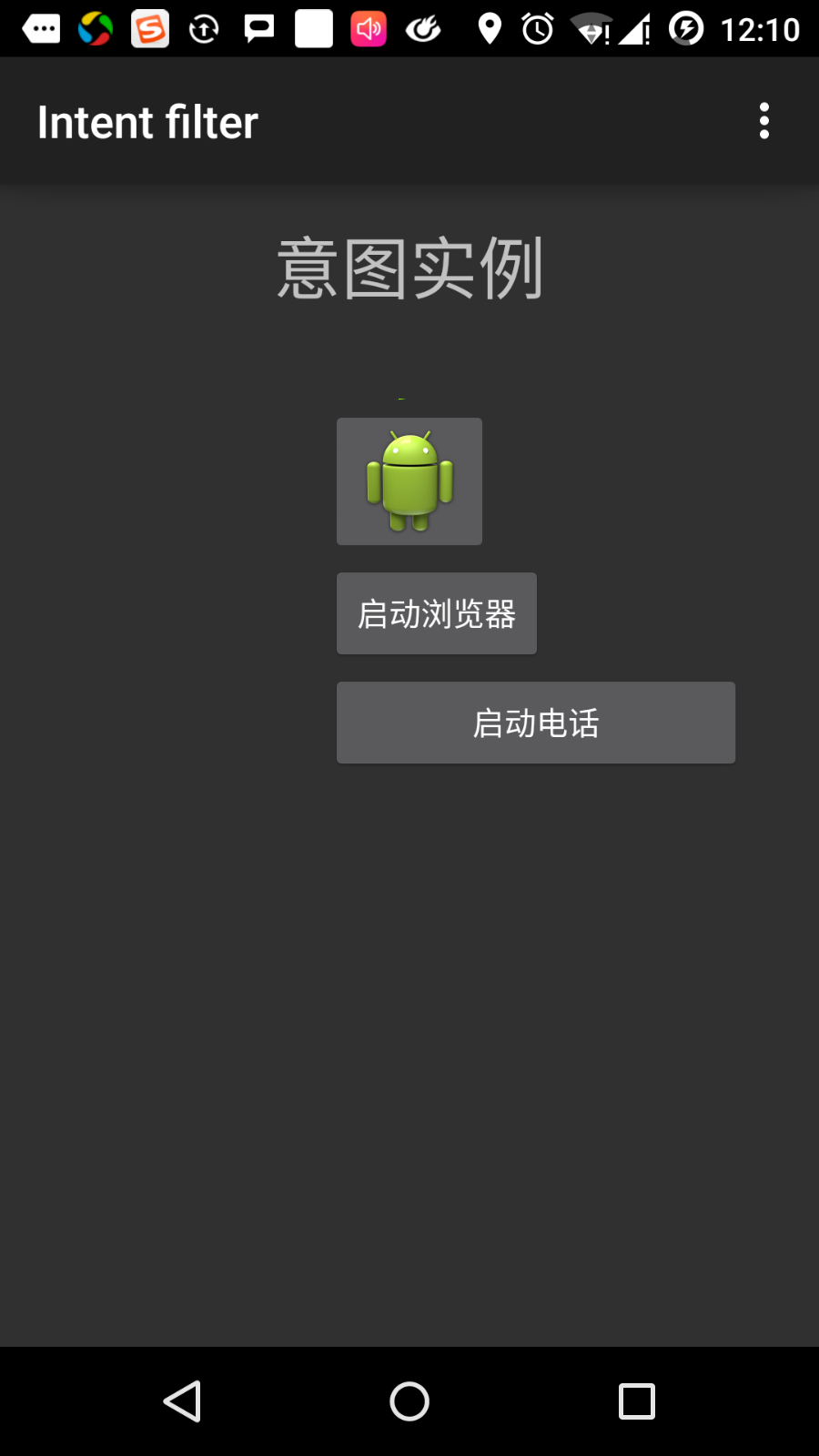
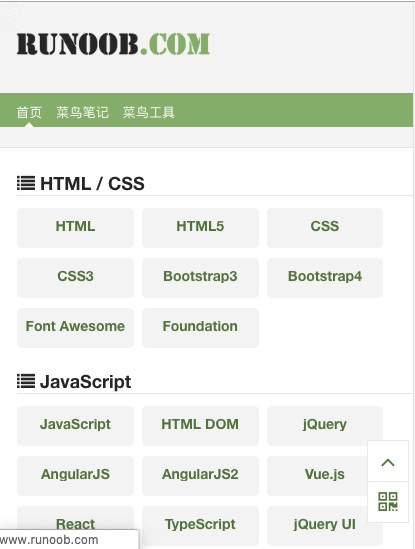
Now click the “start browser” button, which will launch a browser according to the configuration and display the https://www.runoob.com as follows:
In a similar way, you can click the “start phone” button to open the phone interface, which will allow you to dial a given phone number.
3.18.12. Intention filter 
You have seen how to use intent to invoke other activities. The Android operating system uses filters to specify a series of activities, services, and broadcast receiver processing intentions, depending on the actions, categories, and data patterns specified by the intentions. Use the < intent-filter > element in the manifest file to list the corresponding actions, categories, and data types in activities, services, and broadcast receivers.
The following example shows part of the AndroidManifest.xml file, specifying that an active com.runoob.intentfilter.CustomActivity can be called by setting actions, categories, and data:
<activity android:name=".CustomActivity"
   android:label="@string/app_name">

   <intent-filter>
      <action android:name="android.intent.action.VIEW" />
      <action android:name="com.example.MyApplication.LAUNCH" />
      <category android:name="android.intent.category.DEFAULT" />
      <data android:scheme="http" />
   </intent-filter>

</activity>
When an activity is defined by the filter above, other activities can invoke the activity in the following ways. Use android.intent.action.VIEW, use com.runoob.intentfilter.LAUNCH actions, and provide android.intent.category.DEFAULT categories.
Element specifies the expected data type of the activity to be invoked. In the above example, the data expected by the custom activity starts with “ http:// ”.”
In this case, through the filter, the intention will be passed to multiple activities or services, and the user will be asked which component to start. If the target component is not found, an exception occurs.
Before invoking the activity, there is a series of Android check tests:
The filter < intent-filter > needs to list one or more actions and cannot be empty; the filter contains at least one element, otherwise all intentions will be blocked. If more than one action is mentioned, Android tries to match one of the mentioned actions before invoking the activity.
The filter < intent-filter > may list 0, 1 or more categories. If no categories are mentioned, Android passes the test, and if more than one category is mentioned and intends to pass the type test, the classification of each intention object must match one of the categories in the filter.
Each element can specify a URI and a data type (meta media type). There are separate properties, such as each part of the URI: mode, host, port and path. The intention contains a URI and a type, and only its type matches one of the types listed in the filter, it passes the test in the data type section.
3.18.13. Example 
The following examples are some modifications to the above examples. Here we will see how Android resolves conflicts if an intention invokes two defined activities, how to use filters to invoke custom activities, and an exception if no appropriate activity is defined for the intention.
Steps | Description |
|---|---|
1 | Create an Android application using Android Studio IDE and name it Intent filter, and the package name is com.runoob.intentfilter. When creating a project, make sure that the target SDK and compile with the latest version of Android SDK use the advanced API. |
2 | Modify the src/com.runoob.intentfilter/MainActivity.java file and add code to define three listeners to correspond to the three buttons defined in the layout file. |
3 | Add a src/com.runoob.intentfilter/CustomActivity.java file to contain an activity that can be called by different intentions. |
4 | Modify the res/layout/activity_main.xml file to add three buttons to the linear layout. |
5 | Add res/lauout/custom_view.xml layout file, add simply? To display the data passed through the intent. |
6 | Modify the AndroidManifest.xml file and add < intent-filter > rules that define intentions to invoke custom activities. |
7 | Start the Android emulator to run the application and verify the results of the application’s changes. |
以下是src/com.runoob.intentfilter/MainActivity.java的内容:
package com.runoob.intentfilter;

import android.content.Intent;
import android.net.Uri;
import android.support.v7.app.ActionBarActivity;
import android.os.Bundle;
import android.view.Menu;
import android.view.MenuItem;
import android.view.View;
import android.widget.Button;


public class MainActivity extends ActionBarActivity {
    Button b1,b2,b3;

    @Override
    protected void onCreate(Bundle savedInstanceState) {
        super.onCreate(savedInstanceState);
        setContentView(R.layout.activity_main);
        b1=(Button)findViewById(R.id.button);

        b1.setOnClickListener(new View.OnClickListener() {

            @Override
            public void onClick(View v) {
                Intent i = new Intent(android.content.Intent.ACTION_VIEW,Uri.parse("https://www.runoob.com"));
                startActivity(i);
            }
        });

        b2=(Button)findViewById(R.id.button2);
        b2.setOnClickListener(new View.OnClickListener() {

            @Override
            public void onClick(View v) {
                Intent i = new Intent("com.runoob.intentfilter.LAUNCH",Uri.parse("https://www.runoob.com"));
                startActivity(i);
            }
        });

        b3=(Button)findViewById(R.id.button3);
        b3.setOnClickListener(new View.OnClickListener() {

            @Override
            public void onClick(View v) {
                Intent i = new Intent("com.runoob.intentfilter.LAUNCH",Uri.parse("https://www.runoob.com"));
                startActivity(i);
            }
        });
    }

    @Override
    public boolean onCreateOptionsMenu(Menu menu) {
        // Inflate the menu; this adds items to the action bar if it is present.
        getMenuInflater().inflate(R.menu.menu_main, menu);
        return true;
    }

    @Override
    public boolean onOptionsItemSelected(MenuItem item) {
        // Handle action bar item clicks here. The action bar will
        // automatically handle clicks on the Home/Up button, so long
        // as you specify a parent activity in AndroidManifest.xml.

        int id = item.getItemId();

        //noinspection SimplifiableIfStatement
        if (id == R.id.action_settings) {
            return true;
        }
        return super.onOptionsItemSelected(item);
    }
}
下面是src/com.runoob.intentfilter/CustomActivity.java的内容:
package com.runoob.intentfilter;

import android.app.Activity;
        import android.net.Uri;
        import android.os.Bundle;
        import android.widget.TextView;

public class CustomActivity extends Activity {
    @Override
    public void onCreate(Bundle savedInstanceState) {
        super.onCreate(savedInstanceState);
        setContentView(R.layout.custom_view);
        TextView label = (TextView) findViewById(R.id.show_data);
        Uri url = getIntent().getData();
        label.setText(url.toString());
    }
}
Here is the content of res/layout/activity_main.xml:
<RelativeLayout xmlns:android="http://schemas.android.com/apk/res/android"
    xmlns:tools="http://schemas.android.com/tools"
    android:layout_width="match_parent"
    android:layout_height="match_parent"
    android:paddingLeft="@dimen/activity_horizontal_margin"
    android:paddingRight="@dimen/activity_horizontal_margin"
    android:paddingTop="@dimen/activity_vertical_margin"
    android:paddingBottom="@dimen/activity_vertical_margin"
    tools:context=".MainActivity">

    <TextView
        android:id="@+id/textView1"
        android:layout_width="wrap_content"
        android:layout_height="wrap_content"
        android:text="意图实例"
        android:layout_alignParentTop="true"
        android:layout_centerHorizontal="true"
        android:textSize="30dp" />

    <TextView
        android:id="@+id/textView2"
        android:layout_width="wrap_content"
        android:layout_height="wrap_content"
        android:text="www.runoob.com"
        android:textColor="#ff87ff09"
        android:textSize="30dp"
        android:layout_below="@+id/textView1"
        android:layout_centerHorizontal="true" />

    <ImageButton
        android:layout_width="wrap_content"
        android:layout_height="wrap_content"
        android:id="@+id/imageButton"
        android:src="@drawable/ic_launcher"
        android:layout_below="@+id/textView2"
        android:layout_centerHorizontal="true" />

    <EditText
        android:layout_width="wrap_content"
        android:layout_height="wrap_content"
        android:id="@+id/editText"
        android:layout_below="@+id/imageButton"
        android:layout_alignRight="@+id/imageButton"
        android:layout_alignEnd="@+id/imageButton" />

    <Button
        android:layout_width="wrap_content"
        android:layout_height="wrap_content"
        android:text="通过View动作启动浏览器"
        android:id="@+id/button"
        android:layout_alignTop="@+id/editText"
        android:layout_alignRight="@+id/textView1"
        android:layout_alignEnd="@+id/textView1"
        android:layout_alignLeft="@+id/imageButton"
        android:layout_alignStart="@+id/imageButton" />

    <Button
        android:layout_width="wrap_content"
        android:layout_height="wrap_content"
        android:text="通过Launch动作启动浏览器"
        android:id="@+id/button2"
        android:layout_below="@+id/button"
        android:layout_alignLeft="@+id/button"
        android:layout_alignStart="@+id/button"
        android:layout_alignRight="@+id/textView2"
        android:layout_alignEnd="@+id/textView2" />

    <Button
        android:layout_width="wrap_content"
        android:layout_height="wrap_content"
        android:text="异常情况"
        android:id="@+id/button3"
        android:layout_below="@+id/button2"
        android:layout_alignLeft="@+id/button2"
        android:layout_alignStart="@+id/button2"
        android:layout_alignRight="@+id/textView2"
        android:layout_alignEnd="@+id/textView2" />

</RelativeLayout>
下面是res/layout/custom_view.xml文件的内容:
<?xml version="1.0" encoding="utf-8"?>
<LinearLayout xmlns:android="http://schemas.android.com/apk/res/android"
   android:orientation="vertical"
   android:layout_width="fill_parent"
   android:layout_height="fill_parent">

   <TextView android:id="@+id/show_data"
      android:layout_width="fill_parent"
      android:layout_height="400dp"/>

</LinearLayout>
下面是res/values/strings.xml文件的内容:
<?xml version="1.0" encoding="utf-8"?>
<resources>
   <string name="app_name">My Application</string>
   <string name="action_settings">Settings</string>
</resources>
下面是AndroidManifest.xml文件的内容:
<?xml version="1.0" encoding="utf-8"?>
<manifest xmlns:android="http://schemas.android.com/apk/res/android"
    package="com.runoob.intentfilter"
    android:versionCode="1"
    android:versionName="1.0" >

    <uses-sdk
        android:minSdkVersion="8"
        android:targetSdkVersion="22" />

    <application
        android:allowBackup="true"
        android:icon="@drawable/ic_launcher"
        android:label="@string/app_name"
        android:theme="@style/Base.Theme.AppCompat" >

        <activity
            android:name="com.runoob.intentfilter.MainActivity"
            android:label="@string/app_name" >

            <intent-filter>
                <action android:name="android.intent.action.MAIN" />
                <category android:name="android.intent.category.LAUNCHER" />
            </intent-filter>

        </activity>

        <activity android:name="com.runoob.intentfilter.CustomActivity"
            android:label="@string/app_name">

        <intent-filter>
            <action android:name="android.intent.action.VIEW" />
            <action android:name="com.runoob.intentfilter.LAUNCH" />
            <category android:name="android.intent.category.DEFAULT" />
            <data android:scheme="http" />
        </intent-filter>

        </activity>

    </application>
</manifest>
Let’s run the Intent filter application that we just modified. I assume that you have created AVD when you installed the environment. Open the active file in your project and click the icon in the toolbar to run the application in Android Studio. Android Studio installs the application on AVD and starts it. If all goes well, it will be displayed on the simulator window as follows:
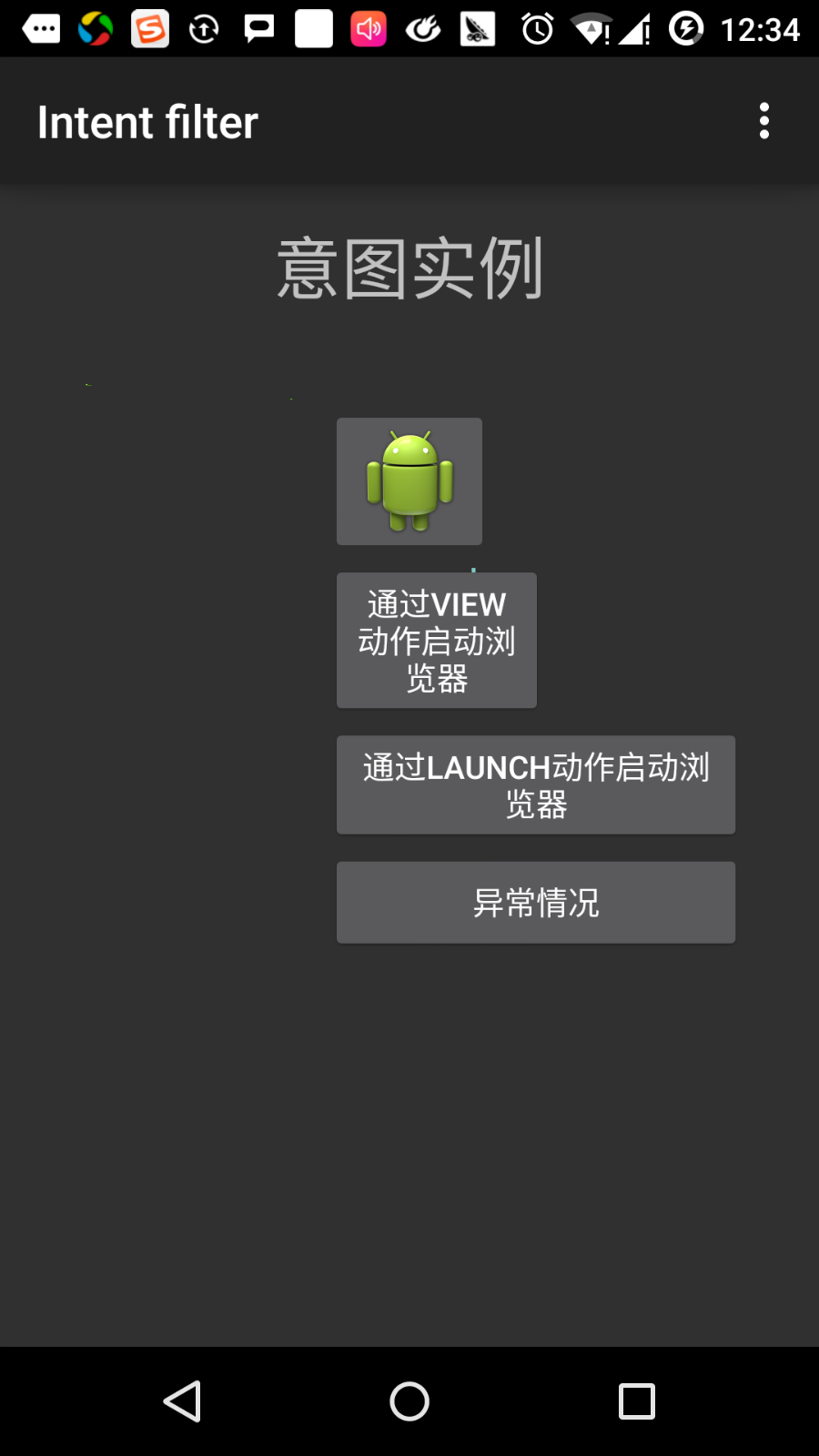
Click the first button, “start the browser using the View action”. Here we define that our custom activity contains “android.intent.action.VIEW”, and the Android system has defined a default activity corresponding to the VIEW action to launch the Web browser, so Android displays the following options to select the activity you want to start:
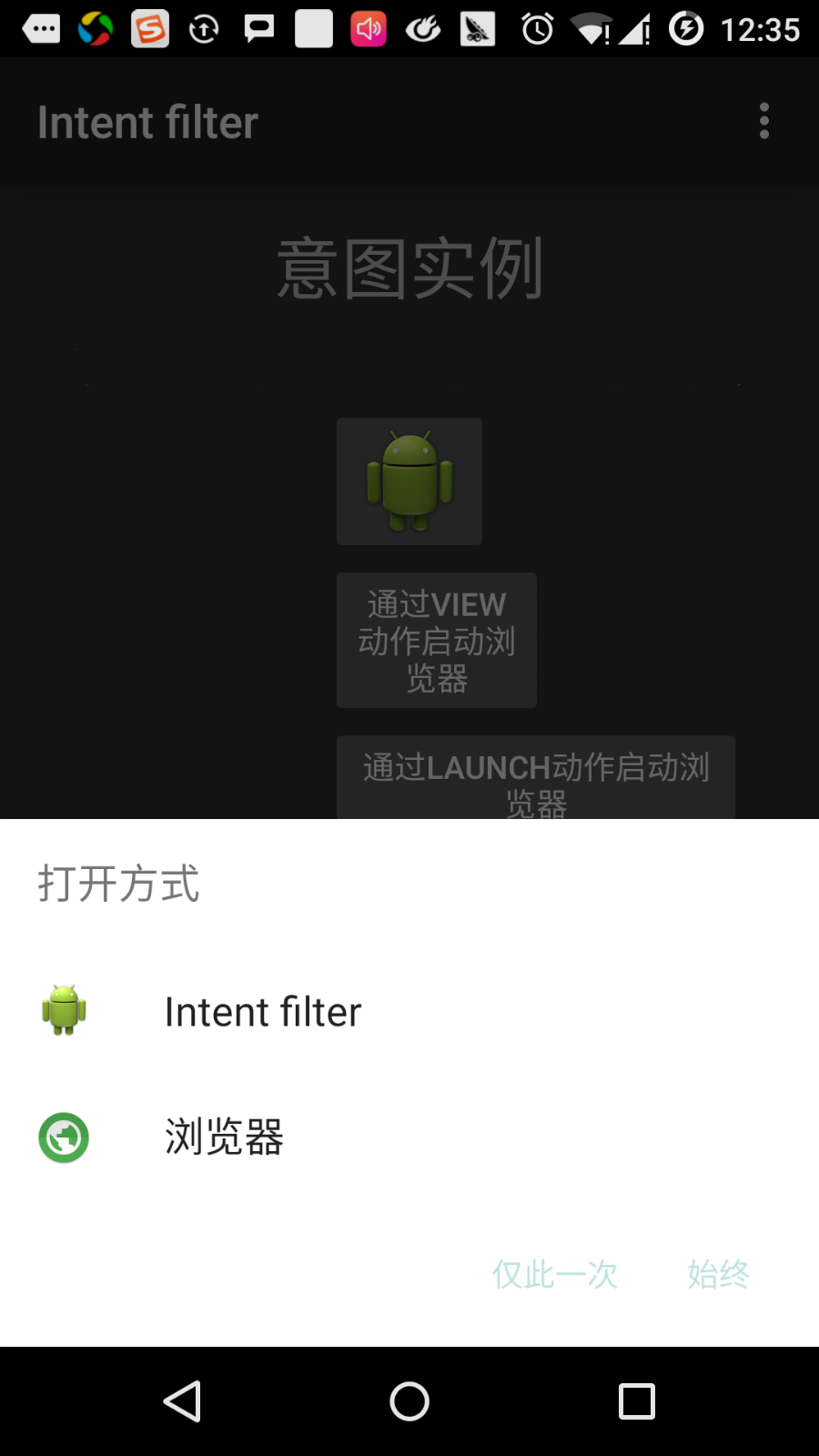
If you choose a browser, Android will launch the Web browser and open the www.runoob.com website. If you select the IntentDemo option, Android will launch CustomActivity, which does nothing but capture and display the passed data in TextView.
Now, go back through the back button and click the “launch browser through Launch Action” button, where Android applies the filter to select the defined activity and simply starts the custom activity.
Use the return button again and click the “exception condition” button, where Android tries to find a valid filter given by the intention, but does not find a defined valid activity. Because we use https instead of http’s data, and given the correct action, Android generates an exception at a time. As follows:
