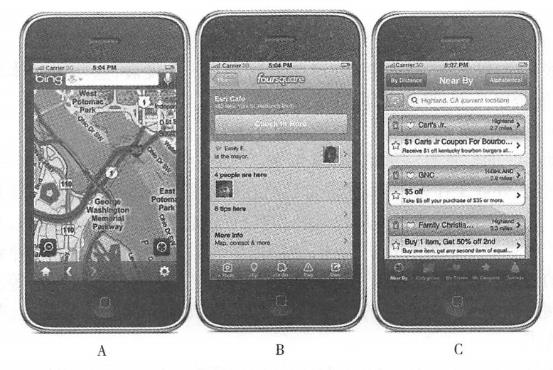
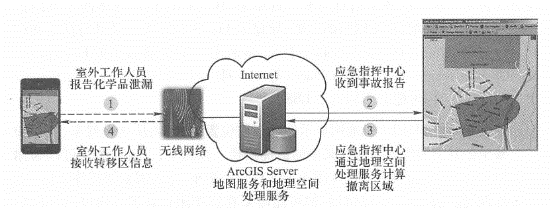
The application field of mobile GIS has developed rapidly in recent years. This section introduces examples in several fields. Traditionally, collecting and editing outdoor geographical data is time-consuming and error-prone. Outdoor workers generally need to carry drawing paper or paper maps to manually draw and record outdoors. After returning to the office, these records will be manually recorded into the GIS database. This entry process is time-consuming, inefficient, and prone to errors, affecting data accuracy and resulting in delayed data updates. Mobile GIS has proven to be an ideal solution to these problems. It can help outdoor workers obtain digital high-precision location information and its attribute information faster and better, so it has been used in outdoor measurement and data collection. More widely used. In recent years, through integration with the Web, mobile GIS can submit freshly collected outdoor data to the server in real time and immediately use it by other GIS functions (Figure 5.11). It can also be further processed to obtain higher accuracy and then stored in the GIS database. For example, the Virginia Department of Forestry has developed the Integrated Forest Resources Information System (IFRIS) based on Arc-GIS Mobile, which allows staff to quickly Fig. 64 Through wireless communication technology, field data collected by mobile GIS can be synchronized to the server database in a timely manner # Collect pest and disease and water quality information and submit it to the office’s geographical database. The U.S. Census Bureau launched a national census in 2010. During this large-scale survey, they configured ArcPad for censors to make household visits to households that did not return questionnaires or were difficult to identify forms., and can return information to the server in a timely manner. Nassau County, Florida, USA, has improved its data collection infrastructure with mobile GIS; Victoria, Australia, used mobile GIS in forest fire search operations, as detailed below. Nassau County, Florida, United States In 2008, Nassau County plans to improve the way data is collected to make it easier for government departments to use it. At the same time, the county also hopes to simplify the user interface and workflow so that field personnel can carry out their work smoothly without requiring extensive training. In this project, Nassau County selected the Esri Standard Data Model to build the county’s water and drainage infrastructure geospatial database. Based on this database, a map document (MXD) was provided and published as a Web service. On the mobile user side, a mobile platform equipped with ArcGIS Mobile and high-precision Trimble GPS is used. Through this application, Mobile device can obtain data and basic basemaps from ArcGIS Server, and data collected outdoors can also be submitted to ArcGIS Server through Web services. The updated data will be displayed on the Web map in a timely manner so that the county’s GIS mapping experts can conduct quality assessment and quality control of the collected data and decide whether to approve the integration of the data into the main database (ESRI,2009). It takes about 15 minutes for each field working group to familiarize themselves with the use of the mobile GIS terminal. Thanks to the use of this system, the daily collection efficiency of the field working group has been greatly improved, and the data accuracy and update frequency have also been greatly improved. This digital information can be directly reviewed by map review experts in a Web-based map browser, eliminating the need for manual digitization, thereby improving the efficiency of data collection in the county and better and more timely supporting other government departments. GIS applications. Victoria, Australia On February 7, 2009, a series of forest fires broke out in Australia and quickly swept across Victoria under extreme weather conditions. This sudden disaster covered an area of 220,000 hm2, killing 173 people and injuring 500 others. It is the largest number of deaths caused by forest fires on record in Australia. After that, the Victoria government asked state police to search for survivors within 50m of all homes and roads. Due to the very large area of the area, many towns and communities have been reduced to ruins, making it difficult to identify street signs, house numbers and mailboxes. As required by the job, some legal documents were also filled out for each house searched. The work was arduous and time was tight. These challenges prompted the state to adopt mobile GIS in search and rescue efforts. The search team used GIS technology to coordinate task allocation among teams and understand the search progress of each team. ArcPad software was used during the task execution process (Figure 5. 12)Assign work. The NAVTEQ street map installed in ArcPad provides navigation capabilities for search teams, using built-in GPS to allow team members to quickly find their assigned neighborhoods and houses in ruins. Mobile GIS spreadsheets replace the paper forms of the past. The spreadsheets are automatically checked and necessary information items must be filled in, thus ensuring that the information is completely and accurately recorded. Through 3G wireless communication, the information collected by the collection team can be quickly synchronized into the database of the search and rescue center, and can be integrated into the State Police Department’s Web map website in a timely manner. Rescue leaders can only look at the map to know which areas have been searched and where the next search focus is, thus improving the process and efficiency of search and rescue work (Barra S, 2009). Fig. 65 Even if road signs and house numbers are destroyed by fire, Australia forest fire search teams can still use mobile GIS to find the right neighborhood among the broken walls. Record searched houses with mobile GIS digital tables and digital cameras with built-in GPS # Emergency response generally involves one or more command centers and dozens or even hundreds of field rescue personnel. In an emergency, the command center needs to make a quick decision in a short period of time. Whether the decision is correct or not is likely to affect the lives of many disaster victims and even rescue workers. Whether we can obtain the latest and most detailed information about the situation in a timely manner is crucial to whether the command center can make the right decision. Mobile GIS has the advantages of mobility, real-time and synchronization with servers, and has become one of the key components of many emergency systems. AEGIS was jointly developed by Lomarinda University and ESRI in the United States (for an introduction, see Section 4. Section 3) plays a variety of roles in projects such as the ESRI situational awareness package, and the All Hazards Emergency Operations Management System (ALLHAZ) jointly developed by Jackson State University and ESRI (Matlack, Wesp and Kehrlein, 2007), including Field map browsing and query: The emergency command center’s WebGIS server can provide map and image services to mobile clients. Mobile GIS can read and aggregate information from multiple sources in real time, including real-time meteorological data, road and traffic videos, hospital conditions and casualties. This information can help disaster relief workers gain a comprehensive understanding of the situation on the spot. Sometimes, data such as basemaps can also be pre-loaded into mobile devices, allowing it to run offline when wireless communication is not possible. Resource tracking: The location of mobile GIS can be tracked, so emergency command centers can track the location of disaster relief resources such as field workers, fire trucks, ambulances and helicopters (see Section 4. Section 3), determine the rescue personnel closest to the scene of the accident and make the best rescue plan. Accident report: Outdoor staff can collect first-hand information about the accident site through mobile GIS terminals, such as location, severity, casualties, on-site photos and videos, and generate reports in a timely manner through wireless networks and submit them to the server. Agencies such as emergency command centers can use this information in a timely manner to quickly formulate disaster relief plans. Collaborative cooperation: Mobile GIS can exchange data, maps, analysis results, text messages, etc. with offices and other mobile users to achieve effective coordination and cooperation. The command center can select an area on the map and send group text messages to people in the area. See Figure 5. 13 shows that in a chemical leak accident, mobile GIS can support the following communication and coordination: ① Field personnel use mobile GIS to collect the chemical leak location, chemical type, leakage volume, wind speed and wind direction, etc., and submit them to the server; ② The emergency command center receives the chemical leak report, calls the geospatial processing service of ArcGIS Server, and calculates the population that needs to be evacuated in the affected area and surrounding areas; ③ArcGIS Server’s Web services can provide public security, transportation, and medical departments with the scope and population information of neighborhoods that need to be evacuated, helping them determine where to set up roadblocks to prevent people from entering, where to divert traffic to speed up evacuations, and where to find nursing homes, kindergartens and hospitals require special care. Fig. 66 Mobile device exchanges data and geospatial analysis functions between GIS servers, thereby assisting communication and coordination between command centers and multiple departments. (Thanks:Tele Atlas North America, lnc.) # Many universities have vast campuses, many buildings, and many institutions. When you are new to school, people often get lost, and many students, parents, faculty and other people who come to school have this experience. Mobile maps are easy to carry, dynamic and flexible, and are good guides for people. The University of Oregon in the United States has developed an iPhone-based mobile campus map that allows users to find the locations of departments, class locations and various campus activities. The app has the latest and most detailed campus map of the University of Oregon and can help students find teaching buildings, dormitories, bookstores, registration locations, and classroom locations. Using the iPhone’s own GPS, the system can display where users are currently on campus. The “Walk Me” function of this system can calculate and display the walking path between any two locations on campus, and will give the estimated walking time. The app also allows students to find where they are attending classes, safe spots on campus at night or in emergencies, find where school events such as art exhibitions and ball games are held, and keep track of news events happening on the 295-acre ® campus., photos and video information, and can be shared through social media. In addition to the school’s current map, the app also provides aerial images of the school from 2008 and 1947, and a historical map from 1913 to show the school’s development and inherit campus culture. This application was developed by the Information Image Laboratory of the Department of Geography at the University of Oregon. They used the school’s own campus map and other data, used the ArcGIS API for iOS technology to develop this mobile version of the campus map, and released the application in Apple’s App Store, for free download by users. This app has been warmly welcomed and has been downloaded by many teachers, students and other users. Especially during freshmen’s studies, it has made it easier for students to familiarize themselves with the campus and adapt to college life. Location-based services (LBS) first determine the geographical location of a mobile user, and then provide various information services related to it based on the location. In recent years, the widespread promotion of 3G and 4G mobile networks, the proliferation of mobile applications, and the development of Social networks have led to the rapid development of LBS and its combination with social networking, forming SoLoMo(social, locaI, mobile; social, localization, mobile), and a series of applications such as Foursquare, mobiQpons, Groupon and Facebook Places have emerged. If you are traveling to a strange city for business or travel, you may use the following LBS: Roadfinding and navigation: Use mobile maps to show your current location and provide the best path to a place by driving, walking, and taking public transportation from here. On the way, mobile maps can also provide you Display traffic information on the road ahead (Figure 5. 14A), information such as whether there is a traffic jam and whether a detour is needed. Check surrounding information: After staying in a hotel, you may need to eat near the hotel. You can use apps such as AroimdMe or YPMobile to find the latest businesses and services. These apps can return query results as maps, sorted lists (such as ‘distance from your current location), etc. Click on a query result to return the merchant’s address, phone number, website and Information such as user ratings to help you make your choice. Check out netizens ‘recommendations: After arriving at the restaurant, you can use your mobile phone to check in services such as Foursquare to see what other netizens who have been here have commented on the restaurant and what suggestions they have left (Figure 5. 14B), such as the service attitude, which dish to recommend or which dish tastes poorly. Mobile social networking: In restaurants or other locations, you can use Foursquare or other mobile social apps to view other people who have checked in, view their photos and messages, etc.(Figure 5. 14B) See if you have any friends or make some new friends. Mobile advertising: You may plan to go shopping before heading home from a business trip. At this time, you can use mobile coupon apps such as mobiQpons to check if there are coupons from a mall near you. Use your mobile phone to display the coupon to the cashier at checkout to enjoy the discount. You can also use mobile apps such as Groupon to check Fig. 67 For LBS examples, from left to right, you use Microsoft Bing Maps to check real-time speed, use Foursquare check-in service to check the information of other check-in netizens and their messages, and use mobiQpons to find promotions and discount coupons from nearby commercial outlets. (Thanks: Microsoft, Foursquare and mobiQpons) # Watch or participate in group buying activities near you to enjoy discounts on group buying. In addition to the above functions, location-based services also bring some related business opportunities to LBS providers, such as Searching for people: Help users find lost people, pets, mobile phones or cars through mobile positioning functions. Resource tracking: Provide tracking services to taxi companies or equipment rental companies to show the location of their vehicles and other equipment, making it easier for these companies to manage and dispatch these equipment. Proximity reminder: Select matching dates for users of mobile dating services, and send reminder text messages to both parties when there is a user who meets the requirements and has also selected mobile dating services nearby. Provide location-based promotional advertisements to shopping malls, and push advertising text messages to users when they enter the vicinity of the shopping mall. For example, Apple’s iPhone 4S provides a location-based reminder service that reminds users to do certain set things when they arrive at home or work.Surveying, mapping, inspection and asset detail #


Incident Response Service #
Mobile version of campus map #
location-based services #