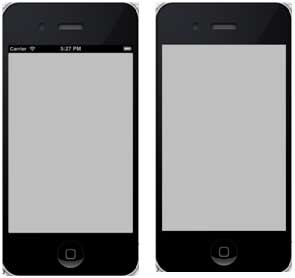
The status bar displays key information about the device.
Device model or network provider
Network signal strength
Battery usage
time
The status bar is as follows:

Ways to hide the status bar
[[UIApplication sharedApplication] setStatusBarHidden:YES];
9.14.1. Another way to hide the status bar 
We can also hide the status bar by adding rows and selecting UIStatusBarHidden with the help of info.plist, and make its value NO.
9.14.2. Add a custom method hideStatusbar to the class 
It hides the status bar for animation and also adjusts the amount of space we think takes up the status bar.
-(void)hideStatusbar{
    [[UIApplication sharedApplication] setStatusBarHidden:YES
    withAnimation:UIStatusBarAnimationFade];
    [UIView beginAnimations:@"Statusbar hide" context:nil];
    [UIView setAnimationDuration:0.5];
    [self.view setFrame:CGRectMake(0, 0, 320, 480)];
    [UIView commitAnimations];
}
Update the viewDidLoad in ViewController.m, as follows:
- (void)viewDidLoad
{
    [super viewDidLoad];
    // The method hideStatusbar called after 2 seconds
    [self performSelector:@selector(hideStatusbar)
    withObject:nil afterDelay:2.0];
    // Do any additional setup after loading the view, typically from a nib.
}
9.14.3. Initial output and output after 2 seconds