Used in the MySQL table INSERT INTO SQL statement to insert data.
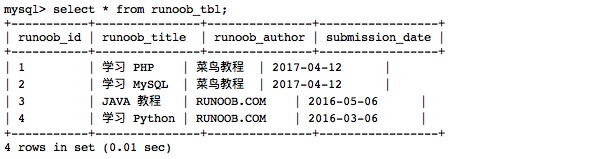
You can insert data into the datasheet through the mysql > command prompt window, or through the PHP script. The following is a common method for inserting data into an MySQL data table INSERT INTO SQL syntax: If the data is character type, you must use single or double quotation marks, such as “value”. Next we will use SQL INSERT INTO Statement to the MySQL data table In the following example, we will insert three pieces of data into the runoob_tbl table: 注意: Using the arrow mark-> is not part of the SQL statement, it just represents a new line. If a SQL statement is too long, we can use the enter key to create a new line to write the SQL statement. The command Terminator of the SQL statement is a semicolon. In the above example, we did not provide the data for runoob_id because we set it to the AUTO_INCREMENT property when we created the table. Therefore, this field is automatically incremented without us to set it. In the instance, NOW () is a MySQL function that returns a date and time. Next, we can view the data table data with the following statement: Read the data table: Output result:Grammar 
INSERT INTO table_name ( field1, field2,...fieldN )
                       VALUES
                       ( value1, value2,...valueN );
Insert data through the command prompt window 
runoob_tbl
Insert dataExample 
root@host# mysql -u root -p password;
Enter password:*******
mysql> use RUNOOB;
Database changed
mysql> INSERT INTO runoob_tbl
    -> (runoob_title, runoob_author, submission_date)
    -> VALUES
    -> ("学习 PHP", "菜鸟教程", NOW());
Query OK, 1 rows affected, 1 warnings (0.01 sec)
mysql> INSERT INTO runoob_tbl
    -> (runoob_title, runoob_author, submission_date)
    -> VALUES
    -> ("学习 MySQL", "菜鸟教程", NOW());
Query OK, 1 rows affected, 1 warnings (0.01 sec)
mysql> INSERT INTO runoob_tbl
    -> (runoob_title, runoob_author, submission_date)
    -> VALUES
    -> ("JAVA 教程", "RUNOOB.COM", '2016-05-06');
Query OK, 1 rows affected (0.00 sec)
mysql>
select\*fromrunoob_tbl;