2.24.1. Method 1. Docker pull tomcat 
Find Docker Hub Tomcat image on:
` <../wp-content/uploads/2016/06/F5FE5252-6FD3-4DE3-880B-808477E45676.jpg>` __
You can view other versions of tomcat through Sort by. The default is the latest version. tomcat:latest .
In addition, we can use the docker search tomcat command on the console to view the available versions:
runoob@runoob:~/tomcat$ docker search tomcat
NAME                       DESCRIPTION                                     STARS     OFFICIAL   AUTOMATED
tomcat                     Apache Tomcat is an open source implementa...   744       [OK]
dordoka/tomcat             Ubuntu 14.04, Oracle JDK 8 and Tomcat 8 ba...   19                   [OK]
consol/tomcat-7.0          Tomcat 7.0.57, 8080, "admin/admin"              16                   [OK]
consol/tomcat-8.0          Tomcat 8.0.15, 8080, "admin/admin"              14                   [OK]
cloudesire/tomcat          Tomcat server, 6/7/8                            8                    [OK]
davidcaste/alpine-tomcat   Apache Tomcat 7/8 using Oracle Java 7/8 wi...   6                    [OK]
andreptb/tomcat            Debian Jessie based image with Apache Tomc...   4                    [OK]
kieker/tomcat                                                              2                    [OK]
fbrx/tomcat                Minimal Tomcat image based on Alpine Linux      2                    [OK]
jtech/tomcat               Latest Tomcat production distribution on l...   1                    [OK]
Here we pull the official image:
runoob@runoob:~/tomcat$ docker pull tomcat
After waiting for the download to complete, we can look up the image whose REPOSITORY is tomcat in the list of local images.
runoob@runoob:~/tomcat$ docker images|grep tomcat
tomcat              latest              70f819d3d2d9        7 days ago          335.8 MB
2.24.2. Method 2. Build through Dockerfile 
Create Dockerfile
First, create the directory tomcat, which will be used to store the following related things.
runoob@runoob:~$ mkdir -p ~/tomcat/webapps ~/tomcat/logs ~/tomcat/conf
The webapps directory will be mapped to the application directory configured by the tomcat container.
The logs directory is mapped to the log directory of the tomcat container.
The configuration file in the conf directory will be mapped to the configuration file of the tomcat container.
Go to the tomcat directory you created and create the Dockerfile.
FROM openjdk:8-jre

ENV CATALINA_HOME /usr/local/tomcat
ENV PATH $CATALINA_HOME/bin:$PATH
RUN mkdir -p "$CATALINA_HOME"
WORKDIR $CATALINA_HOME

# let "Tomcat Native" live somewhere isolated
ENV TOMCAT_NATIVE_LIBDIR $CATALINA_HOME/native-jni-lib
ENV LD_LIBRARY_PATH ${LD_LIBRARY_PATH:+$LD_LIBRARY_PATH:}$TOMCAT_NATIVE_LIBDIR

# runtime dependencies for Tomcat Native Libraries
# Tomcat Native 1.2+ requires a newer version of OpenSSL than debian:jessie has available
# > checking OpenSSL library version >= 1.0.2...
# > configure: error: Your version of OpenSSL is not compatible with this version of tcnative
# see http://tomcat.10.x6.nabble.com/VOTE-Release-Apache-Tomcat-8-0-32-tp5046007p5046024.html (and following discussion)
# and https://github.com/docker-library/tomcat/pull/31
ENV OPENSSL_VERSION 1.1.0f-3+deb9u2
RUN set -ex; \
    currentVersion="$(dpkg-query --show --showformat '${Version}\n' openssl)"; \
    if dpkg --compare-versions "$currentVersion" '<<' "$OPENSSL_VERSION"; then \
        if ! grep -q stretch /etc/apt/sources.list; then \
# only add stretch if we're not already building from within stretch
            { \
                echo 'deb http://deb.debian.org/debian stretch main'; \
                echo 'deb http://security.debian.org stretch/updates main'; \
                echo 'deb http://deb.debian.org/debian stretch-updates main'; \
            } > /etc/apt/sources.list.d/stretch.list; \
            { \
# add a negative "Pin-Priority" so that we never ever get packages from stretch unless we explicitly request them
                echo 'Package: *'; \
                echo 'Pin: release n=stretch*'; \
                echo 'Pin-Priority: -10'; \
                echo; \
# ... except OpenSSL, which is the reason we're here
                echo 'Package: openssl libssl*'; \
                echo "Pin: version $OPENSSL_VERSION"; \
                echo 'Pin-Priority: 990'; \
            } > /etc/apt/preferences.d/stretch-openssl; \
        fi; \
        apt-get update; \
        apt-get install -y --no-install-recommends openssl="$OPENSSL_VERSION"; \
        rm -rf /var/lib/apt/lists/*; \
    fi

RUN apt-get update && apt-get install -y --no-install-recommends \
        libapr1 \
    && rm -rf /var/lib/apt/lists/*

# see https://www.apache.org/dist/tomcat/tomcat-$TOMCAT_MAJOR/KEYS
# see also "update.sh" (https://github.com/docker-library/tomcat/blob/master/update.sh)
ENV GPG_KEYS 05AB33110949707C93A279E3D3EFE6B686867BA6 07E48665A34DCAFAE522E5E6266191C37C037D42 47309207D818FFD8DCD3F83F1931D684307A10A5 541FBE7D8F78B25E055DDEE13C370389288584E7 61B832AC2F1C5A90F0F9B00A1C506407564C17A3 713DA88BE50911535FE716F5208B0AB1D63011C7 79F7026C690BAA50B92CD8B66A3AD3F4F22C4FED 9BA44C2621385CB966EBA586F72C284D731FABEE A27677289986DB50844682F8ACB77FC2E86E29AC A9C5DF4D22E99998D9875A5110C01C5A2F6059E7 DCFD35E0BF8CA7344752DE8B6FB21E8933C60243 F3A04C595DB5B6A5F1ECA43E3B7BBB100D811BBE F7DA48BB64BCB84ECBA7EE6935CD23C10D498E23

ENV TOMCAT_MAJOR 8
ENV TOMCAT_VERSION 8.5.32
ENV TOMCAT_SHA512 fc010f4643cb9996cad3812594190564d0a30be717f659110211414faf8063c61fad1f18134154084ad3ddfbbbdb352fa6686a28fbb6402d3207d4e0a88fa9ce

ENV TOMCAT_TGZ_URLS \
# https://issues.apache.org/jira/browse/INFRA-8753?focusedCommentId=14735394#comment-14735394
    https://www.apache.org/dyn/closer.cgi?action=download&filename=tomcat/tomcat-$TOMCAT_MAJOR/v$TOMCAT_VERSION/bin/apache-tomcat-$TOMCAT_VERSION.tar.gz \
# if the version is outdated, we might have to pull from the dist/archive :/
    https://www-us.apache.org/dist/tomcat/tomcat-$TOMCAT_MAJOR/v$TOMCAT_VERSION/bin/apache-tomcat-$TOMCAT_VERSION.tar.gz \
    https://www.apache.org/dist/tomcat/tomcat-$TOMCAT_MAJOR/v$TOMCAT_VERSION/bin/apache-tomcat-$TOMCAT_VERSION.tar.gz \
    https://archive.apache.org/dist/tomcat/tomcat-$TOMCAT_MAJOR/v$TOMCAT_VERSION/bin/apache-tomcat-$TOMCAT_VERSION.tar.gz

ENV TOMCAT_ASC_URLS \
    https://www.apache.org/dyn/closer.cgi?action=download&filename=tomcat/tomcat-$TOMCAT_MAJOR/v$TOMCAT_VERSION/bin/apache-tomcat-$TOMCAT_VERSION.tar.gz.asc \
# not all the mirrors actually carry the .asc files :'(
    https://www-us.apache.org/dist/tomcat/tomcat-$TOMCAT_MAJOR/v$TOMCAT_VERSION/bin/apache-tomcat-$TOMCAT_VERSION.tar.gz.asc \
    https://www.apache.org/dist/tomcat/tomcat-$TOMCAT_MAJOR/v$TOMCAT_VERSION/bin/apache-tomcat-$TOMCAT_VERSION.tar.gz.asc \
    https://archive.apache.org/dist/tomcat/tomcat-$TOMCAT_MAJOR/v$TOMCAT_VERSION/bin/apache-tomcat-$TOMCAT_VERSION.tar.gz.asc

RUN set -eux; \
    \
    savedAptMark="$(apt-mark showmanual)"; \
    apt-get update; \
    \
    apt-get install -y --no-install-recommends gnupg dirmngr; \
    \
    export GNUPGHOME="$(mktemp -d)"; \
    for key in $GPG_KEYS; do \
        gpg --keyserver ha.pool.sks-keyservers.net --recv-keys "$key"; \
    done; \
    \
    apt-get install -y --no-install-recommends wget ca-certificates; \
    \
    success=; \
    for url in $TOMCAT_TGZ_URLS; do \
        if wget -O tomcat.tar.gz "$url"; then \
            success=1; \
            break; \
        fi; \
    done; \
    [ -n "$success" ]; \
    \
    echo "$TOMCAT_SHA512 *tomcat.tar.gz" | sha512sum -c -; \
    \
    success=; \
    for url in $TOMCAT_ASC_URLS; do \
        if wget -O tomcat.tar.gz.asc "$url"; then \
            success=1; \
            break; \
        fi; \
    done; \
    [ -n "$success" ]; \
    \
    gpg --batch --verify tomcat.tar.gz.asc tomcat.tar.gz; \
    tar -xvf tomcat.tar.gz --strip-components=1; \
    rm bin/*.bat; \
    rm tomcat.tar.gz*; \
    rm -rf "$GNUPGHOME"; \
    \
    nativeBuildDir="$(mktemp -d)"; \
    tar -xvf bin/tomcat-native.tar.gz -C "$nativeBuildDir" --strip-components=1; \
    apt-get install -y --no-install-recommends \
        dpkg-dev \
        gcc \
        libapr1-dev \
        libssl-dev \
        make \
        "openjdk-${JAVA_VERSION%%[.~bu-]*}-jdk=$JAVA_DEBIAN_VERSION" \
    ; \
    ( \
        export CATALINA_HOME="$PWD"; \
        cd "$nativeBuildDir/native"; \
        gnuArch="$(dpkg-architecture --query DEB_BUILD_GNU_TYPE)"; \
        ./configure \
            --build="$gnuArch" \
            --libdir="$TOMCAT_NATIVE_LIBDIR" \
            --prefix="$CATALINA_HOME" \
            --with-apr="$(which apr-1-config)" \
            --with-java-home="$(docker-java-home)" \
            --with-ssl=yes; \
        make -j "$(nproc)"; \
        make install; \
    ); \
    rm -rf "$nativeBuildDir"; \
    rm bin/tomcat-native.tar.gz; \
    \
# reset apt-mark's "manual" list so that "purge --auto-remove" will remove all build dependencies
    apt-mark auto '.*' > /dev/null; \
    [ -z "$savedAptMark" ] || apt-mark manual $savedAptMark; \
    apt-get purge -y --auto-remove -o APT::AutoRemove::RecommendsImportant=false; \
    rm -rf /var/lib/apt/lists/*; \
    \
# sh removes env vars it doesn't support (ones with periods)
# https://github.com/docker-library/tomcat/issues/77
    find ./bin/ -name '*.sh' -exec sed -ri 's|^#!/bin/sh$|#!/usr/bin/env bash|' '{}' +

# verify Tomcat Native is working properly
RUN set -e \
    && nativeLines="$(catalina.sh configtest 2>&1)" \
    && nativeLines="$(echo "$nativeLines" | grep 'Apache Tomcat Native')" \
    && nativeLines="$(echo "$nativeLines" | sort -u)" \
    && if ! echo "$nativeLines" | grep 'INFO: Loaded APR based Apache Tomcat Native library' >&2; then \
        echo >&2 "$nativeLines"; \
        exit 1; \
    fi

EXPOSE 8080
CMD ["catalina.sh", "run"]
Create an image through Dockerfile and replace it with your own name:
runoob@runoob:~/tomcat$ docker build -t tomcat .
After the creation is completed, we can find the newly created image in the local image list:
runoob@runoob:~/tomcat$ docker images|grep tomcat
tomcat              latest              70f819d3d2d9        7 days ago          335.8 MB
Use tomcat mirroring 
2.24.3. Run the container 
runoob@runoob:~/tomcat$ docker run --name tomcat -p 8080:8080 -v $PWD/test:/usr/local/tomcat/webapps/test -d tomcat
acb33fcb4beb8d7f1ebace6f50f5fc204b1dbe9d524881267aa715c61cf75320
runoob@runoob:~/tomcat$
Command description:
-p 8080:8080: Map port 8080 of the host to port 8080 of the container.
-v $PWD/test:/usr/local/tomcat/webapps/test: Mount the test in the current directory in the host to the / test of the container.
Check the container startup status
runoob@runoob:~/tomcat$ docker ps
CONTAINER ID    IMAGE     COMMAND               ... PORTS                    NAMES
acb33fcb4beb    tomcat    "catalina.sh run"     ... 0.0.0.0:8080->8080/tcp   tomcat
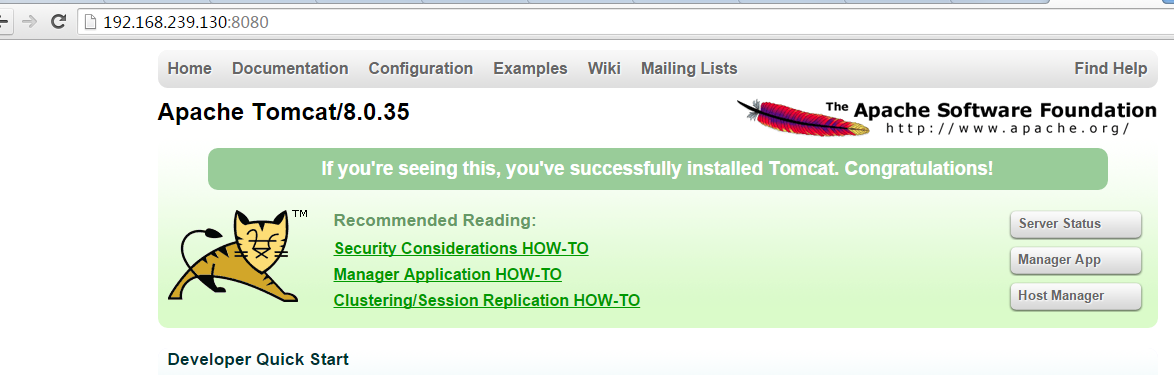
Access through a browser