2.14.1. What is Dockerfile? 
Dockerfile is a text file used to build an image. The text contains instructions and instructions needed to build the image.
2.14.2. Use Dockerfile to customize the image 
Here only explains how to run the Dockerfile file to customize an image. The instructions in the Dockerfile file are described in detail in the next section, where you just need to know the construction process.
1、下面以定制一个 nginx 镜像(构建好的镜像内会有一个 /usr/share/nginx/html/index.html 文件)
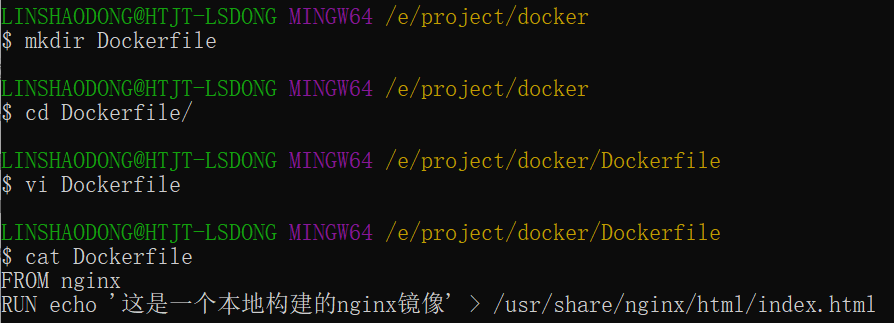
Under an empty directory, create a new file named Dockerfile and add the following to the file:
FROM nginx
RUN echo '这是一个本地构建的nginx镜像' > /usr/share/nginx/html/index.html
2、FROM 和 RUN 指令的作用
FROM Customized images are all based on FROM images, and the nginx here is the basic image needed for customization. All subsequent operations are based on nginx.
RUN Used to execute the command line commands that follow There are two formats:
Shell format:
RUN <命令行命令>
# <命令行命令> 等同于,在终端操作的 shell 命令。
Exec format:
RUN ["可执行文件", "参数1", "参数2"]
# 例如:
# RUN ["./test.php", "dev", "offline"] 等价于 RUN ./test.php dev offline
注意 Each time the Dockerfile instruction is executed, a new layer is created on the docker. So too many meaningless layers will cause the mirror image to expand too much. For example:
FROM centos
RUN yum -y install wget
RUN wget -O redis.tar.gz
"http://download.redis.io/releases/redis-5.0.3.tar.gz"
RUN tar -xvf redis.tar.gz
The above execution creates a 3-layer image. Can be simplified to the following format:
FROM centos
RUN yum -y install wget \\
    && wget -O redis.tar.gz
"http://download.redis.io/releases/redis-5.0.3.tar.gz" \\
    && tar -xvf redis.tar.gz
As above, connect the command with the & & symbol, and when executed, only one layer of mirror will be created.
2.14.3. Start building an image 
In the directory where the Dockerfile file is stored, perform the build action.
The following example builds a nginx:v3 (image name: image label) from the Dockerfile in the directory.
注 The last one. Represents the context path for this execution, which is described in the next section.
$ docker build -t nginx:v3 .

The above shows that it has been built successfully.
2.14.4. Context path 
In the previous section, the last instruction was mentioned. It’s a context path, so what is a context path?
$ docker build -t nginx:v3 .
Context path means that when docker builds an image, sometimes it wants to use local files (such as copying). After learning about this path, the docker build command will package all the contents under the path.
解析 Because the running mode of docker is CCompact S. Our local machine is CQuery docker engine is S. The actual build process is done under the docker engine, so our native files cannot be used at this time. This requires that the files in the specified directory of our machine be packaged and provided to the docker engine.
If the last parameter is not specified, the default context path is where Dockerfile is located.
注意 Do not put useless files under the context path, because they will be packaged and sent to the docker engine together. If there are too many files, the process will be slow. Dockerfile instruction Description FROM Specifies the base image for subsequent instruction builds. MAINTAINER Specify the author / maintainer of the Dockerfile. (deprecated, LABEL instruction is recommended) LABEL Add mirrored metadata in the form of key-value pairs. RUN Execute commands in the mirror during the build process. CMD Specifies the default command when the container is created. (can be overwritten) ENTRYPOINT Sets the main commands for container creation. (cannot be overwritten) EXPOSE Declares the specific network port on which the container is listening. ENV Set environment variables inside the container. ADD Copy a file, directory, or remote URL to the mirror. COPY Copy a file or directory to the mirror. VOLUME Create mount points or declare volumes for the container. WORKDIR Set the working directory for subsequent instructions. USER Specifies the user context for subsequent instructions. ARG Defines the variables passed to the builder during the build process, which can be set using the “docker build” command. ONBUILD Add a trigger when the image is used as the basis for another build process. STOPSIGNAL Sets the system call signal sent to the container to exit. HEALTHCHECK Define commands that periodically check the health of containers. SHELL Overrides the default shell in Docker for RUN, CMD, and ENTRYPOINT instructions.Instruction detailed explanation 
2.14.5. COPY 
Copy directive, copy a file or directory from the context directory to the container to specify the path.
Format:
COPY [--chown=<user>:<group>] <源路径1>...  <目标路径>
COPY [--chown=<user>:<group>] ["<源路径1>",...  "<目标路径>"]
[–chown=<user>:<group>] Optional parameters, the user changes the owner and group of files copied into the container.
<源路径> Source file or source directory, where it can be a wildcard expression whose wildcard rules meet the filepath.Match rules of Go. For example:
COPY hom* /mydir/
COPY hom?.txt /mydir/
<目标路径> The specified path in the container. The path does not need to be built in advance. If the path does not exist, it will be created automatically.
2.14.6. ADD 
The ADD directive is similar to the use case of COPY (under the same requirements, COPY is officially recommended). The function is similar, but the differences are as follows:
The advantage of ADD: if the source file is compressed to tar, and the compressed format is gzip, bzip2 and xz, it will be automatically copied and extracted to the destination path.
The disadvantage of ADD: the tar compressed file cannot be copied without decompressing it. It invalidates the image build cache, which may make the image build slower. Whether to use it or not can be decided according to whether it needs to be decompressed automatically.
2.14.7. CMD 
Similar to the RUN directive, it is used to run the program, but at different points in time:
CMD runs when docker run.
RUN is in docker build.
作用 Specify the default program to run for the launched container, and when the program ends, the container ends. The program specified in the CMD directive can be overridden by the program to be run specified in the docker run command line argument.
注意 If there is more than one CMD instruction in Dockerfile, only the last one takes effect.
Format:
CMD <shell 命令>
CMD ["<可执行文件或命令>","<param1>","<param2>",...]
CMD ["<param1>","<param2>",...]  # 该写法是为 ENTRYPOINT 指令指定的程序提供默认参数
The second format is recommended, and the execution process is relatively clear. The first format is actually automatically converted to the second format while running, and the execution file is sh by default.
2.14.8. ENTRYPOINT 
Similar to the CMD instruction, but it is not overridden by the instructions specified by the command-line arguments of the docker run, and these command-line arguments are sent as arguments to the program specified by the ENTRYPOINT instruction.
However, if the– entrypoint option is used when running docker run, the program specified by the ENTRYPOINT directive will be overwritten.
优点 You can specify the parameters required for the ENTRYPOINT to run when you execute docker run
注意 If there is more than one ENTRYPOINT instruction in Dockerfile, only the last one takes effect.
Format:
ENTRYPOINT ["<executeable>","<param1>","<param2>",...]
You can use it with the CMD command: CMD is usually used only with variable parameters. CMD here is equivalent to passing parameters to ENTRYPOINT, as mentioned in the following example.
Example:
Suppose you have built a nginx:test image through Dockerfile:
FROM nginx

ENTRYPOINT ["nginx", "-c"] # 定参
CMD ["/etc/nginx/nginx.conf"] # 变参
1、不传参运行
$ docker run nginx:test
The following command will be run by default in the container to start the main process.
nginx -c /etc/nginx/nginx.conf
2、传参运行
$ docker run nginx:test -c /etc/nginx/new.conf
The following command will be run by default in the container to start the main process (/ etc/nginx/new.conf: assuming this file already exists in the container)
nginx -c /etc/nginx/new.conf
2.14.9. ENV 
Set the environment variable, define the environment variable, then you can use this environment variable in subsequent instructions.
Format:
ENV <key> <value>
ENV <key1>=<value1> <key2>=<value2>...
The following example sets NODE_VERSION = 7.2.0, which can be referenced by $NODE_VERSION in subsequent instructions:
ENV NODE_VERSION 7.2.0

RUN curl -SLO "https://nodejs.org/dist/v$NODE_VERSION/node-v$NODE_VERSION-linux-x64.tar.xz" \
  && curl -SLO "https://nodejs.org/dist/v$NODE_VERSION/SHASUMS256.txt.asc"
2.14.10. ARG 
Build parameters, consistent with the role of ENV. But the scope is different. The environment variable set by ARG is only valid in Dockerfile, that is, it is only valid in the process of docker build, and this environment variable does not exist in the constructed image.
The build command docker build can be overridden with– build-arg < parameter name > = < value >.
Format:
ARG <参数名>[=<默认值>]
2.14.11. VOLUME 
Define anonymous data volumes. If you forget to mount the data volume when you start the container, it will be automatically mounted to the anonymous volume.
Function:
It is fatal to avoid losing important data due to container restart.
Prevent the container from getting bigger.
Format:
VOLUME ["<路径1>", "<路径2>"...]
VOLUME <路径>
When starting the container docker run, we can modify the mount point with the-v parameter.
2.14.12. EXPOSE 
Just declare the port.
Function:
Help mirror consumers understand the daemon port of this mirror service to facilitate the configuration of mapping.
When random port mapping, that is, docker run-P, is used at run time, the port of EXPOSE is automatically randomly mapped.
Format:
EXPOSE <端口1> [<端口2>...]
2.14.13. WORKDIR 
Specify the working directory. The working directory specified with WORKDIR exists in every layer of the build image. The working directory specified by WORKDIR must be created in advance.
During the process of building the image by docker build, each RUN command is a new layer. Only directories created through WORKDIR will always exist.
Format:
WORKDIR <工作目录路径>
2.14.14. USER 
It is used to specify the users and user groups to execute subsequent commands. This is only to switch the users for subsequent command execution (users and user groups must already exist in advance).
Format:
USER <用户名>[:<用户组>]
2.14.15. HEALTHCHECK 
Used to specify a program or instruction to monitor the running status of the docker container service.
Format:
HEALTHCHECK [选项] CMD <命令>:设置检查容器健康状况的命令
HEALTHCHECK NONE:如果基础镜像有健康检查指令,使用这行可以屏蔽掉其健康检查指令

HEALTHCHECK [选项] CMD <命令> : 这边 CMD 后面跟随的命令使用,可以参考 CMD 的用法。
2.14.16. ONBUILD 
Used to delay the execution of build commands. To put it simply, the command specified by ONBUILD in Dockerfile will not be executed during the construction of the image (assuming the image is test-build). When a new Dockerfile uses the previously built image FROM test-build, when the Dockerfile build of the new image is executed, the command specified by ONBUILD in the Dockerfile of test-build will be executed.
Format:
ONBUILD <其它指令>
2.14.17. LABEL 
The LABEL directive is used to add some metadata to the image in the form of key-value pairs. The syntax format is as follows:
LABEL <key>=<value> <key>=<value> <key>=<value> ...
For example, we can add the author of the mirror image:
LABEL org.opencontainers.image.authors="runoob"