To use mongodb in php, you must use mongodb’s php driver.
For the installation of MongoDB PHP on each platform and the download of the driver package, please see: PHP安装MongoDB扩展驱动
If you are using PHP7, please see: PHP7 MongoDB 安装与使用 . To ensure a correct connection, you need to specify the database name. If the database does not exist in mongoDB, mongoDB will automatically create it. The code snippet is as follows: The code snippet to create the collection is as follows: Execute the above procedure, and the output is as follows: Use in mongoDB Insert the document code snippet as follows: Execute the above procedure, and the output is as follows: Then we use the db.runoob.find (). Pretty (); command on the mongo client to view the data: Use The code snippet that reads the usage document is as follows: Execute the above procedure, and the output is as follows: Use The following example updates the document titled ‘MongoDB tutorial’ with the following code snippet: Execute the above procedure, and the output is as follows: Then we use it on the mongo client Use In the following example, we will remove a data record where ‘title’ is the MongoDB tutorial’. The code snippet is as follows: 除了以上实例外,在php中你还可以使用 For more methods of operation, refer to the Mongodb core class: http://php.net/manual/zh/mongo.core.php . 3.29.1. Make sure you connect and select a database 
<?php
$m = new MongoClient(); // 连接默认主机和端口为:mongodb://localhost:27017
$db = $m->test; // 获取名称为 "test" 的数据库
?>
Create a collection 
<?php
$m = new MongoClient(); // 连接
$db = $m->test; // 获取名称为 "test" 的数据库
$collection = $db->createCollection("runoob");
echo "集合创建成功";
?>
集合创建成功
Insert document 
insert()
Method to insert the document:<?php
$m = new MongoClient(); // 连接到mongodb
$db = $m->test; // 选择一个数据库
$collection = $db->runoob; // 选择集合
$document = array(
"title" => "MongoDB",
"description" => "database",
"likes" => 100,
"url" => "http://www.runoob.com/mongodb/",
"by", "菜鸟教程"
);
$collection->insert($document);
echo "数据插入成功";
?>
数据插入成功
Find a document 
find()
Method to read the documents in the collection.<?php
$m = new MongoClient(); // 连接到mongodb
$db = $m->test; // 选择一个数据库
$collection = $db->runoob; // 选择集合
$cursor = $collection->find();
// 迭代显示文档标题
foreach ($cursor as $document) {
echo $document["title"] . "\n";
}
?>
MongoDB
Update document 
update()
Method to update the document.<pre>
<?php
$m = new MongoClient(); // 连接到mongodb
$db = $m->test; // 选择一个数据库
$collection = $db->runoob; // 选择集合
// 更新文档
$collection->update(array("title"=>"MongoDB"), array('$set'=>array("title"=>"MongoDB 教程")));
// 显示更新后的文档
$cursor = $collection->find();
// 循环显示文档标题
foreach ($cursor as $document) {
echo $document["title"] . "\n";
}
?>
MongoDB 教程
db.runoob.find().pretty()
; command to view data: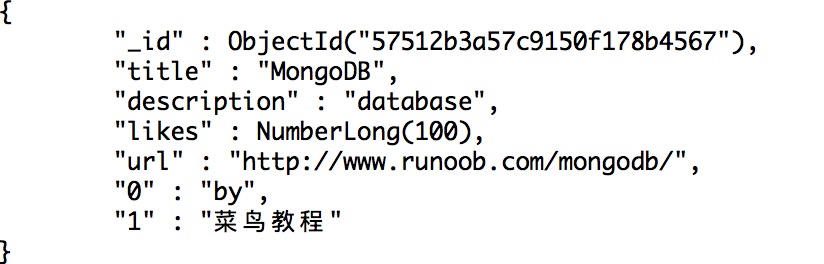
Delete document 
remove()
Method to delete the document.<?php
$m = new MongoClient(); // 连接到mongodb
$db = $m->test; // 选择一个数据库
$collection = $db->runoob; // 选择集合
// 移除文档
$collection->remove(array("title"=>"MongoDB 教程"), array("justOne" => true));
// 显示可用文档数据
$cursor = $collection->find();
foreach ($cursor as $document) {
echo $document["title"] . "\n";
}
?>
findOne()
,
save()
,
limit()
,
skip()
,
sort()
等方法来操作Mongodb数据库。