Fundamentals of the Web #
Web applications follow the client/server (C/S) architectural model. Among them, the client is called a Web client; the server is called a Web server. A typical Web application system usually has a three-tier architecture, namely, the data layer, the logical layer and the presentation layer, as shown in Figure 2. 1 shows. In many cases, the Web client is a Web browser. Therefore, Web application architecture is also called browser/server (B/S) architecture. The basic workflow of a Web application is as follows:
Users use a Web client (often a Web browser) to issue a request to a Web server by entering the URL( Uniform Resource Locator) address of a network resource in the address bar, or clicking a URL link on a web page;
After receiving the request, the Web server searches for the files or scripts stored on the server, and returns the results obtained by the files or executing the scripts to the Web client;
The Web client receives the response result and renders and displays the returned result.
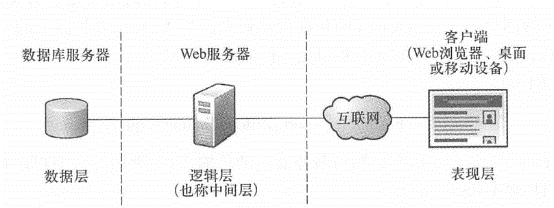
Fig. 12 Three-tier architecture of a basic Web application #
HTn>, URL and HTML are the three cornerstones of WWW technology. These protocols were proposed by Tim Bemers-Lee and have now become international standards managed and maintained by the W3C(World Wide Web Consortium). They are briefly introduced below.
HTTP
Most Web applications involve two or more components, so you need to customize a set of specifications that each component should follow. As a protocol, HTIP defines a set of specifications that Web servers and clients should abide by when making requests and responses. For example, HTTP request and response information both contain a message header and a message body. According to the HTTP protocol, the Web server knows what information to put in the message header and what to put in the message body, and the Web client also knows what information to read in the message header and the message body.
HTTP defines a total of eight request methods, namely
GET
、
POST
、
HEAD
、
PUT
、
DELETE
、
TRACE
、
OPTIONS
and
CONNECT
, among them
GET
and
POST
Most commonly used. The HTTP message header contains cache control information, content type, status code, etc. The main features of the HTTP protocol include
Simple: Type in the URL or click on a link to execute.
No memory state: After the server responds to the client, the connection between them will be immediately revoked, and the server will not retain client-related information to reduce the load on the server.
Flexibility: There are many types of content that can be transmitted, including parameters, pictures, PDFs, audio and video, etc.
HTTP S (Secure Hypertext Transfer Protocol) is a secure version of HTTP built on top of the Secure Sockets Layer. In a normal HTTP connection, data transmitted between a server and a client can be intercepted; while HTTP S uses encryption to prevent data from being eavesdropped, it is usually used to transmit sensitive data, such as users ‘personal information, login passwords, and credit card information. Websites using the HTTP S protocol need to install a certificate file issued by a certification authority on the server.
URL
URL is an identification method that describes the addresses of web pages and other resources on the Internet. Simply put,
A URL is a Web address, commonly known as a “URL”. Each web page has a globally unique URL identification. Just like street addresses in real life are used to locate home addresses, web addresses are used to locate hundreds of millions of pages on the World Wide Web. Without URLs, Web clients cannot find resources on Web servers; without URLs, resources on the Internet cannot connect to each other to form the World Wide Web.
The basic format of a URL is
Protocol : //hostname [ : port ] /filepathname ? query—string
Protocol(Protocol): refers to the transfer protocol between the client and the server. Commonly used protocols include HTTP, HTTP S, FTP and MMS;hostname(Host name) or IP address: refers to the server where the resources are stored;Port(Port number): When omitted, the system will use the default port. For example, the HTTP default port is 80; the HTTP S default port is 443;path(File path): Represents the directory and file name where resources are stored on the Web server (these directories and file names can be virtual, that is, they are not the real file path);query_string(Query string): Optional, used to send HTTP request parameters to the Web server.
HTML
HTML is the main language used to create web pages, and most current web page source code uses this format. Similar to Word documents, HTML also contains information such as content, layout, and format. When a Web page is loaded into a Web browser, the Web browser interprets the HTML code and displays the Web page content in the format specified therein. As a markup language,HTML is essentially a plain text file identified by a set of tags, such as head, body, table, center, and fonts. In addition, the appearance and layout information of HTML can be defined by CSS(cascading style sheets). CSS can be included directly in an HTML file, or stored in a separate text file and referenced by HTML.
Today, the HTML standard will gradually be replaced by HTML5. HTML5 is a combination of technologies including HTML, CSS and JavaScript that hopes to enable rich Internet applications without relying on plug-ins such as Adobe Flash and Mi-Crosoft Silverlight. HTML5 adds many new grammatical features, including
<video>
、
<audio>
and
<canvas>
Element; at the same time, it integrates scalable vector graphics (SVG) content. These elements were added to make it easier to add and process multimedia and image content on web pages. It also adds other elements to enhance the performance of Web pages, adds capabilities such as local databases, and improves caching and offline running capabilities.
related technologies #
This section focuses on the development technologies used in Web servers and clients, as well as the data exchange formats used for communication between servers and clients (Figure 2. 2)。 Fig. 13 Web application development can be implemented using multiple technologies # 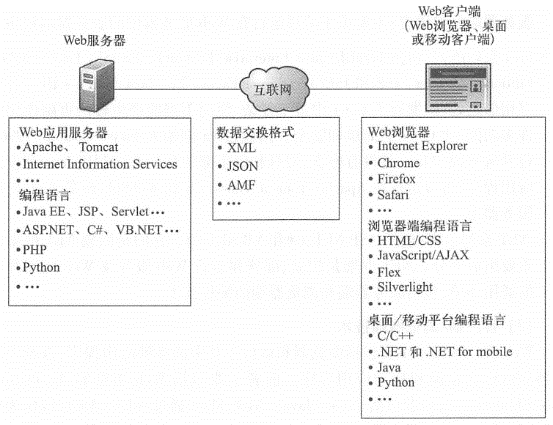
(1)server-side technology
Server-side technology mainly includes Web application servers and program development languages running on the server side.
Web application server:Web server is specially used to receive HTTP requests, process the requests accordingly, and finally return HTTP responses to the client. It can either return a static page or image as a response, or run the corresponding program dynamically, such as Java Servlet,
      ASP.
      NET
etc., implement the business logic designed by the Web developer. The more commonly used Web application servers mainly include the following types.
Apache Web Server and Tomcat: They are both open source Web servers developed with support from the Apache Software Foundation. It is characterized by simplicity, fast speed, and stable performance. It can run on all operating system platforms, including Unix, Windows and Linux. It is currently the most widely used Web server software (Netcraft, 2009). Among them, Apache mainly supports Java series of applications.
IIS(Intemet Information Server) :IIS is a Web server developed by Microsoft for the Windows operating system. It is currently the second most popular Web server among Web applications (Netcraft, 2009). IIS mainly supports. NET series of technologies, and can also support multiple other languages through appropriate extensions.
Other Web server products: Including Oracle/Sun’s GlassFish and IBM’s WebSphere.
Server-side development language: Mainly used to write server-side programs running on Web servers.
Java series of languages: Including JavaEE( Java Enterprise Edition), JavaSE(Java Standard Edition), Servlets, JSP, and JSF(JavaServer Faces). Java has many similarities with the C++ language, but it abandons many functions in C++ that are too complex and can cause serious side effects when used improperly, making it simpler and safer than C++. Therefore, Java founder James Gosling( 1996) once joked: “Java is C++ without guns, knives and clubs.” Applications developed using Java can run on Web application servers such as Apache, Tomcat, GlassFish, and WebSphere.
.NETSeries of languages: IncludingASP.NET, C#andVB.NETWait. They are Microsoft.NETAn important part of the framework..NETA framework is a common environment for building, deploying and running Web services and Web applications, including server-side and browser-side programming technologies.
Client/browser technology
Web client technology mainly includes the browser and the various applications running in it, as well as desktop and mobile applications running outside the browser. The former mainly includes Web browsers, JavaScript, Flex and Silverlight, while the latter includes C++, Java,
.NET
, Flex(which can be run as a desktop program through Adobe Air, outside the browser) and Silverlight(which can also be run as a desktop program, independent of the browser).
Web browser: A Web browser is a type of software that obtains or displays HTML and other program results on a Web server and allows users to interact with these files. For most users, the Web browser represents the “facade” of the World Wide Web. Technically, a Web browser is a client that complies with HTTP, HTML, and JavaScript specifications. It knows how to communicate with a Web server, how to display HTML pages, and how to interpret and execute JavaScript scripts. Commonly used Web browsers include Microsoft’s Internet Explorer, Google’s Chrome, Mozilla’s Firefox, and Apple’s Safari. These browsers have subtle differences in their support for HTML and JavaScript specifications, sometimes causing the same Web page to appear differently in different browsers.
Browser-side programming technologies: mainly including JavaScript, Flex and Silverlight.
JavaScript: JavaScript is a scripting language proposed by Netscape in 1995 that runs in browsers. It is currently used on most web pages on the Internet and is one of the most used browser languages in the world. The basic syntax of JavaScript is similar to Java, which is easy to learn and can be easily used by non-professional programmers. It is independent of the operating system platform and runs in the browser. In some cases, because different Web browsers have subtle differences in their support for the JavaScript specification, the same JavaScript program will have different operating effects in different browsers, causing trouble for application development that needs to support multiple browsers.
AJAX (Asynchronous JavaScript and XML): AJAX is not a new technology, but a combination of existing Web development technologies, including JavaScript and XML. It became popular in 2005 and is used to create better, faster, and more interactive Web applications on the browser side. AJAX supports the asynchronous communication mode between the browser and the server, that is, the web page can read data from the server in the background without affecting the user’s interaction with the current page, which greatly improves the user experience. From a software engineering perspective, the main advantage of AJAX is that it facilitates the separation of data and interfaces, and is a good software design pattern. AJAX can also run on smartphones and tablets Among brain browsers, you can cross desktop browsers and mobile browsers.
Adobe Flex: Adobe Flex can be used to develop highly interactive, expressive, cross-web browser Web applications and is a rich Internet application (RIA, see Section 2.4. Section 2) A powerful tool for development. Flex uses MXML to write the user interface and ActicmScript, a strongly typed, object-oriented programming language, to implement client-side logic. Based on the Adobe Flash Player plug-in,Flex applications can run in multiple Web browsers, mainly desktop Web browsers; based on the Adobe AIR running environment, Flex applications can run directly in multiple operations without relying on the browser. Systems such as Windows, Linux and Android.
Microsoft Silverlight: Microsoft Silverlight has similar goals to Flex. Both have good graphics and animation capabilities, both provide a good user experience, and both are designed to support rich Internet application development. Silvenight is based on Microsoft’s
.NETFramework, writing user interfaces using XAML, using.NETLanguages such as C#orVB.NETImplement business logic. Using the Microsoft Silverlight plug-in, Silverlight programs can run in mainstream browsers, mainly desktop Web browsers; using the WPF( Windows Presentation Foundation) running environment, Silverlight programs can run outside the browser, that is, directly on operating systems such as Windows and Windows Phone.
Information exchange format between server and client
Web clients often put parameters in URLs and pass them to the server, and the server often returns the results to the browser in HTML format. In addition, servers and clients often use the following formats for data exchange.
Extensible Markup Language (XML): XML is a markup language that allows users to customize tags and attributes. It has many advantages. Its tags and attributes often have easy-to-understand names; it is a pure text file with extensive support and platform independence; it has a good structure and can be automatically parsed by a computer (that is, read the value or attribute of a node from XML). These advantages make XML a widely used data exchange format on the World Wide Web. However, relatively speaking, XML also has obvious shortcomings. It repeatedly uses tags to separate data, which is complicated, resulting in large files and low parsing efficiency, which is not conducive to its use in JavaScript.
JavaScript Object Notation (JSON) : JSON is a lightweight data exchange format that is part of the JavaScript standard for the scripting programming language developed by ECM A (European Computer Manufacturers Associa). JS0N is lighter than XML. At the same time, JS0N is a native data type of JavaScript. Processing JS0N data in JavaScript does not require any special API or toolkit, which is very efficient. Currently, in Web application development, JS0N is gradually replacing XML in many cases. For example, the REST interface of ArcGIS Server supports the JSON format (see Chapter 3). The following example compares XML and JSON when describing the same content (i.e., the names and hobbies of two students):
XML format:
<? xml version = ”1 •0”encoding = “UTF-8”? >
< students >
<student >
<name > John < /hame >
<hobby > Basket Ball < /hobby >
</student >
<student >
<name > Lisa < /hame >
<hobby >Movie < /hobby >
</student >
</students >
JSON format:
\| "students":[
\| "name" : "John", "hobby" : "Basket Ball" \| , j"name":"Lisa",
"hobby":"Movie"\|
AMF (Action Message Format) :AMF is a binary data format developed by Adobe and mainly used to exchange information between FlexWeb clients and servers. As Flex’s native data type, Flex handles AMF faster than JSON. In addition, compared with XML, AMF has much smaller data volume and is more efficient in transmitting and parsing. The REST interface of ArcGIS Server has begun to support the AMF format.