We know that we use the SQL SELECT command in MySQL to read data, and we can read data in the
SELECT
Statement to get the specified record using the WHERE clause.
You can use the equal sign = in the WHERE clause to set conditions for getting data, such as “runoob_author = ‘RUNOOB.COM’”.
But sometimes we need to get
runoob_author
Field contains all records with the character “COM”, at this point we need to set the
WHERE
Use the SQL LIKE clause in the clause.
The percent sign% character is used in the SQL LIKE clause to represent any character, similar to the asterisk* in UNIX or regular expressions.
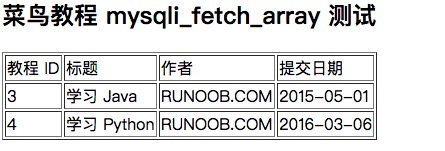
If the% sign is not used, the LIKE clause has the same effect as the equal sign =. The following is the general syntax for SQL SELECT statements to read data from a data table using the LIKE clause: You can specify any condition in the WHERE clause. You can use the like clause in the WHERE clause. You can use the LIKE clause instead of the equal sign =. LIKE is usually used with%, similar to a metacharacter search. You can specify one or more conditions using AND or OR. You can use the WHERE…LIKE clause in the DELETE or UPDATE command to specify the condition. Next we will use the WHERE…LIKE clause in the SQL SELECT command to read data from the MySQL data table runoob_tbl. The following is what we will do SQL LIKE statement: You can use the PHP function This function is used to execute the But if it is, The following is how we use the PHP script in the MySQL LIKE clause test: The output is shown in the following figure:Grammar 
SELECT field1, field2,...fieldN
FROM table_name
WHERE field1 LIKE condition1 [AND [OR]] filed2 = 'somevalue'
Use the LIKE clause at the command prompt 
Example 
runoob_tbl
Get from the table
runoob_author
All records that end with COM in the field:mysql>useRUNOOB;Databasechangedmysql>SELECT\*fromrunoob_tblWHERErunoob_authorLIKE'%COM';
+-----------+---------------+---------------+-----------------+
\|runoob_id\|runoob_title\|runoob_author\|submission_date\|
+-----------+---------------+---------------+-----------------+ \|3\|
学习Java\|RUNOOB.COM\|2015-05-01\| \|4\|
学习Python\|RUNOOB.COM\|2016-03-06\|
+-----------+---------------+---------------+-----------------+2rowsinset(0.01sec)
Using the LIKE clause in PHP scripts 
mysqli_query()
And the same SQL SELECT with the command of the WHERE…LIKE clause to get the data.
SQL
Command, and then pass the
PHP
Function
mysqli_fetch_array()
To output data for all queries.
DELETE
Or
UPDATE
You do not need to use the S QL statement that uses the WHERE…LIKE clause in the
mysqli_fetch_array()
Function.Example 
runoob_tbl
Read from the table
runoob_author
All records that end with COM in the field:<?php$dbhost='localhost';//mysql服务器主机地址$dbuser='root';//mysql用户名$dbpass='123456';//mysql用户名密码$conn=mysqli_connect($dbhost,$dbuser,$dbpass);if(!$conn){die('连接失败:'.mysqli_error($conn));}//设置编码,防止中文乱码mysqli_query($conn,"set
names utf8");$sql='SELECT runoob_id, runoob_title, runoob_author,
submission_date FROM runoob_tbl WHERE runoob_author LIKE
"%COM"';mysqli_select_db($conn,'RUNOOB');$retval=mysqli_query($conn,$sql);if(!$retval){die('无法读取数据:'.mysqli_error($conn));}echo'<h2>菜鸟教程
mysqli_fetch_array 测试<h2>';echo'<table border="1"><tr><td>教程
ID</td><td>标题</td><td>作者</td><td>提交日期</td></tr>';while($row=mysqli_fetch_array($retval,MYSQLI_ASSOC)){echo"<tr><td>{$row['runoob_id']}</td>"."<td>{$row['runoob_title']}</td>"."<td>{$row['runoob_author']}</td>"."<td>{$row['submission_date']}</td>"."</tr>";}echo'</table>';mysqli_close($conn);?>