9.39.1. Brief introduction 
GameKit is a commonly used framework in iOS SDK. It has three core functions:
Interactive game platform Game Center
P2P device communication function
In-Game Voice .
9.39.2. Instance step 
1.在链接 iTunes 时请确保拥有一个唯一的 App ID( unique App ID),App ID在我们应用程序更新 bundle ID时及在Xcode代码签名与相应的配置文件需要使用到。
2.创建新的应用程序和更新应用程序信息。在添加新的应用程序文档可以了解更多有关信息。
3.打开你申请的application,点击Manage Game Center选项。进入后点击Enable Game Center使你的Game Center生效。接下来设置自己的Leaderboard和Achievements。
4.下一步涉及处理代码,并为我们的应用程序创建用户界面。
5.创建一个single view application,并输入 bundle identifier 。
6.更新 ViewController.xib,如下所示
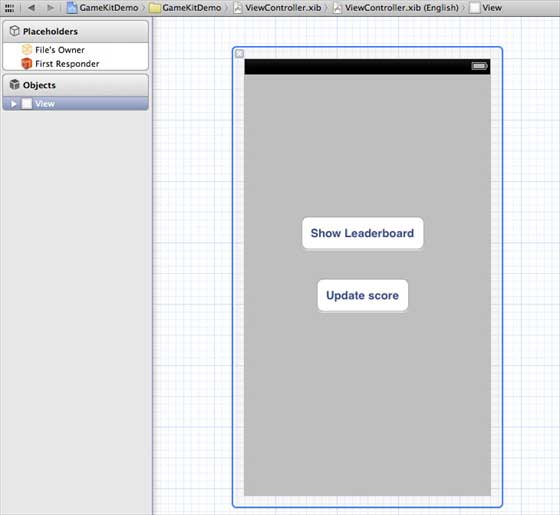
7.选择项目文件,然后选择目标,然后添加GameKit.framework
8.为已添加的按钮创建IBActions
9.更新ViewController.h文件,如下所示
#import <UIKit/UIKit.h>
#import <GameKit/GameKit.h>

@interface ViewController : UIViewController
<GKLeaderboardViewControllerDelegate>

-(IBAction)updateScore:(id)sender;
-(IBAction)showLeaderBoard:(id)sender;

@end
10.更新ViewController.m ,如下所示
#import "ViewController.h"

@interface ViewController ()

@end

@implementation ViewController

- (void)viewDidLoad
{
    [super viewDidLoad];
    if([GKLocalPlayer localPlayer].authenticated == NO)
    {
      [[GKLocalPlayer localPlayer]
      authenticateWithCompletionHandler:^(NSError *error)
      {
         NSLog(@"Error%@",error);
      }];
    }
}

- (void)didReceiveMemoryWarning
{
    [super didReceiveMemoryWarning];
    // Dispose of any resources that can be recreated.
}
- (void) updateScore: (int64_t) score
forLeaderboardID: (NSString*) category
{
    GKScore *scoreObj = [[GKScore alloc]
    initWithCategory:category];
    scoreObj.value = score;
    scoreObj.context = 0;
    [scoreObj reportScoreWithCompletionHandler:^(NSError *error) {
        // Completion code can be added here
        UIAlertView *alert = [[UIAlertView alloc]
        initWithTitle:nil message:@"Score Updated Succesfully"
        delegate:self cancelButtonTitle:@"Ok" otherButtonTitles: nil];
        [alert show];

    }];
}
-(IBAction)updateScore:(id)sender{
    [self updateScore:200 forLeaderboardID:@"runoob"];
}
-(IBAction)showLeaderBoard:(id)sender{
    GKLeaderboardViewController *leaderboardViewController =
    [[GKLeaderboardViewController alloc] init];
    leaderboardViewController.leaderboardDelegate = self;
    [self presentModalViewController:
    leaderboardViewController animated:YES];

}
#pragma mark - Gamekit delegates
- (void)leaderboardViewControllerDidFinish:
(GKLeaderboardViewController *)viewController{
    [self dismissModalViewControllerAnimated:YES];
}

@end
9.39.3. Output 
Run the application, and the output is as follows
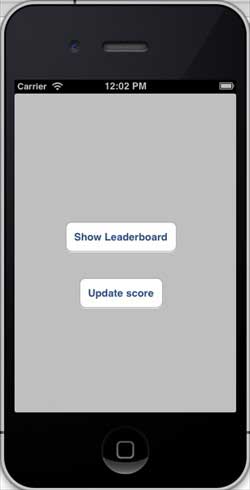
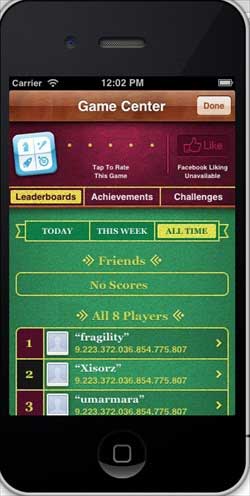
When we click to display the rankings, the screen displays as follows:
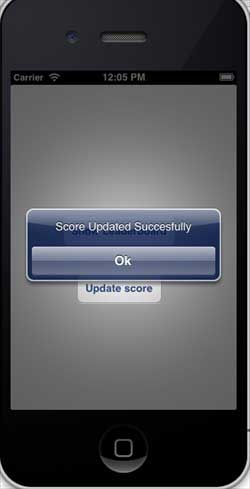
When we click to update the score, the score will be updated to our ranking, and we will get a message, as shown in the following figure